

Fastreel:
Are you looking for the best video maker app?
Then stick with us as we will guide you to the best video maker application currently available in the market. We live in a world that is going through digital evolution. Video making is widespread nowadays with platforms like YouTube, etc. Making a video a really simple; you just have to point and record.
The main problem is to edit those videos. Many video editing programs are so complicated that it is tough to figure things out on your own. The more popular video editing software is either paid or takes a lot of time to learn. But what if you need something simple and intuitive? Something that totally works online? This is where an online video maker comes into play.
What is Fastreel?
Fastreel is a totally web-based video maker app that has been developed by Movavi. It is software that is suitable for both beginners as well as professionals.
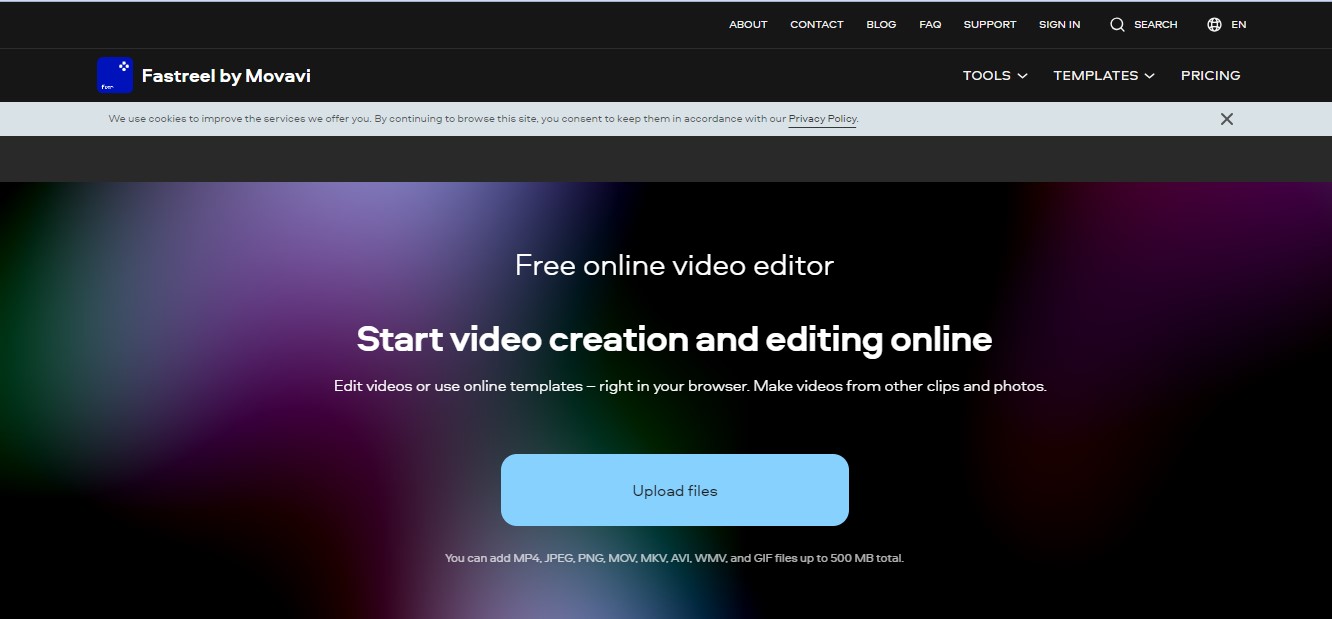
The best thing about this software is that you don’t need to download and install it. As it is online-based, you can use it through your browser. It is a clean and simple interface that makes it easier for beginners to edit videos effectively. You are not bombarded with lots of different menus in Fastreel.
Working:
There are two working modes of Fastreel.
- Creating Slideshows
- Using the Tools
The first one is to create a slideshow of the videos or photos with music. The other one is to use the tools available at your disposal to edit the video. For making slideshows, you have to first choose a template from more than 30 different available templates. There are in-built effects present in the templates like frames, stickers, animations, etc. So, you don’t have to fiddle around. The only thing that you need to do is to place your files and select the music that you want.
When using the tools, you have many things at your service like cut, crop, rotate, resize, etc. You can edit your footage in any way that you prefer. Using the tools, you can make little nuisance changes in the video to make it your vision. After that, you can export the video.
Interface:
The interface of Fastreel is really sleek and good-looking. It consists of dark colors on a clear layout which makes everything simpler. When you open a tool, it is opened in a new tab so that everything remains clearer. There are also automated tools present that will automatically do the desired things for you. There is also drag & drop control present, which is used for managing the project. Everything is very intuitive and designed with beginners in mind.
Importing:
You can upload pictures as well as videos on Fastreel. The following formats on Fastreel:
- JPEG
- PNG
- GIF
- MP4
- MOV
- MKV
- AVI
- WMV
So, as you can see, there is a lot of variety present, and Fastreel accepts all kinds of formats. These are the most commonly used formats anyway. However, you have to keep in mind that you can’t upload a file with more than 500MB in size. For the upload procedure, it can be done directly from your computer or through Dropbox as well.
Fastreel Unique Features:
Some of the main features of Fastreel are:
Templates:
One of the most impressive features of Fastreel is its in-built template system. If you are a beginner and don’t want to use the tools to edit the video, you can go with the templates. For creating a mind-blowing video with lots of different effects, templates will work the best for you. This mode is suited for people who don’t have the time nor the skills to edit their videos. The different categories are:
- Social Media
- Festive
- Education
- Marketing and Business
- Hobby
- Intro
- Love
All of these templates have built-in slides already present with animations and everything. You have to select the one that suits your video. There are empty slots present in the slides, which you will fill with your video and pictures. The next step would be to add the music to use your own or choose one from Fastreel’s library. Then the final step will be to export the video. This is an amazing feature for beginners.
Tools:
There is a multifunctional toolkit available on Fastreel, which makes everything easier. You can use these tools to make the video exactly as you imagine it to be. The editing process is also straightforward, and it only takes a few clicks to adjust colors, editing, cropping, etc. Below are the things that you can do in Fastreel:
1- Video Compression:
There is a video compression tool available that will compress the size of your video. This is really useful if you want to upload a video on a website or attach it with an email.
2- Cutting:
There is a fundamental tool that allows you to trim your video. You can either trim the video at the end or even remove anything from the middle portion as well.
3- Cropping & Resizing:
You can crop the video as well as change the aspect ratio. You also get the option of setting convenient custom parameters.
4- Video Speed:
You can make your video four times faster or slower. This is useful when you have a long video of scenery. You can slow it down to make it more mesmerizing.
5- Merging:
You can also merge multiple video clips into one another to make a longer one.
6- Reversing:
If you want, you can reverse a video as well.
7- Adding Music:
You can upload your own track or use one of Fastreel’s tracks to add to your video.
8- Looping Videos:
You can loop a video up to 10 times in Fastreel.
Like these tools, there are other tools available that will help you in making sure that your video is ready. You can edit every little part of your video and even add subtitles and text to it as well.
9- Movie Making:
Using the slideshows that are available to you, you can also make a movie as well. You have to upload the pictures and the videos, add different captions and transitions, and then export the video. This is so simple that even a beginner can make a small movie as well.
10- Exporting:
After you have finished the editing session, you can export your file in MP4 format. This is the only export format available at Fastreel. This is because it is the most popular video format out there. If you are using templates, you will also have the option of directly uploading the footage to YouTube.
Benefits:
- You don’t need to install software as it is online-based
- Intuitive & Easy to use
- Advanced Toolset
- Built-in Templates are Amazing
- Suitable for Beginners & Experienced People
Drawbacks:
- You will need an internet connection to use Fastreel
- The Single Premium seems a bit pricey
Pricing Plans:
You can use Fastreel as a free video maker software, but there is a limitation. You will have to make do with their watermark present in the videos that you edit on their platform. But it would help if you were glad as you are not limited in any other way, and you can process your video as many times as you like.
But if you want to make the best out of Fastreel, you should use one of the two premium plans:
- Single-Premium: $5.95/Video
This plan is for the people who only want to work on a single video. This plan will allow you to export a single video without any watermark in 720p resolution. If you want to edit another video and save it, then you will need to purchase the single premium plan once again.
- Unlimited Premium: $19.95/month or $199.40/annually
This plan gives you unlimited access to all of the features of Fastreel. There are no limitations, and you can safely edit and export as many videos as you like in the 720p. This is really useful for people who are into videography.
Should You Use Fastreel?
If you want our honest opinion, then yes, Fastreel is really worth it. It is a straightforward and user-friendly video maker tool. There are a lot of tools present which you don’t find anywhere else. It is online-based, so you don’t have to install anything. The built-in templates are amazing. It is really geared towards beginners and making sure that you can do everything without getting lost in menus. For the more experienced people, the toolset is the best way to edit your footage in the best way possible.
Final Verdict:
So, video editing can seem a bit difficult, but with the introduction of software like Fastreel, it has become effortless. If you are looking for a way to edit your videos quickly, then you are going to love Fastreel. You don’t need any specific skills to edit videos in Fastreel. Everything is laid out effortlessly. All in all, this is probably the best online video editing software.

