


Posting a tweet in itself is simple. Writing a few lines, attaching an image, and hitting “Post” requires minimal effort. The real challenge is doing it consistently—every day—without missing a beat, rushing, or compromising quality.
At first, manual posting seems manageable. You open X, draft your content, maybe add an image, and post. But as you commit to a regular schedule, obstacles quickly emerge:
- Some days are busy, leaving no time to post.
- Other days, you forget entirely.
- Sometimes inspiration strikes at the wrong hour, meaning your post may miss peak engagement times.
- And some days, great ideas exist but there’s no opportunity to publish them thoughtfully.
Over time, what seemed like a simple daily task can become stressful rather than productive. This is typically when creators and brands begin seeking solutions like bulk scheduling—a strategy that ensures consistency, quality, and peace of mind.
What Bulk Scheduling Solves in Practice
Bulk scheduling is more than just a technical feature—it addresses the everyday challenges that arise when managing an X account seriously. It allows creators, brands, and marketers to shift from reactive posting to proactive, strategic content management.
In practical terms, bulk scheduling enables you to stop worrying about posting every day. Instead, you can plan content on a weekly or monthly basis. You can sit down, prepare your posts calmly, and schedule everything in advance. Once scheduled, your account continues publishing content consistently, whether you are working, traveling, sick, or offline.
Consistency matters because X rewards predictable activity. Random posting produces unpredictable results, whereas planned scheduling ensures steady engagement and a reliable presence.
Bulk scheduling is particularly valuable when:
- You want your account to remain active even during busy periods.
- You do not want posting to rely on daily motivation.
- You want to separate content creation from content publishing.
- You want to post at optimal engagement times without constantly checking the clock.
- You want to plan campaigns in advance instead of reacting daily.
Once your content is scheduled, your mental load decreases. You no longer feel “behind” on posting, freeing up time and focus for strategy, engagement, and growth.
Why Bulk Scheduling Is a Significant Upgrade Over Manual Posting
Manual posting relies heavily on habits, while bulk scheduling relies on structured systems. That distinction may seem subtle, but it has a major impact on efficiency and consistency.
When posting manually, mistakes are common: you might forget to attach an image, post at a low-engagement time, rush a tweet because you’re late, or even skip a day due to unexpected events. These small issues accumulate, affecting the overall performance of your account.
Bulk scheduling addresses these problems systematically:
- It saves hours each week by eliminating repetitive posting tasks.
- It keeps your timeline consistently active without requiring daily effort.
- It ensures content is published at optimal times rather than random hours.
- It allows you to review and refine all posts before they go live.
- It enables focused content planning rather than last-minute execution.
Another significant advantage is confidence. Knowing your posts are scheduled in advance removes the stress of daily posting. This frees you to concentrate on engagement, analyzing performance, and developing new content strategies, rather than constantly worrying about whether your account is active.
Join the X Creator Growth Lab Community
For creators on X looking to stay ahead, the Circleboom X Creator Growth Lab Community offers a free, dedicated space to learn, share, and grow.
Inside the community, you can:
- Stay updated on algorithm changes and platform updates.
- Discover strategies to boost engagement and audience growth.
- Learn about new monetization and payout opportunities.
- Connect
The Limitations of X for Posting at Scale
X is designed for real-time engagement, not for structured content planning. While manual posting and scheduling individual tweets are possible, the platform shows clear limitations once you aim to manage content strategically.
- There is no option to upload multiple posts at once.
- CSV import is not supported.
- Campaign-level planning is absent.
- Everything is centered on one post at a time.
For casual users, this works fine. But for anyone managing daily content, campaigns, or preparing posts weeks in advance, trying to do everything within X quickly becomes inefficient and frustrating.
This makes scaling your content workflow challenging for:
- Creators posting consistently
- Brands running multi-day campaigns
- Marketers managing content calendars
- Teams preparing content in advance
Why Circleboom Twitter Is the Better Solution
To manage posting efficiently, I rely on Circleboom Twitter, an official X Enterprise developer. Being an official developer ensures reliability, compatibility, and access to advanced features without compromising platform integrity.
Circleboom is not just about scheduling—it is built around the entire content workflow, from idea generation to publication. It transforms content planning into a structured, controllable process.
Inside Circleboom Twitter, content creation and scheduling become seamless:
- AI Post Generator: Generates content ideas when inspiration runs low.
- Built-in Image Tools: Integrates Canva, Unsplash, and Giphy to quickly find visuals.
- Font Styling Tools: Make your posts stand out visually.
- Optimal Post Timing Suggestions: Remove guesswork when scheduling.
- Bulk Scheduling: Upload and schedule large batches automatically, saving hours of repetitive work.
Plan Once, Post Automatically
With Circleboom, you no longer need to log in every day to post. Instead, you can:
- Prepare weeks of content at once.
- Schedule all posts in a single workflow.
- Maintain a consistent posting schedule without daily effort.
The bulk scheduling functionality ensures that your content is delivered on time, consistently, and in a way that aligns with your strategic goals. For anyone serious about growing on X, Circleboom Twitter turns posting from a repetitive chore into a streamlined, professional process.
Explore Circleboom Publish to see how bulk scheduling can transform your X workflow.
Bulk Scheduling Tweets with Circleboom Twitter
Bulk scheduling in Circleboom Twitter is designed for creators and brands who already know what they want to post and need an efficient, reliable way to publish at scale. It allows you to transform a long list of prepared content into a fully scheduled workflow, eliminating repetitive manual posting.
Bulk Upload: How It Works
Circleboom uses a simple CSV-based system for bulk uploads. At first, CSV files may seem technical, but they are actually a practical way to structure your tweets with content, media, and posting times.
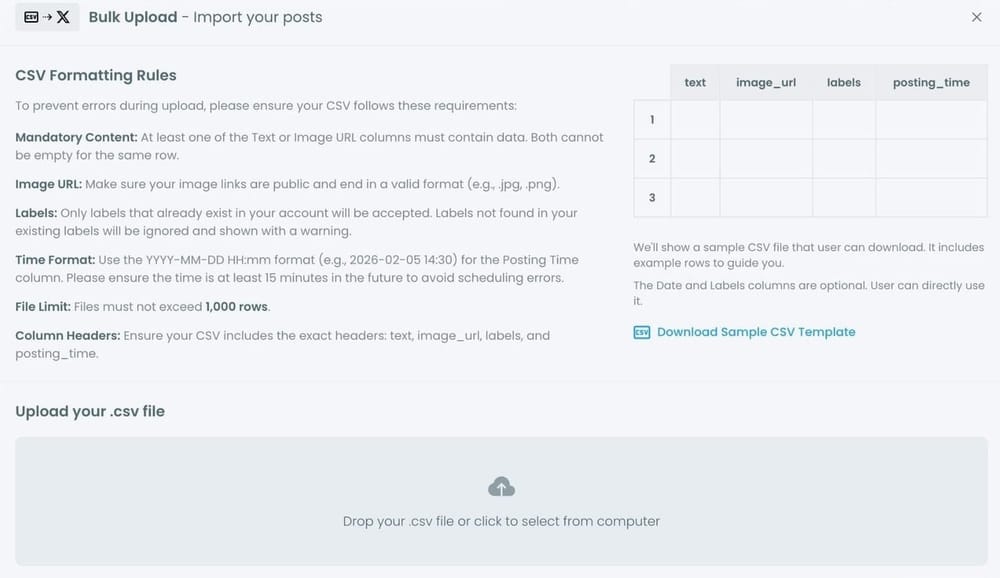
The benefits of this approach include:
- Prepare content offline: Work on your tweets without being connected to X.
- Pre-publication review: Check all posts before anything goes live.
- Schedule in large batches: Upload dozens or hundreds of tweets at once.
- Error correction: Fix any issues before scheduling to avoid mistakes.
Once your CSV file is uploaded, Circleboom handles the rest—automating the scheduling process while giving you full control.
CSV Formatting Rules: What You Need to Know
Proper CSV formatting is essential to prevent errors and ensure smooth scheduling. While the rules may seem strict, they exist to guarantee that posts are delivered correctly and consistently.
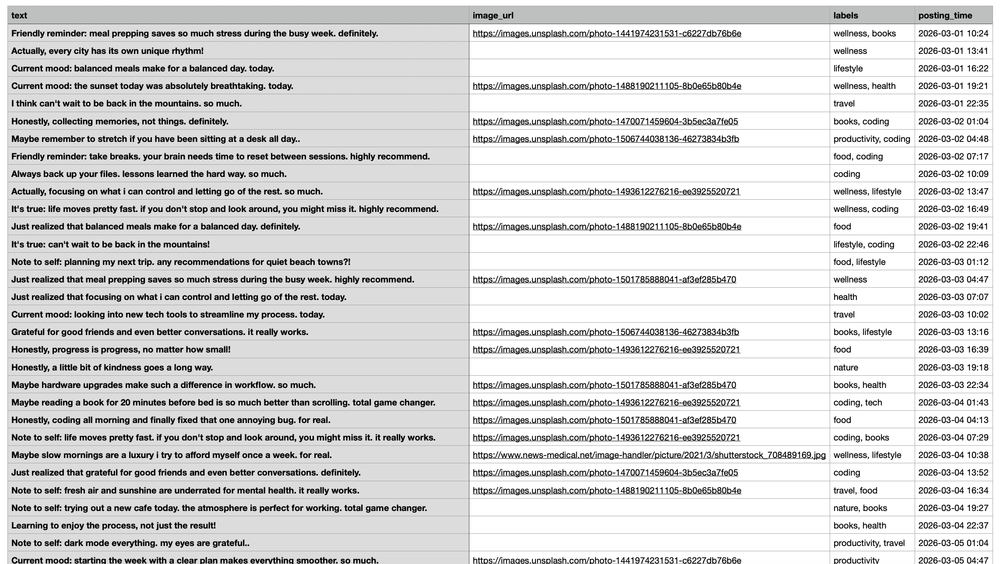
Key guidelines:
- Content is required: Each row must include text or an image. Empty posts cannot be scheduled.
- Accessible images: Image URLs must be public and end with a valid extension such as
.jpgor.png. If the system cannot access the image, it will not attach it to the tweet. - Labels for organization: Labels help group and manage posts. Only labels that already exist in your Circleboom account are accepted to avoid confusion.
- Clear posting times: Dates and times must follow the
YYYY-MM-DD HH:mmformat. Scheduled times must be at least 15 minutes in the future to prevent accidental immediate posting. - Exact column headers: The system reads data based on column names. Headers must remain exactly as follows:
textimage_urllabelsposting_time
To make this process even easier, Circleboom provides a sample CSV template. Using it ensures correct formatting, prevents errors, and saves time.
How to Bulk Schedule Tweets with Circleboom Twitter
Scheduling multiple tweets at once on Circleboom Twitter is straightforward and efficient. Here’s a step-by-step guide to make it seamless.
Step 1: Open the Bulk Scheduling Interface
After logging in to Circleboom Twitter, click Bulk Schedule. This opens the bulk scheduling interface, where you can import multiple tweets at once instead of creating them individually.

Step 2: Upload Your CSV File
Upload your CSV file by dragging it into the upload area or selecting it from your computer.
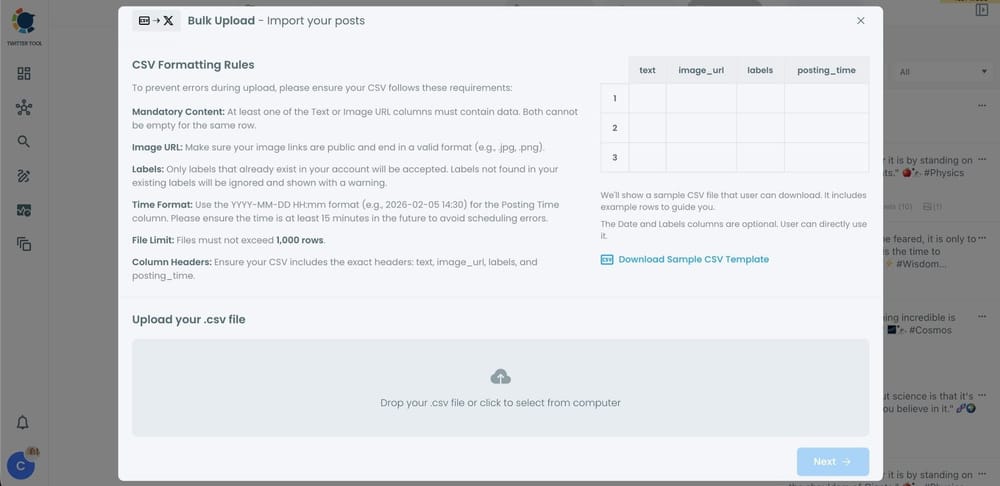
Before uploading, ensure your file follows the required format:
- Include correct column headers:
text,image_url,labels,posting_time. - Each row must represent a single tweet.
- You can include text, image URLs, labels, and scheduled posting times.
Preparing your CSV correctly helps prevent errors during scheduling.
Step 3: Review Imported Tweets
Once uploaded, Circleboom displays a preview list of all your tweets.
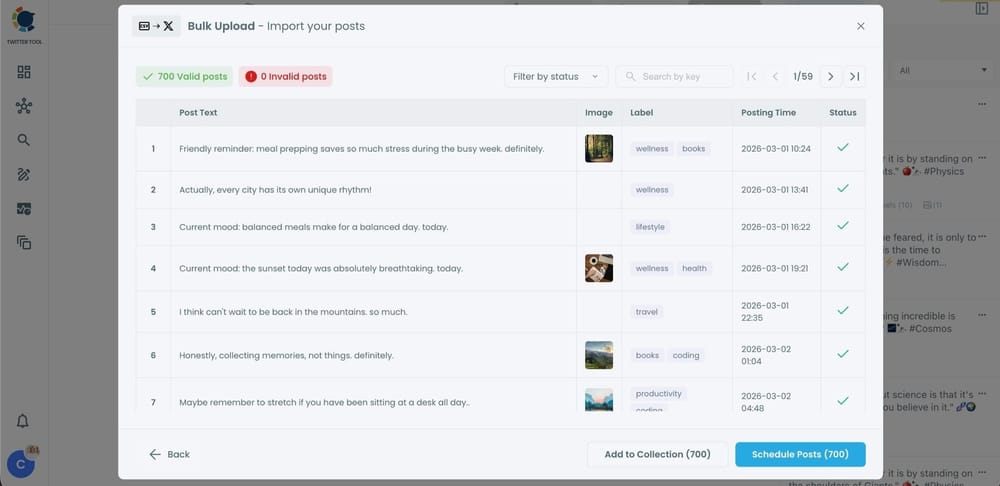
At this stage:
- Valid tweets are clearly marked.
- Invalid tweets show the reason for the error.
- You can organize tweets into Collections for future use or better management.
Reviewing your tweets before scheduling ensures everything is accurate and ready to go live.
Step 4: Schedule All Tweets at Once
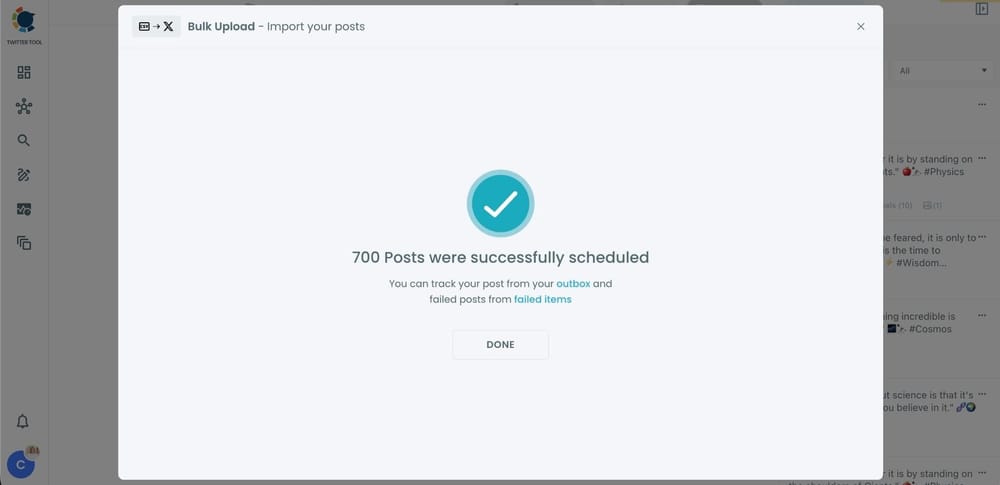
After reviewing, click “Schedule Posts”. Circleboom automatically schedules all valid tweets according to the times listed in your CSV file.
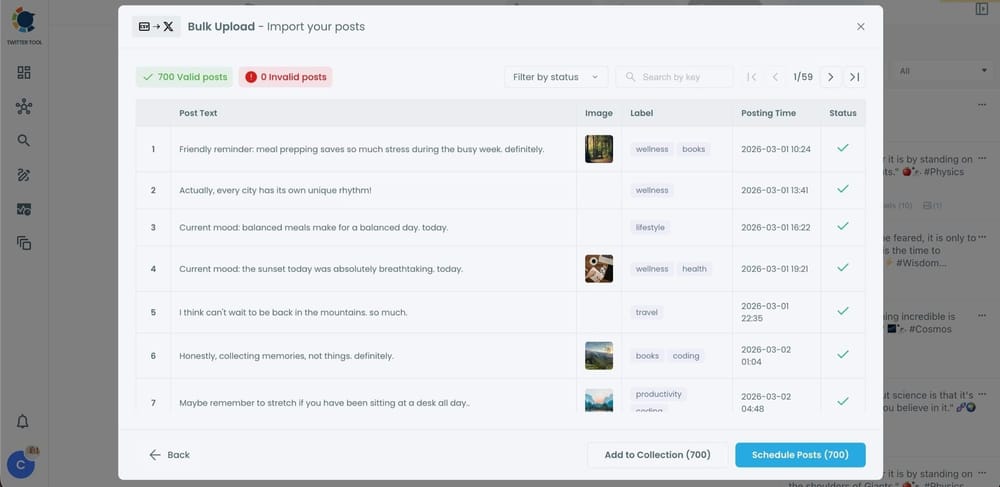
Even hundreds of tweets can be scheduled in seconds, eliminating the need for daily manual posting.
Step 5: Manage Scheduled Tweets from the Outbox
All scheduled tweets appear in your Outbox and calendar view. From here, you can:
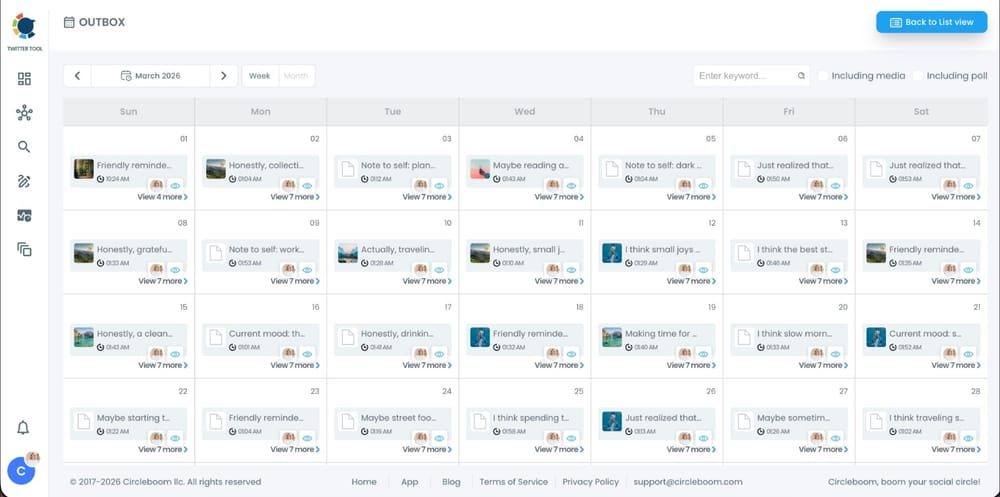
- See all scheduled tweets by date and time.
- Edit or remove posts as needed.
- Track content efficiently to stay on top of your posting strategy.
This gives you complete control even after bulk scheduling is complete.
Why Bulk Scheduling Is Essential
Most people start posting manually but eventually face two common issues:
- Posting inconsistently.
- Experiencing burnout from daily effort.
Bulk scheduling solves both. By planning content ahead:
- Posting becomes predictable.
- Quality stays consistent.
- Stress from daily posting disappears.
- Growth becomes easier to manage.
Bulk scheduling is not just for large brands—it is essential for any creator, marketer, or business serious about maintaining an active presence on X.
Final Thoughts
Bulk scheduling is not automation for its own sake—it is control.
When tweets are scheduled in advance, you stop reacting daily and start executing a strategic plan. That shift alone changes how X feels to manage and allows you to focus on engagement, analysis, and growth.
This is why I rely on Circleboom Twitter’s bulk scheduling feature instead of handling everything manually inside X.

