

Featured Social Media Software:
Yes, you can recover some Facebook Messenger messages—but only in certain situations. If a conversation was archived instead of deleted, you can restore it easily. You can also download parts of your Messenger history through Facebook’s “Download Your Information” feature if the data is still available. However, messages that have been permanently deleted from Facebook’s servers generally cannot be recovered. Avoid third-party recovery apps, as they rarely work and may put your account or personal data at risk.
Accidentally deleting an important Messenger conversation can be stressful, especially if it contains personal memories, work discussions, or important information you didn’t save elsewhere.
A quick online search often produces dozens of websites and apps claiming they can recover permanently deleted Facebook Messenger messages. Unfortunately, many of these claims are misleading or completely false.
The good news is that some Messenger conversations can be recovered, depending on how they disappeared. The bad news is that permanently deleted messages usually cannot be restored once they’re removed from Meta’s servers.
This guide explains what is actually possible, how Facebook Messenger stores your conversations, and which recovery methods are worth trying. We’ll also show you how to distinguish between archived and deleted chats, use Facebook’s official recovery tools, and avoid scams that promise impossible results.
Can You Recover Deleted Messages in Facebook Messenger?
It depends on how the messages were removed. Archived conversations can be restored, and some message history may still be available through Facebook’s data download tools. However, permanently deleted Messenger messages generally cannot be recovered once they’re erased from Meta’s servers.
The key is understanding the difference between hiding a conversation and permanently deleting it.
Many users believe they’ve deleted their messages when they’ve actually archived the conversation instead. In those cases, recovery is quick and straightforward.
If you’ve permanently deleted a conversation, however, Facebook’s official policy is that deleted messages are removed from its systems after the deletion process is complete, making recovery unlikely.
How Does Facebook Messenger Store Your Messages?
Messenger stores conversations on Meta’s servers and synchronizes them across your logged-in devices. This allows you to access the same chat history from your phone, tablet, and computer.
Unlike traditional SMS messages that are stored only on your device, Messenger uses cloud-based synchronization.
This means:
- Your conversations are linked to your Facebook account.
- Messages appear across multiple devices after you sign in.
- Deleting a conversation affects your account rather than just one device.
- Logging into another device won’t restore a conversation that’s been permanently deleted from your account.
Understanding this cloud-based system helps explain why some recovery methods work while others don’t.
Deleted vs. Archived Messenger Messages
Archived conversations are hidden but still exist in your account. Deleted conversations are removed and generally cannot be restored through Messenger.
This distinction is the source of much confusion.
| Feature | Archived Chat | Deleted Chat |
|---|---|---|
| Visible in inbox | ❌ No | ❌ No |
| Stored on Facebook | ✅ Yes | ❌ No (after deletion completes) |
| Can be restored | ✅ Yes | ❌ Usually No |
| Messages remain intact | ✅ Yes | ❌ No |
| Searchable in Messenger | ✅ Yes | ❌ No |
Before attempting advanced recovery methods, always check whether the conversation was archived rather than deleted.
When Can Messenger Messages Be Recovered?
Recovery is usually possible only when the messages still exist somewhere in your account or on another synchronized device.
Recovery may be possible in the following situations:
1. The Conversation Was Archived
The most common scenario. Archived chats remain stored in your account and can be restored in seconds.
2. The Conversation Exists on Another Logged-In Device
If another device hasn’t synchronized recent changes yet, you may still be able to view the conversation temporarily. This isn’t guaranteed but can occasionally help identify missing information before synchronization completes.
3. Your Facebook Data Still Includes the Messages
If the conversation existed when a downloadable account archive was generated, portions of your Messenger history may be available through Facebook’s Download Your Information feature.
Availability depends on your account history and the timing of the deletion.
4. The Messages Were Never Actually Deleted
Many users accidentally:
- Archive conversations.
- Filter message requests.
- Hide chats.
- Forget which account they’re signed into.
Checking these possibilities should always be your first step.
When Recovery Is Usually Impossible
If you permanently deleted the conversation and it has already been removed from Meta’s systems, there is no official way to restore it.
Recovery is generally not possible when:
- You permanently deleted the conversation.
- The deletion has completed across Facebook’s servers.
- No archived version exists.
- No downloadable account data contains the messages.
- No synchronized device still retains accessible copies.
This is why it’s important to verify whether a conversation was archived before assuming it’s gone forever.
Common Reasons Messenger Conversations Seem to Disappear
Not every missing conversation has been deleted. Messenger chats can disappear for several reasons, many of which don’t involve permanent data loss.
Common causes include:
- You accidentally archived the conversation.
- You’re logged into a different Facebook account.
- Messenger hasn’t synchronized correctly.
- The conversation was filtered into Message Requests.
- The other person’s account was deleted or deactivated.
- Temporary app bugs prevent chats from loading.
- Poor internet connectivity delays synchronization.
Identifying the reason your chat disappeared will help you choose the correct recovery method.
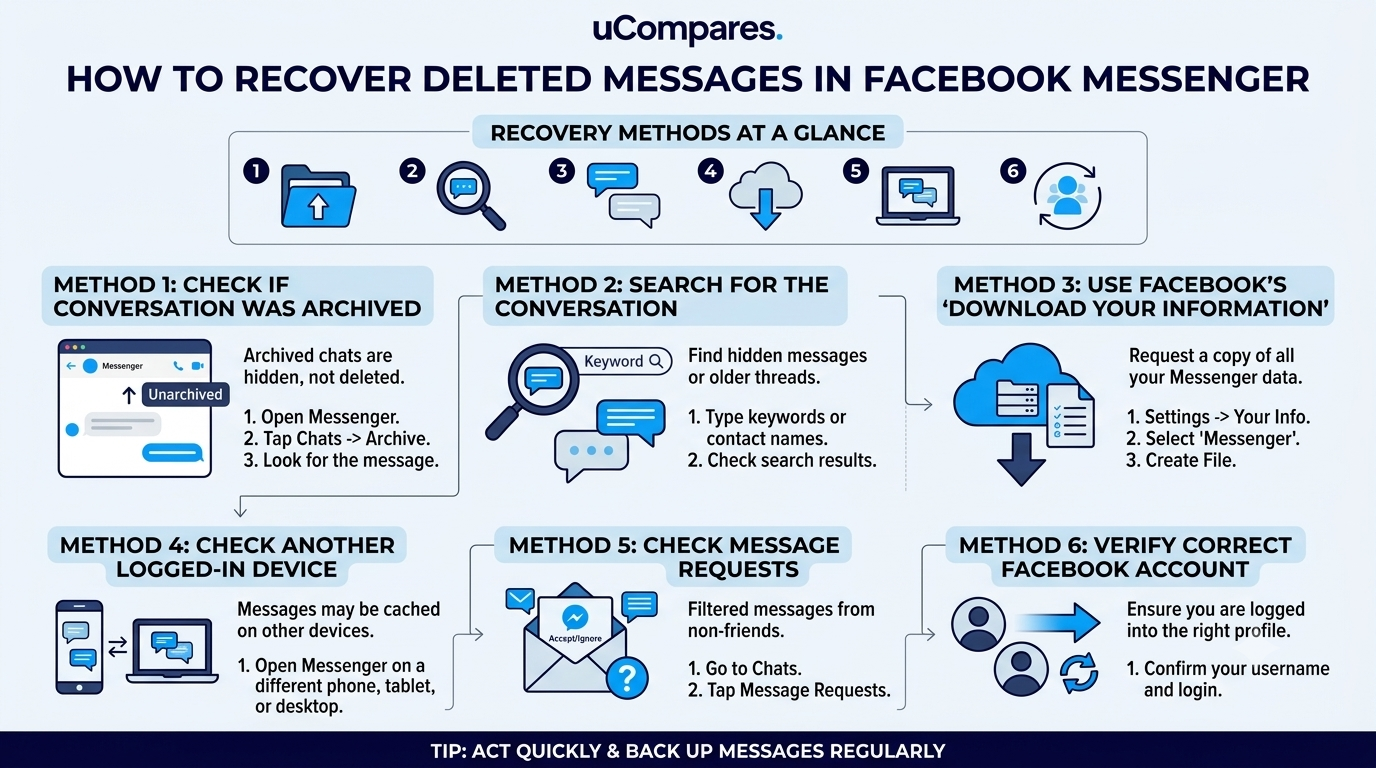
Recovery Methods at a Glance
| Recovery Method | Works for Archived Chats | Works for Deleted Chats | Difficulty |
|---|---|---|---|
| Restore Archived Conversation | ✅ Yes | ❌ No | Easy |
| Search Messenger | ✅ Yes | ❌ No | Easy |
| Download Your Information | Sometimes | Sometimes* | Medium |
| Check Another Logged-In Device | Sometimes | Rarely | Easy |
| Reinstall Messenger | ❌ No | ❌ No | Easy |
| Third-Party Recovery Apps | ❌ No | ❌ No | Not Recommended |
Note: The Download Your Information feature may include messages that were still stored in your account at the time the data archive was created or processed. It should not be considered a reliable method for recovering permanently deleted conversations.
Method 1: Check if the Conversation Was Archived
If your Messenger conversation was archived instead of deleted, you can restore it instantly. Archived chats are hidden from your inbox but remain stored in your account.
Many users accidentally archive conversations and mistake them for deleted chats. This is the easiest recovery method and should always be your first step.
On Android and iPhone
- Open the Messenger app.
- Tap the Search bar at the top.
- Type the person’s name.
- If the conversation appears, tap it.
- Send a new message to move the conversation back to your inbox.
On Messenger Web
- Open Messenger in your browser.
- Search for the person’s name.
- Open the conversation if it appears.
- Send a message to restore it to your active chats.
Tip: If the conversation appears in search, it was likely archived—not deleted.
Method 2: Search for the Conversation
Sometimes a conversation isn’t deleted but simply difficult to find. Searching by the person’s name or a keyword from the conversation can help locate it.
Try searching for:
- The person’s name
- Their Facebook username
- A nickname you’ve assigned
- A word or phrase from the conversation
If the chat appears in the search results, you haven’t lost it.
Method 3: Use Facebook’s “Download Your Information”
Facebook lets you request a copy of your account data, including Messenger history that is still available in your account. This is the only official data recovery feature provided by Meta.
How to Request Your Data
- Open Facebook Settings.
- Go to Accounts Center.
- Select Your Information and Permissions.
- Choose Download Your Information.
- Select your Facebook account.
- Choose Messages (or select all data if preferred).
- Pick a date range and file format.
- Submit the request.
- Wait for Facebook to prepare the download.
- Download the archive when it’s ready.
What You May Find
- Existing Messenger conversations
- Photos and videos shared in chats
- Stickers and reactions
- Message timestamps
- Conversation participants
What You Shouldn’t Expect
If a conversation was permanently deleted before the downloadable archive was generated, it generally won’t appear in the exported data.
Method 4: Check Another Logged-In Device
If you’re signed into Messenger on multiple devices, another device may still display a conversation that hasn’t fully synchronized yet.
Examples include:
- Tablet
- Secondary smartphone
- Desktop Messenger app
- Web browser
- Older device
While this isn’t guaranteed, it’s worth checking before assuming the conversation is permanently gone.
Method 5: Check Message Requests
Sometimes conversations move into Message Requests instead of your main inbox, making them seem like they’ve disappeared.
Steps
- Open Messenger.
- Tap your profile picture.
- Select Message Requests.
- Review both:
- You May Know
- Spam
If the conversation is there, accept the request to move it into your inbox.
Method 6: Verify You’re Using the Correct Facebook Account
Many users have multiple Facebook accounts or accidentally log into a different account, making it appear that conversations have disappeared.
Check:
- Email address
- Phone number
- Facebook profile photo
- Friends list
- Messenger profile
If you’ve signed into the wrong account, your chats won’t appear until you switch back.
Android Recovery Guide
Android doesn’t store recoverable Messenger conversations locally. Your messages are synced with your Facebook account, so recovery depends on your account data rather than your phone.
Recommended Steps
- Check archived conversations.
- Search Messenger.
- Request Facebook data.
- Update Messenger.
- Clear the Messenger cache.
- Restart your device.
- Sign back into your account.
Avoid
- Root-only recovery tools
- Fake “Messenger recovery” apps
- APKs claiming to restore deleted chats
These applications rarely work and can expose your personal information.
iPhone Recovery Guide
Like Android, iPhones don’t keep a recoverable local copy of deleted Messenger conversations. Recovery depends on Facebook’s servers and your account history.
Try These Steps
- Search for the conversation.
- Check archived chats.
- Download your Facebook information.
- Update Messenger.
- Restart your iPhone.
- Sign out and back into Messenger.
Reinstalling Messenger won’t restore permanently deleted conversations, but it may fix syncing issues.
Messenger Web Recovery
Messenger Web provides access to the same cloud-based conversations as the mobile app and can help confirm whether a missing chat is an app-specific issue.
Try:
- Searching for the conversation.
- Checking archived chats.
- Logging out and back in.
- Using a different browser.
- Opening Messenger in an incognito/private window.
If the conversation is missing everywhere, it’s likely no longer available in your account.
Does Reinstalling Messenger Recover Deleted Messages?
No. Reinstalling Messenger doesn’t recover permanently deleted conversations because your messages aren’t stored inside the app itself.
Reinstalling can fix:
- Sync problems
- App crashes
- Missing conversations caused by bugs
It cannot restore deleted account data.
Can Phone Backups Recover Messenger Messages?
Usually not. Device backups don’t typically restore deleted Messenger conversations because Messenger stores messages on Meta’s servers rather than locally on your phone.
However, restoring an older device backup may restore app settings or cached data in rare cases. It shouldn’t be considered a reliable recovery method.
Recovery Methods Comparison
| Method | Archived Chats | Deleted Chats | Official | Recommended |
|---|---|---|---|---|
| Search Messenger | ✅ | ❌ | ✅ | ⭐⭐⭐⭐⭐ |
| Restore Archived Chat | ✅ | ❌ | ✅ | ⭐⭐⭐⭐⭐ |
| Download Your Information | Sometimes | Limited | ✅ | ⭐⭐⭐⭐☆ |
| Check Another Device | Sometimes | Rarely | ✅ | ⭐⭐⭐☆☆ |
| Reinstall Messenger | ❌ | ❌ | ✅ | ⭐⭐☆☆☆ |
| Third-Party Recovery Software | ❌ | ❌ | ❌ | ⭐☆☆☆☆ |
Recovery Myths You Should Ignore
Myth 1: Any Deleted Messenger Message Can Be Recovered
Reality: Permanently deleted conversations generally cannot be restored once removed from Meta’s servers.
Myth 2: Recovery Apps Can Restore Anything
Reality: Most apps advertising Messenger recovery don’t have access to Facebook’s servers and can’t recover deleted cloud-based messages.
Myth 3: Clearing Cache Deletes Your Chats
Reality: Clearing the Messenger cache removes temporary app files, not your cloud-stored conversations.
Myth 4: Reinstalling Messenger Restores Deleted Messages
Reality: Reinstalling only downloads a fresh copy of the app. It doesn’t recreate deleted conversations.
Myth 5: Facebook Secretly Stores Every Deleted Message Forever
Reality: Facebook follows its own data retention and deletion policies. Once deletion is completed, permanently removed conversations generally aren’t recoverable through your account.
Troubleshooting Missing Messenger Conversations
Problem: My Chat Disappeared Overnight
Possible Causes
- Conversation archived
- Wrong Facebook account
- Temporary sync issue
- Messenger bug
Try
- Search for the conversation.
- Restart Messenger.
- Log out and back in.
- Check another device.
Problem: Only One Conversation Is Missing
Possible Causes
- Archived chat
- Conversation deleted
- Other person’s account deleted or deactivated
- Privacy or account changes
Try
- Search for the person’s name.
- Check archived conversations.
- Verify whether their Facebook profile is still available.
Problem: Messages Aren’t Loading
Possible Causes
- Weak internet connection
- Messenger outage
- Outdated app
- Temporary server issue
Try
- Switch between Wi-Fi and mobile data.
- Update Messenger.
- Restart your device.
- Wait and try again later if there’s a known outage.
Best Practices to Avoid Losing Messenger Conversations
- Archive important chats instead of deleting them.
- Double-check before confirming permanent deletion.
- Regularly download your Facebook account data if you need long-term records.
- Keep Messenger updated.
- Stay signed into the correct Facebook account.
- Avoid unofficial recovery tools that request your Facebook credentials.
Frequently Asked Questions (FAQs)
Can you recover permanently deleted Facebook Messenger messages?
In most cases, no. Once a Messenger conversation has been permanently deleted and removed from Meta’s servers, there is no official method to recover it.
If the conversation was archived instead of deleted, you can restore it. Otherwise, recovery is generally not possible after permanent deletion.
Are archived Messenger messages the same as deleted messages?
No. Archived conversations are hidden from your inbox but remain stored in your account, while deleted conversations are removed from your Messenger history.
Archived chats can usually be restored at any time.
Does Facebook keep deleted Messenger messages?
Facebook may retain certain data for a limited period as part of its operational, legal, or security processes, but permanently deleted conversations are generally no longer accessible through your account.
This means users should not expect to retrieve permanently deleted messages through Messenger once deletion is complete.
Can I recover deleted Messenger messages without a backup?
Only if the messages still exist somewhere in your Facebook account, such as in archived conversations or downloadable account data. Otherwise, recovery is unlikely.
Messenger does not provide a recycle bin for permanently deleted chats.
Is there a recycle bin in Facebook Messenger?
No. Facebook Messenger doesn’t have a recycle bin or trash folder for deleted conversations.
Once you confirm deletion, there isn’t a built-in option to restore the chat.
Can I recover deleted Messenger messages on Android?
Android devices don’t store recoverable local copies of Messenger conversations. Recovery depends on your Facebook account rather than your phone.
Checking archived chats and requesting your Facebook data are your best options.
Can I recover deleted Messenger messages on iPhone?
Yes, but only in the same limited situations as Android. If the conversation still exists in your account or downloadable data, you may recover it. Permanently deleted chats usually can’t be restored.
Does reinstalling Messenger restore deleted chats?
No. Reinstalling Messenger only reinstalls the app. It doesn’t recover conversations that have already been permanently deleted from your account.
Can I recover Messenger messages from another device?
Sometimes. If another logged-in device hasn’t synchronized recent changes, you may still be able to view a conversation temporarily. This isn’t guaranteed and shouldn’t be relied upon as a recovery method.
Can Facebook Support recover deleted Messenger messages?
Generally, no. Meta doesn’t provide a service for restoring permanently deleted Messenger conversations upon request.
Support may assist with account-related issues, but not with recovering permanently erased chats.
Do third-party Messenger recovery apps work?
In most cases, no. Apps claiming they can recover permanently deleted Messenger messages are usually misleading and may pose privacy or security risks.
Avoid granting such apps access to your Facebook account or personal information.
How long does Facebook keep deleted Messenger messages?
Meta doesn’t publish a guaranteed timeframe for user-accessible recovery after permanent deletion. Once the deletion process is complete, users generally can’t retrieve those conversations.
Can police recover deleted Messenger messages?
This depends on local laws, legal procedures, and whether the data still exists within Meta’s systems. It isn’t a recovery option available to ordinary users and shouldn’t be viewed as a method for restoring personal chats.
Why did my Messenger conversation disappear?
A conversation may disappear because it was:
- Archived
- Deleted
- Filtered into Message Requests
- Hidden due to a synchronization issue
- Associated with a deactivated or deleted account
Checking each possibility helps identify the actual cause.
What’s the safest way to protect important Messenger conversations?
Archive conversations instead of deleting them, regularly download your Facebook account data if needed, and avoid relying on unofficial recovery software.
Expert Recommendations
1. Confirm Before You Delete
Deleting a Messenger conversation is intended to be permanent. If you think you might need the messages later, archive the conversation instead of deleting it.
2. Use Only Official Recovery Methods
The safest recovery methods are those provided by Meta, including:
- Archived conversations
- Search within Messenger
- Download Your Information
- Checking synchronized devices
These methods don’t require sharing your account with unknown third parties.
3. Be Cautious of Recovery Claims
Many websites and apps promise to recover deleted Messenger messages in minutes. In reality, cloud-based messaging platforms don’t allow third-party tools to retrieve permanently deleted conversations from Meta’s servers.
If a service asks for your Facebook password or claims guaranteed recovery, treat it with caution.
4. Download Important Conversations
If you need Messenger chats for work, legal records, or personal memories, periodically export your Facebook data using the Download Your Information feature. Having your own copy is far more reliable than trying to recover deleted messages later.
5. Understand the Difference Between Archived and Deleted
Many recovery attempts fail because users confuse archived conversations with deleted ones. Always search for the chat and check your archived conversations before assuming it’s permanently gone.
Common Mistakes to Avoid
- Deleting a conversation when you only wanted to hide it.
- Forgetting to search for archived chats.
- Logging into the wrong Facebook account.
- Trusting unofficial recovery software.
- Sharing Facebook login credentials with third-party services.
- Assuming reinstalling Messenger restores deleted conversations.
- Ignoring the Download Your Information feature.
- Waiting too long before checking available recovery options.
Best Practices
- Archive conversations you may need later.
- Regularly review important chats before deleting them.
- Keep Messenger updated to avoid synchronization issues.
- Use a strong password and enable two-factor authentication to protect your account.
- Download your Facebook data periodically if preserving conversation history is important.
- Verify information using official Meta documentation instead of relying on unverified online advice.
Final Verdict
Recovering deleted Facebook Messenger messages depends entirely on how the conversation was removed.
If the chat was archived, hidden, or still available through Facebook’s downloadable account data, recovery may be possible using official tools. However, if the conversation was permanently deleted and the deletion process has completed, there is generally no supported method to restore those messages.
Instead of relying on websites or apps that promise guaranteed recovery, focus on Meta’s official features, verify whether the conversation was actually deleted, and understand the difference between archived and permanently removed chats. This approach protects both your data and your account while giving you the best chance of recovering messages that are still available.
Key Takeaways
- Archived Messenger conversations can be restored; permanently deleted ones usually cannot.
- Search for the conversation before assuming it’s gone.
- Use Download Your Information to access Messenger data that remains available in your account.
- Checking another logged-in device may help in limited situations.
- Reinstalling Messenger won’t recover permanently deleted conversations.
- Avoid third-party recovery tools that request your Facebook credentials.
- Back up important conversations before deleting them if you may need them in the future.
Conclusion
Losing an important Messenger conversation can be frustrating, but understanding how Facebook stores and manages your data makes the recovery process much clearer.
The first step is determining whether the conversation was archived, hidden, or truly deleted. From there, you can use official tools like Messenger search, archived chats, and Facebook’s Download Your Information feature to recover any messages that are still available.
If the conversation has been permanently deleted, it’s important to set realistic expectations. While many online services claim to recover deleted Messenger messages, official recovery options are limited, and most third-party solutions cannot access data that no longer exists in your account.
By using Messenger’s built-in features, protecting your account, and archiving important conversations instead of deleting them, you can reduce the risk of losing valuable chat history in the future.

