


For a long time, my social media presence felt unbalanced. My Twitter (X) account was thriving—my tweets were generating engagement, retweets, and meaningful conversations. Meanwhile, my Instagram profile sat largely inactive. The content was there, but the engagement was almost nonexistent.
The issue wasn’t the quality of my content—it was visibility. Most of my audience was active on Twitter, while my Instagram followers rarely saw the insights, opinions, and ideas I was sharing daily.
That’s when I decided to start cross-posting my twehttps://circleboom.com/social-media-scheduler/twitter-scheduler/cross-post/twitter-to-instagramets as Instagram Stories using Circleboom. That simple change transformed how my Instagram account performed, turning it from dormant to active and engaging almost overnight.
Why Cross-Posting Tweets to Instagram Stories Matters
Not all audiences behave the same way.
People on Twitter (X) are used to fast-paced, text-driven conversations. Meanwhile, Instagram is built around visuals, quick consumption, and passive scrolling—especially through Stories.
This creates a gap.
Even if you’re active on both platforms, your audience is rarely identical. Many of your Instagram followers may never see your tweets, and vice versa.
By cross-posting tweets to Instagram Stories:
- You extend your reach beyond one platform
- You stay visible to different audience segments
- You maintain consistency without creating new content
- You reinforce your personal brand across channels
This strategy turns one piece of content into multiple opportunities for engagement—and that’s exactly what modern content growth requires.
The Main Challenge: Tweets Are Text, Instagram Stories Are Visual
Here’s the core problem:
Tweets are designed for reading. Instagram Stories are designed for viewing.
You can’t just copy and paste text from Twitter into Instagram and expect it to perform well. Stories demand clean layouts, readable typography, and visually appealing formats.
That’s why manual methods fail.
Most creators try to:
- Take screenshots of tweets
- Crop and resize images
- Adjust readability manually
- Post inconsistent visuals
It works occasionally—but it’s not scalable.
Over time, this process becomes frustrating, time-consuming, and inconsistent. The quality drops, and so does your motivation to keep posting.
To succeed, you need a system that converts text into visuals automatically—without compromising design or readability.
How I Solved It with Circleboom Twitter
The turning point came when I discovered Circleboom.

Instead of manually handling everything, Circleboom introduced a smarter workflow—one where content creation and distribution happen in one place.
By connecting my Twitter and Instagram accounts, I was able to:
- Create or reuse tweets easily
- Schedule content in advance
- Share posts across multiple platforms
- Automate the entire cross-posting process
But the real advantage wasn’t just automation—it was transformation.
Circleboom doesn’t simply copy tweets to Instagram. It converts them into visually optimized content designed specifically for Instagram formats.
This removed the biggest bottleneck in my content strategy and replaced it with a system that actually scales.
Turning Tweets into Instagram Stories Automatically
Automation is powerful—but only when it maintains quality.
With Circleboom, tweets are automatically transformed into Instagram-ready visuals that match the platform’s style and behavior.
Instead of raw text, your content becomes:
- Clean, readable story layouts
- Professionally styled typography
- Visually balanced designs
- Optimized dimensions for Stories
You can choose how your content appears:
- As an Instagram Story
- As a feed post
- Or even as a Reel
This flexibility allows you to adapt your content without recreating it.
For most creators, Instagram Stories are the sweet spot. They’re quick to consume, highly visible, and perfect for sharing short insights, opinions, and value-driven content from Twitter.
By turning tweets into Stories automatically, you eliminate friction, save time, and maintain consistency—all while increasing your reach.
How to Cross-Post Tweets to Instagram Stories with Circleboom
Cross-posting your tweets to Instagram Stories might sound complicated—but with Circleboom, it becomes a fast and streamlined process.
Instead of juggling multiple apps or manually editing screenshots, you can manage everything from a single dashboard and turn your tweets into visually optimized Instagram content in just a few steps.
Step #1: Log in to Your Circleboom Account
Start by accessing your Circleboom Twitter account. If you’re new, setting up an account only takes a few seconds.
Once you’re inside, you’ll have access to a complete content management system designed to simplify your workflow.

Step #2: Navigate to Post Creation
From the dashboard, head to the left-hand menu and locate “Post Management & Analytics.”
Click on “Write and Plan Your Post” to open the content creation panel.
This is where everything begins—whether you’re creating a fresh tweet or repurposing an existing one.

Step #3: Create or Generate Your Tweet
Now it’s time to write your tweet.
You can either craft it manually or take advantage of Circleboom’s built-in AI tools to generate engaging tweets automatically.
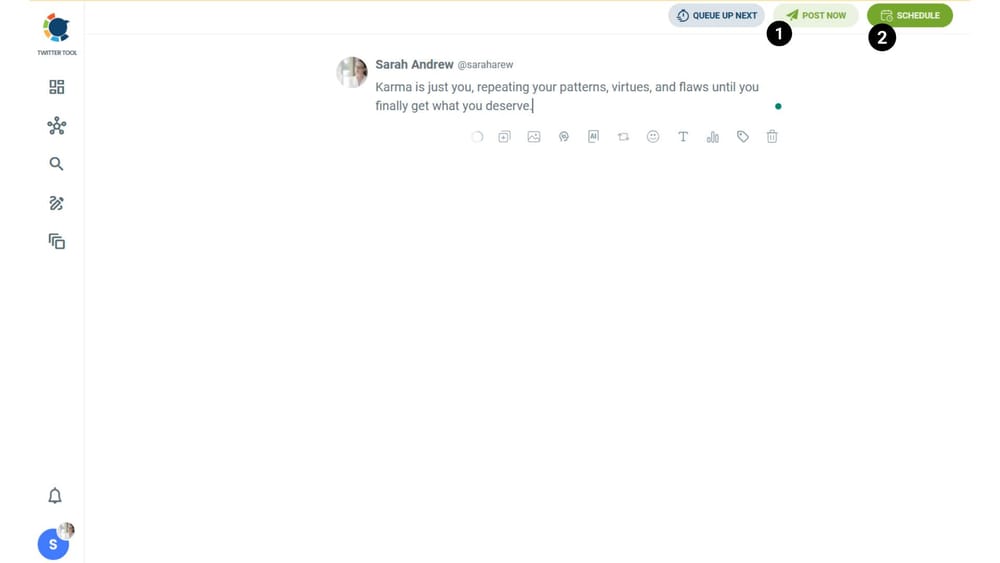
Once your content is ready, you’ll have two options:
- Post instantly
- Schedule for later
To enable cross-posting, simply proceed with either option.
Step #4: Select Platforms for Cross-Posting
After choosing to post or schedule, you’ll see all your connected social media accounts.
Here’s where Circleboom truly shines.
With just a few clicks, you can share your tweet across multiple platforms, including:
- Threads
- Bluesky
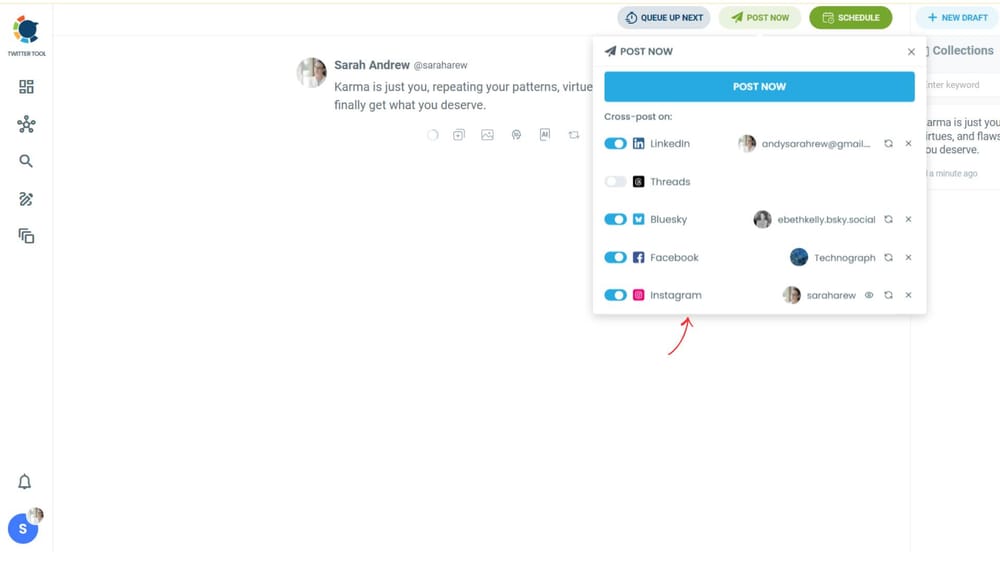
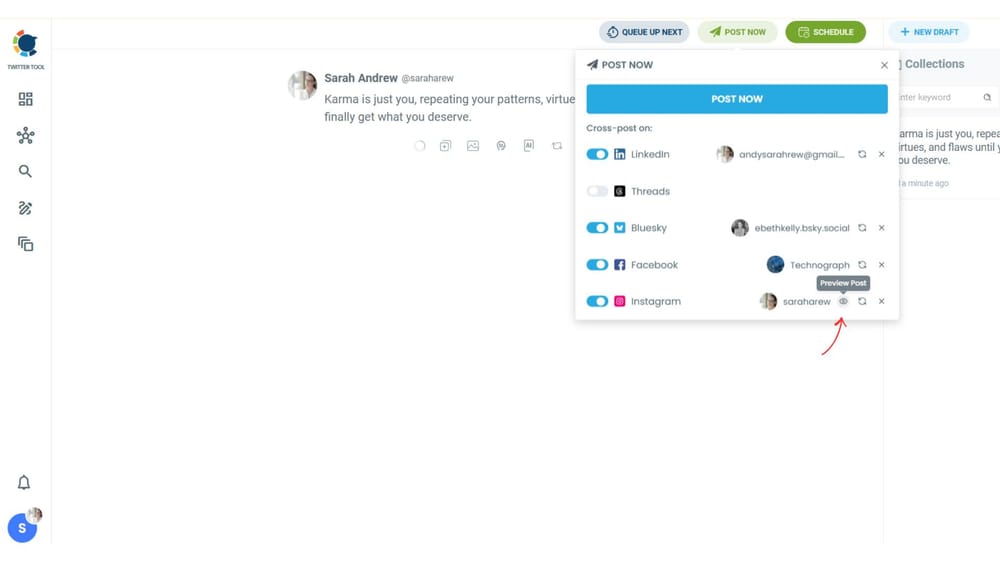
To Customize how your tweet appears on Instagram, click on “Preview.”
Step #5: Choose Instagram Post Type, Layout, and Theme
In this step, you decide how your tweet will appear on Instagram.
Select Post Type and Layout: Choose whether your tweet will be shared as a Post, Story, or Reel and customize its appearance by adjusting text placement, alignment, and spacing to ensure it looks visually appealing and fits the chosen format.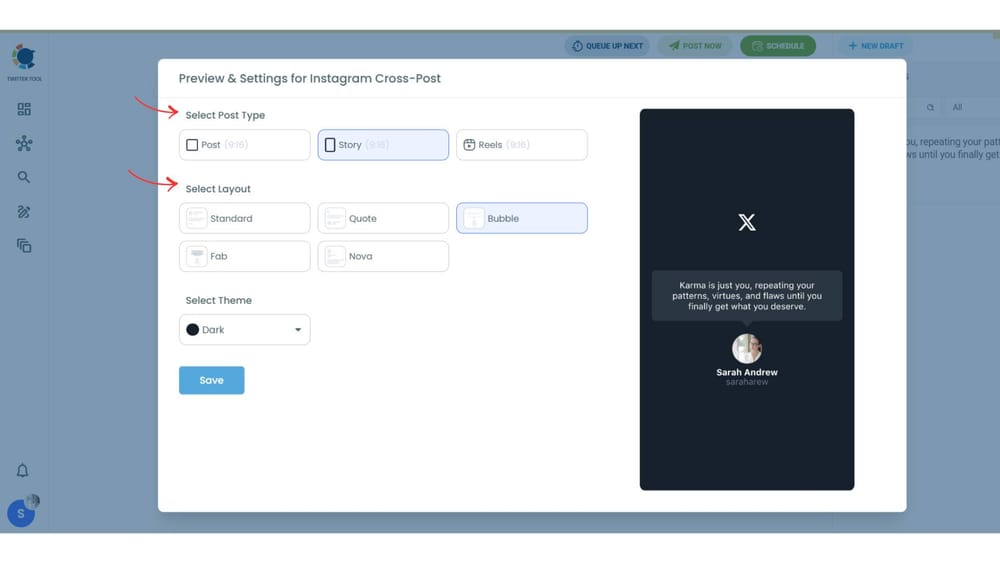
Apply a Theme: Circleboom lets you select different color schemes and visual themes to match your brand style. This ensures every Instagram Story looks polished and professional.
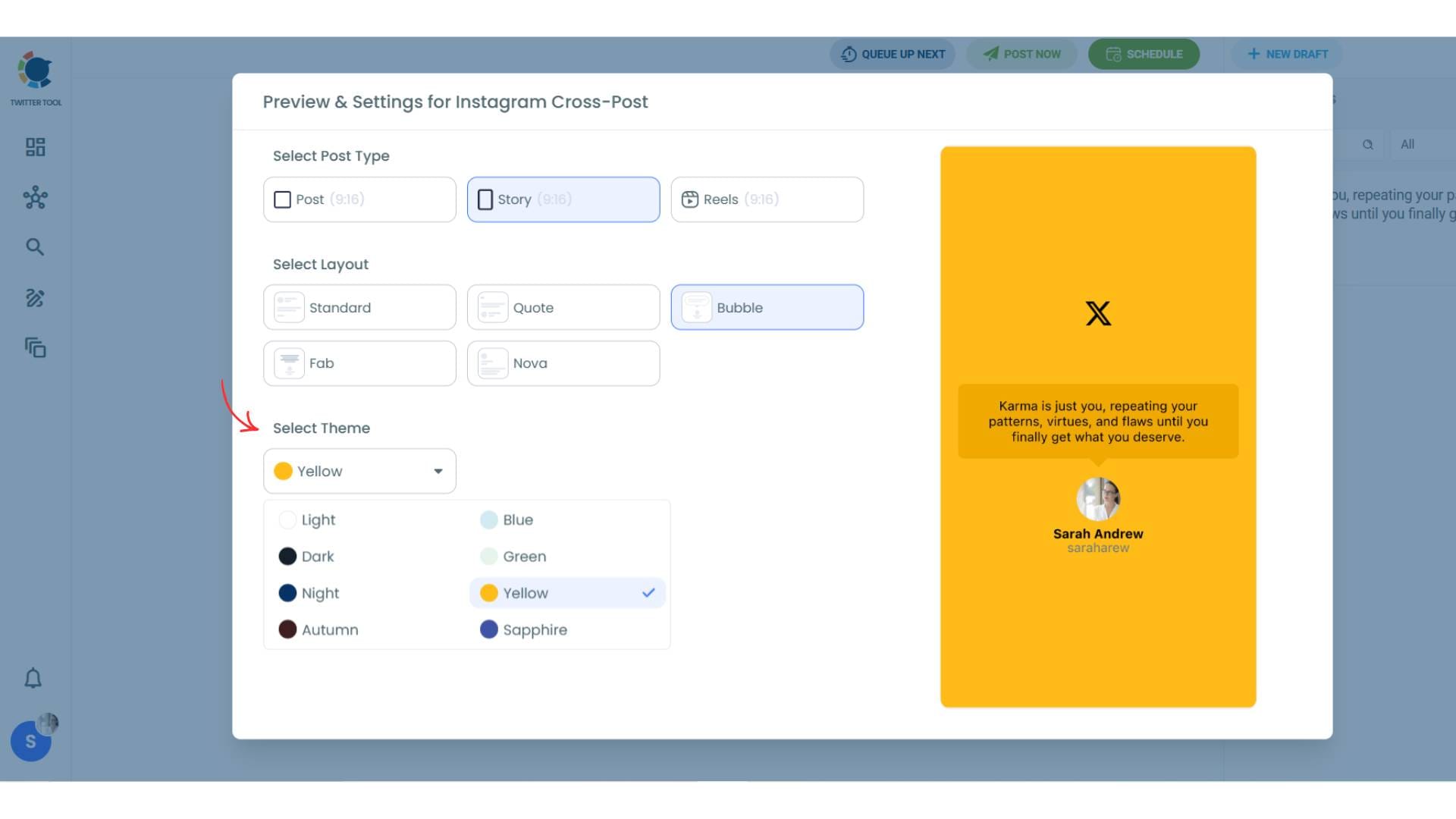
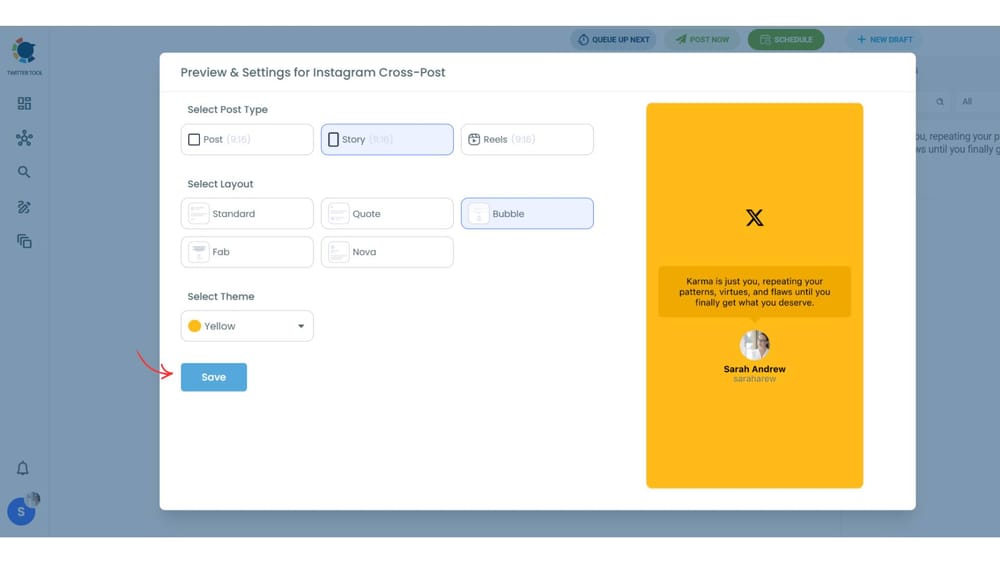
Preview and Save Your Design: Use the Preview & Settings option to see exactly how your tweet will appear on Instagram. Once you’re satisfied with the layout, theme, and colors, click “Save”—your tweet is now fully optimized and ready to be shared or scheduled as an Instagram Story.
Step #6: Publish or Schedule Your Content
Once everything looks perfect, click “Save.”
Now you’re ready to go live.
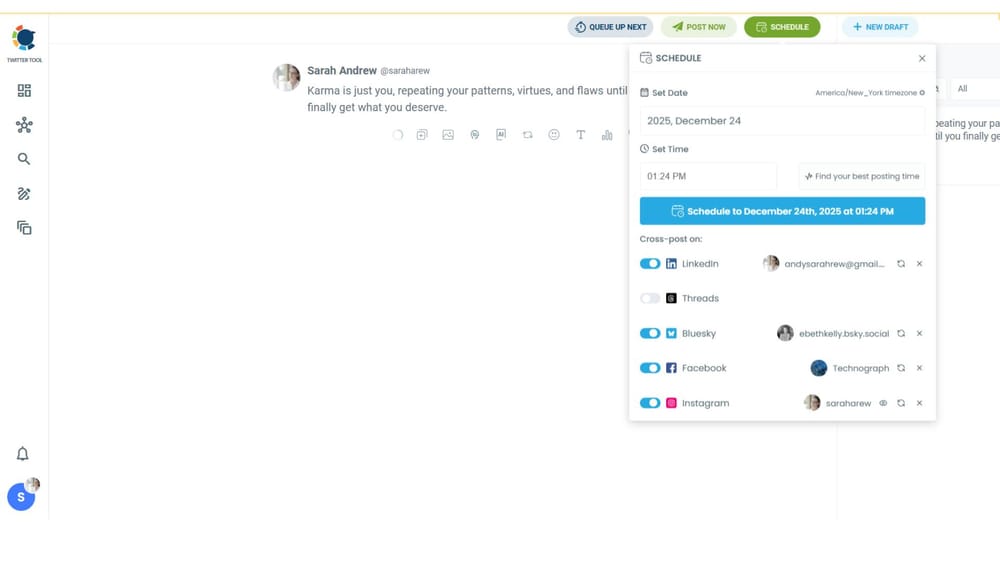
You can either:
- Share your content immediately
- Schedule it for a specific date and time
Scheduling allows you to stay consistent without being online all the time—making your content strategy far more efficient.
Reach More People Without Creating More Content
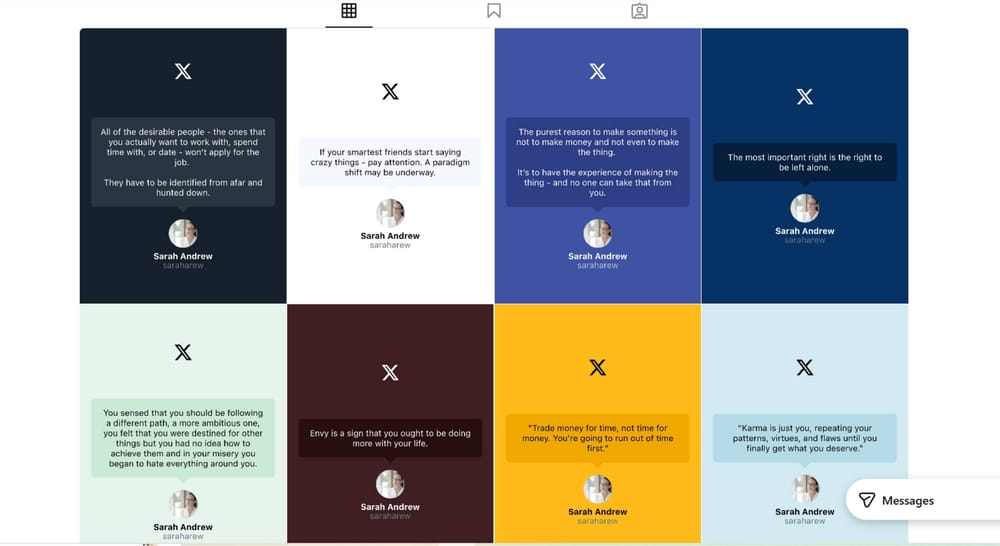
By cross-posting your tweets to Instagram Stories, you’re not just reposting—you’re expanding your reach.
Your content gets a second life on Instagram, where a completely different audience can discover, engage, and interact with it.
Instead of limiting your ideas to one platform, you turn every tweet into a multi-platform asset.
And that’s how smart creators grow faster—by working smarter, not harder.
How to Connect Twitter (X) to Instagram for Seamless Cross-Posting
Before you can automate anything, you need to connect your accounts properly.
Circleboom makes this process straightforward by allowing you to link your Twitter (X) and Instagram accounts securely within minutes.
Once connected:
- Your tweets become instantly available for repurposing
- You can select multiple platforms for cross-posting
- Your content distribution becomes centralized
This connection is what turns scattered efforts into a unified content strategy.
Instead of managing each platform separately, you control everything from one place. That means less time switching between apps—and more time focusing on creating valuable content.
Tips to Make Your Tweet-Based Instagram Stories More Engaging
Not every tweet will perform equally well as a Story. The key is to optimize for how Instagram users consume content.
Here are a few proven ways to improve engagement:
Keep your text short and clear. Long tweets don’t translate well into Stories. Simplicity always wins.
Use strong opening lines. The first few words should grab attention instantly.
Focus on one idea per Story. Avoid clutter and keep the message easy to understand.
Choose clean, high-contrast designs. Readability is everything on mobile screens.
Add personality. Even simple tweets can feel engaging when they reflect your tone and style.
Circleboom helps with the visual side, but the message still matters. When both align, your Stories become far more impactful.
Common Mistakes to Avoid When Cross-Posting Tweets to Instagram
While cross-posting is powerful, doing it incorrectly can reduce its effectiveness.
One common mistake is posting tweets exactly as they are without adapting them for visual platforms. Instagram requires clarity and design—not just text.
Another issue is inconsistency. Posting occasionally won’t deliver results. Growth comes from regular visibility.
Some creators also overload their Stories with too much text, making them difficult to read. If your audience has to struggle to understand your content, they’ll simply skip it.
Lastly, ignoring design quality can hurt your brand. Poor visuals create a weak impression—even if the content itself is valuable.
Using Circleboom helps eliminate many of these problems by ensuring your content is always presented in a clean, professional format.
What Happened After I Started Sharing Tweets as Stories
After connecting my Twitter (X) and Instagram accounts through Circleboom and consistently sharing my tweets as Stories, I started noticing significant changes in engagement.
Linking X to Instagram Made It Simple
I wanted a way to automatically turn my tweets into Instagram content—whether as posts, Stories, or Reels—without changing how I create on X. Circleboom made this process seamless, eliminating the need for screenshots, manual edits, or separate design tools. You can learn more about these features on the Circleboom blogs.
Real Results from Cross-Posting
Once I started cross-posting consistently:
- Story views increased steadily
- More users reacted and replied to my content
- Profile visits rose, boosting visibility
- Follower growth became noticeable
The best part? The content itself hadn’t changed. What changed was the audience—Instagram users were now seeing my tweets in a format designed for them. By repurposing existing content visually, engagement began to grow naturally without extra effort.
Join the Circleboom Creator Community
If you’re a creator on X looking to stay updated on algorithm changes, engagement strategies, and monetization opportunities, you can join the Circleboom X Creator Growth Lab Community. It’s a free space to learn, collaborate, and contribute with other creators.
Best Types of Tweets to Share as Instagram Stories
Not every tweet works well as an Instagram Story. Stories are designed for quick consumption, so the format and clarity of your message are just as important as the content itself. Over time, I’ve noticed that certain types of tweets consistently perform better when repurposed for Stories—they are visually clear, easy to read, and immediately understandable.
Short Insights or Strong Opinions
Tweets that express a concise point of view or a bold opinion work exceptionally well in Stories. Instagram users often scroll quickly, so a statement that’s clear and punchy grabs attention immediately. These types of tweets don’t require extensive context, making them ideal for quick, impactful Story slides.
Tips and Quick Takeaways
Practical advice or a single actionable tip translates perfectly into Stories. Tweets that offer value in one or two lines feel natural in a visual format and often encourage engagement because they provide helpful information without appearing promotional.
Quotes and One-Liners
Quotes, punchy sentences, or short reflections are highly effective in Stories. They fit neatly into visual layouts, remain readable on small screens, and resonate emotionally with viewers, often prompting replies or shares. To create standout quote posts, tools like Circleboom’s Quote Generator make it easy to generate professional, visually appealing quotes for social media.
Educational Tweets with a Clear Message
Educational content works best when it focuses on a single, clear idea. Instead of lengthy explanations, tweets that deliver one key insight or teach a small concept perform better in Story format. These micro-learning moments feel effortless to consume and can build engagement quickly.
Across all types, the most important principle is clarity and simplicity. Keeping text concise and easy to read ensures your Story can be consumed in just a few seconds, aligning with how Instagram users naturally interact with content. Tweets that are quick to understand are far more likely to generate reactions, replies, and profile visits.
Final Thoughts: One Tweet, Two Platforms, Maximum Impact
Cross-posting tweets as Instagram Stories completely transformed my inactive Instagram account into a platform that attracts consistent engagement—without the need to create new content from scratch.
Although Twitter and Instagram audiences behave differently, your ideas don’t have to be confined to one platform. By converting tweets into visually compelling Stories, your content adapts seamlessly to Instagram, reaching users who might never see your posts on Twitter.
Instead of posting once and moving on, cross-posting allows the same content to work harder, expanding your reach, boosting engagement, and growing your audience. This simple strategy made a measurable difference in both visibility and influence across platforms.

