

Featured Social Media Software:
Facebook has a feature that enables users to keep track of their recently watched videos. However, the exact path to access this list may not be immediately apparent to all users. To locate recently watched videos on Facebook, follow this detailed guide that outlines each step with clear instructions. This article will also provide answers to common questions about accessing Facebook video history and managing this feature for improved usability.
Steps to Access Recently Watched Videos on Facebook
1. Open the Facebook App or Website
Accessing your video history on Facebook is possible both on mobile and desktop versions. Start by logging into your Facebook account on the device of your choice.
2. Navigate to Your Profile
After logging in, locate your profile by clicking on your profile picture or name on the home screen. This step directs you to your profile page, where you can manage various features, including video history.
3. Access the Activity Log
The Activity Log is the primary place to review your Facebook activity, including watched videos. Follow these steps to access the Activity Log:
- On Desktop: Click on the downward arrow at the top right of the screen and select Settings & Privacy. From there, select Activity Log.
- On Mobile App: Tap on the menu icon (three horizontal lines), scroll down to Settings & Privacy, and tap on Activity Log.
4. Filter the Activity Log by Video Activity
Once in the Activity Log, you can refine the log to view only video activity.
- Select Filters or Category on the Activity Log screen.
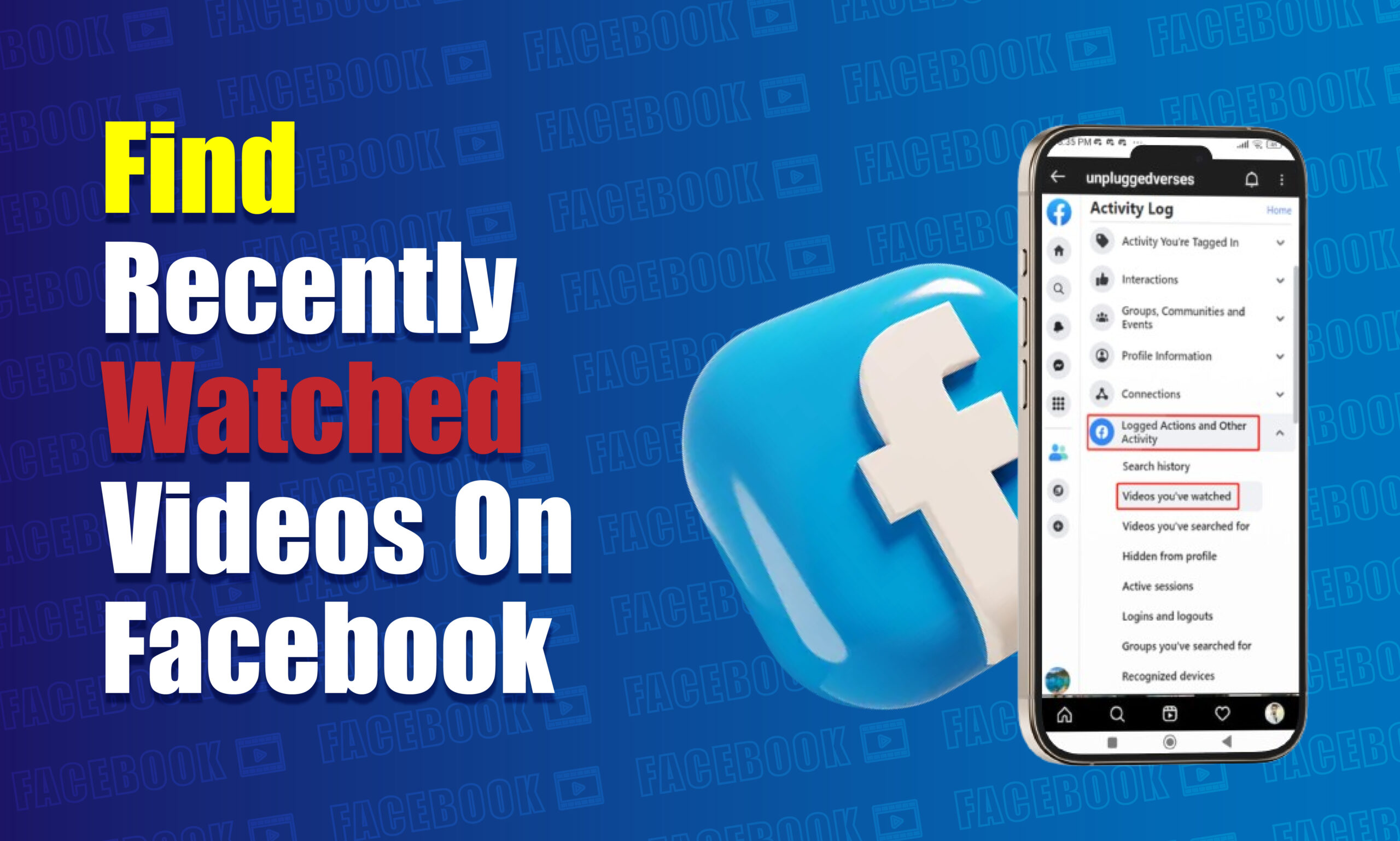
- Choose Logged Actions and Other Activity.
- Scroll to find Videos You’ve Watched. This category lists all videos you have watched on Facebook.
5. View and Manage Watched Videos
When you open the Videos You’ve Watched section, Facebook displays a chronological list of videos you have viewed. Here, you can:
- Watch any video again by tapping on the video link.
- Delete specific entries if you want to clear certain videos from your watch history.
- Clear all video history by selecting the Clear Video Watch History option at the top.
Additional Options for Recently Watched Videos
Facebook’s Activity Log provides several options to refine, manage, and delete watched videos:
1. Filtering by Date
The Activity Log allows users to filter watched videos by date. This function enables users to view their video activity within a specific time range, making it easier to find older content.
2. Deleting Specific Videos
You can delete individual entries from your watched video history. Locate the video you want to remove, select the three dots next to it, and choose Delete to remove it from your history.
3. Clearing All Video History
If you prefer to erase your entire watched video history, choose the Clear Video Watch History option at the top of the Videos You’ve Watched section. This action removes all logged video activity and is irreversible.
Accessing Recently Watched Videos on Facebook Lite
Facebook Lite offers a similar but slightly modified process for accessing watched videos. Follow these steps:
- Open Facebook Lite and navigate to Settings.
- Go to Activity Log and select Filter.
- Scroll to find and tap on Videos You’ve Watched. This list provides an overview of all videos viewed on Facebook Lite.
How to Manage Video Watch History Privacy
Facebook provides privacy settings for your activity log, which include options for watched videos. These settings determine who can see your activity and ensure your video-watching habits remain private.
- Open Privacy Settings: Access Privacy Settings by selecting Settings & Privacy from the menu.
- Customize Privacy: Choose the audience who can view your activity in the Activity Log, including watched videos. Options include Only Me, Friends, or Public.
- Set to ‘Only Me’ for Privacy: For maximum privacy, set the visibility of watched videos to Only Me. This selection ensures that only you can see your video watch history.
How Facebook Utilizes Watch History Data
Facebook uses watched video data to enhance your experience by:
- Improving Content Recommendations: Facebook recommends videos based on previously watched content to align with user preferences.
- Personalizing the News Feed: Facebook prioritizes video content in the News Feed that aligns with past viewing habits.
- Targeted Advertising: Facebook uses watch history data to show ads relevant to user interests.
Troubleshooting Issues with Finding Recently Watched Videos
If you encounter difficulties find recently watched videos, consider these solutions:
- Check for App Updates: Outdated Facebook apps may lack the latest features. Update to the newest version for improved functionality.
- Clear Cache: Clearing your browser or app cache can resolve display or access issues.
- Restart the App: Closing and reopening the app may resolve temporary glitches.
- Check Internet Connection: A stable internet connection ensures seamless navigation through Facebook features.
Important Notes on Facebook’s Watched Video Feature
- Data Retention: Facebook retains video watch history for an undefined period. Regularly clearing history is recommended for privacy.
- No Download Option: Facebook does not offer a download feature for watched videos. If you wish to save a video, consider using third-party tools, though these may violate Facebook’s terms.
- Limited to Facebook Content: Only videos watched on Facebook itself appear in the Videos You’ve Watched section. Shared links or videos from external sites are not included.
Conclusion
Accessing and managing your watched videos on Facebook is straightforward with the Activity Log. By following the outlined steps, users can view, manage, and delete their watched video history effectively. Understanding how to control and access this feature empowers users to optimize their Facebook experience and maintain privacy.
Frequently Asked Questions (FAQs)
How do I find my watched videos on Facebook quickly?
To locate watched videos on Facebook quickly, open the Activity Log and filter by Videos You’ve Watched.
Can I view watched videos from years ago on Facebook?
Yes, Facebook’s Activity Log includes all videos you’ve watched, enabling you to view videos from as far back as data is available.
Is it possible to delete individual videos from my Facebook watch history?
Yes, individual videos can be deleted from your watch history by selecting the video and choosing the Delete option in the Activity Log.
Can I recover deleted watched videos on Facebook?
Once a watched video is deleted from your history, it cannot be recovered. Consider carefully before deleting any entries.
Why can’t I see my watched video history on Facebook?
If you cannot see your watched video history, ensure your app is updated. Also, clear your cache and verify your internet connection to resolve any issues.

