

In 2026, there are two main ways to integrate ChatGPT with WhatsApp. If you are in the European Economic Area, you can use OpenAI’s official WhatsApp experience by messaging the verified 1-800-CHATGPT contact at +1-800-242-8478; a ChatGPT account is optional, and linking one provides higher usage limits.
The phrase “integrate ChatGPT into WhatsApp” can mean two very different things.
A personal user may simply want to open WhatsApp and ask ChatGPT questions without switching to the ChatGPT website or app. A business or developer, however, may want something much more advanced: a WhatsApp number that automatically answers customer questions using an OpenAI model.
This guide covers both paths so you can choose the one that matches your goal. It also explains what changed in 2026, how a custom WhatsApp AI bot works, how to test it, what commonly goes wrong, and how to make the integration safer and more useful.
What Does ChatGPT WhatsApp Integration Mean?
ChatGPT WhatsApp integration means connecting an AI model powered by OpenAI to conversations taking place through WhatsApp.
There are two basic models:
| Integration type | What it does | Technical skill |
|---|---|---|
| Official ChatGPT on WhatsApp | Lets eligible users chat directly with ChatGPT through WhatsApp | Very low |
| Custom WhatsApp AI bot | Lets a business or developer build its own AI-powered WhatsApp workflow | Medium to advanced |
The first option is a ready-made service provided by OpenAI. The second is an application that you build around WhatsApp’s business messaging infrastructure and the OpenAI API.
For a custom integration, the basic flow looks like this:
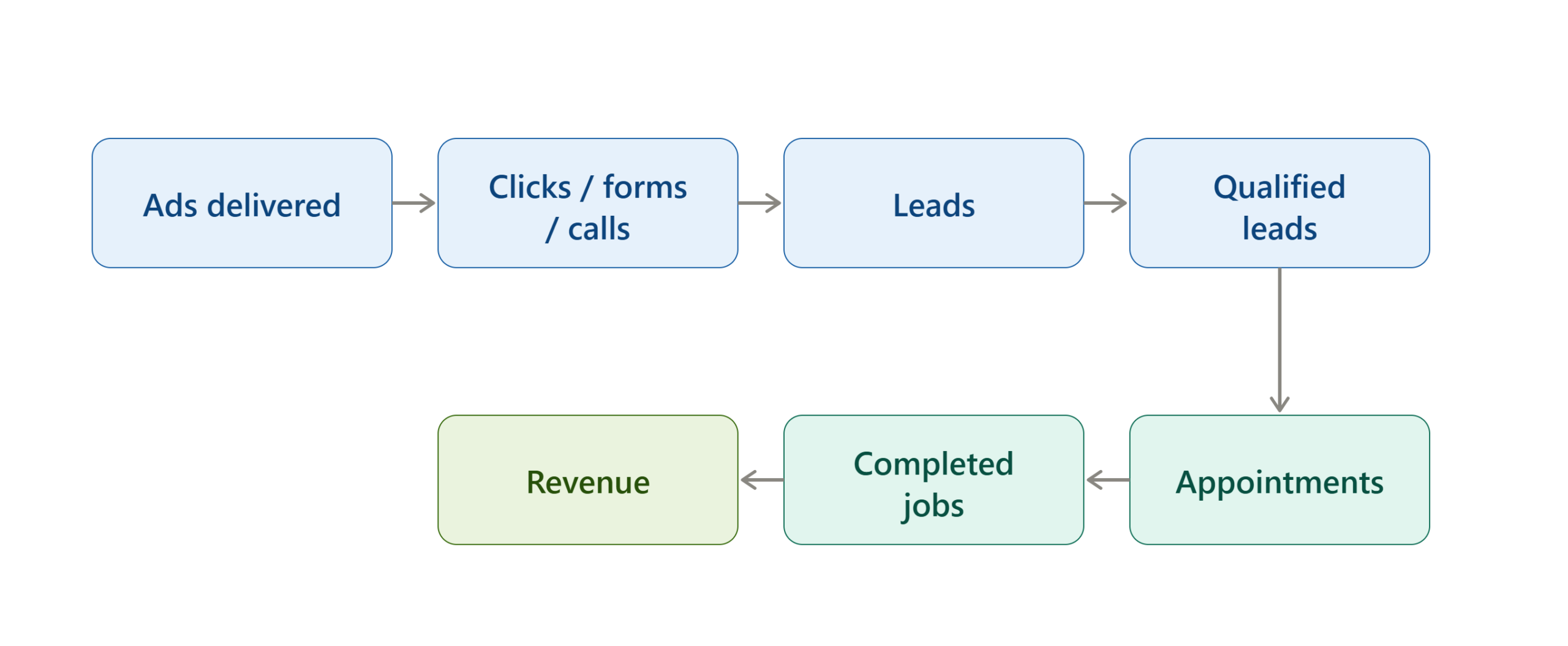
The OpenAI API itself is not a WhatsApp account. It provides the AI capabilities that your application calls. OpenAI’s documentation describes the API as a way to generate text, analyze images, use tools, and build application workflows.
Is ChatGPT Available on WhatsApp in 2026?
Yes, but availability depends on the region and the type of integration.
OpenAI’s July 13, 2026 release notes state that ChatGPT returned to WhatsApp in the European Economic Area. Users can message the verified 1-800-CHATGPT contact at +1-800-242-8478, and OpenAI says the service supports text messages, image uploads, voice notes, image creation, and multiple languages. Linking a ChatGPT account is optional and provides higher usage limits.
This is different from the situation announced by OpenAI in October 2025. At that time, OpenAI said ChatGPT would no longer be available on WhatsApp after January 15, 2026 because of a change in WhatsApp’s policies and terms.
Therefore, articles that simply say “ChatGPT was discontinued on WhatsApp” are incomplete for the current 2026 situation.
At the same time, the official return described by OpenAI is specifically for the EEA. You should not assume that the same consumer ChatGPT WhatsApp service is available in every country.
Why Integrate ChatGPT With WhatsApp?
The value of a WhatsApp AI integration depends on what you want the system to accomplish.
For personal users, the advantage is convenience. WhatsApp becomes another place to ask questions, send prompts, upload supported content, or interact with ChatGPT.
For businesses, the potential use cases are broader.
Customer Support
A business can use an AI assistant to answer frequently asked questions about products, services, opening hours, policies, or basic troubleshooting.
The AI should still be given clear instructions about what it can and cannot answer.
Lead Qualification
A WhatsApp bot can ask structured questions such as:
- What service are you interested in?
- What country are you located in?
- What is your approximate budget?
- When do you need the service?
- Would you like to speak with a human?
The answers can then be passed into a CRM or another business system.
Content Assistance
Businesses can use AI to draft responses, summarize customer questions, classify conversations, or suggest replies for human agents.
Product Questions
A properly connected system can retrieve information from a product database or knowledge base and use that information to answer customer questions.
This is more reliable than simply asking a language model to guess product details.
Internal WhatsApp Workflows
Organizations can also create restricted workflows for internal users, such as asking an AI assistant to summarize approved information or generate standardized responses.
How Does a ChatGPT WhatsApp Integration Work?
A custom integration normally contains several separate components.
WhatsApp Layer
WhatsApp receives the user’s message and delivers it through the business messaging infrastructure used by your application.
Webhook
A webhook is an endpoint on your server that receives incoming events. For example, a WhatsApp message might produce an event containing information about the sender and the message.
Your application reads that event and determines what should happen next.
Application Server
Your server acts as the middle layer.
It can:
- Receive the WhatsApp event.
- Identify the user.
- Retrieve relevant conversation context.
- Apply your business rules.
- Send the user’s request to OpenAI.
- Receive the AI response.
- Send the response back through WhatsApp.
OpenAI API
The OpenAI API performs the AI portion of the workflow.
OpenAI’s current developer quickstart demonstrates using the Responses API with the official SDK, including a basic responses.create() request.
Data or Knowledge Layer
A more advanced system can connect the AI to:
- Product databases
- FAQs
- CRM records
- Help-center content
- Order systems
- Internal documentation
- Scheduling systems
- Other APIs
This allows the bot to answer based on business information rather than relying only on its general model knowledge.
Before You Start
Before building a custom integration, decide which type of setup you actually need.
Choose Your Integration Type
Use the official OpenAI WhatsApp experience if your goal is simply:
- Asking ChatGPT questions
- Sending prompts
- Using ChatGPT from WhatsApp
- Using supported media features
Build a custom integration if your goal is:
- Customer support
- Lead generation
- Automated replies
- Business FAQs
- CRM integration
- Order workflows
- Custom instructions
- Connecting business data
- Automated actions
Prepare Your Accounts
A custom implementation generally requires access to the relevant WhatsApp business infrastructure and an OpenAI API account.
You also need a server or backend capable of receiving webhooks and making API requests.
Protect Your API Key
Your OpenAI API key should remain on the server.
OpenAI explicitly warns developers not to expose API keys in client-side code and recommends securely loading them through environment variables or a key-management system.
Never put a secret API key directly into:
- HTML
- Browser JavaScript
- Public GitHub repositories
- Front-end applications
- WhatsApp messages
Define the Bot’s Purpose
Write down exactly what the bot should do.
For example:
“Answer product questions using our approved product information. If the customer asks about an issue that requires account access, transfer the conversation to a human agent.”
This is much better than giving an AI bot an unrestricted instruction such as “Answer all customer questions.”
How to Use the Official ChatGPT Integration on WhatsApp
If you are located in an eligible EEA market, the official route is considerably simpler than building a custom bot.
Step 1 — Check Your Country Eligibility
Your WhatsApp number’s country code determines whether the official service is available to you.
OpenAI says availability may be rolled out gradually, so two users in the same broad region may not necessarily see identical availability at the same time.
Step 2 — Find the Verified ChatGPT Contact
Open WhatsApp and locate the verified 1-800-CHATGPT contact.
The official OpenAI Help Center identifies the number as:
+1-800-242-8478
Be careful with unofficial WhatsApp accounts claiming to be ChatGPT.
Step 3 — Start a Conversation
Send a message to the verified contact.
You do not need to construct an API, webhook, server, or custom bot for this method.
Step 4 — Send a Normal Prompt
For example, you could send:
“Explain how HTTP webhooks work in simple terms.”
ChatGPT should respond within the WhatsApp conversation if the service is available for your account and region.
Step 5 — Try Supported Features
OpenAI says the returned WhatsApp experience supports text messaging, image uploads, voice notes, image creation, and multiple languages. Usage limits apply.
Step 6 — Link Your ChatGPT Account if Needed
Account linking is optional.
OpenAI says linking your ChatGPT account provides higher usage limits.
This option is useful if you want to connect the WhatsApp experience with your ChatGPT account rather than using the WhatsApp experience anonymously.
How to Build a Custom ChatGPT WhatsApp Bot
A custom integration is a different process.
The general architecture is:
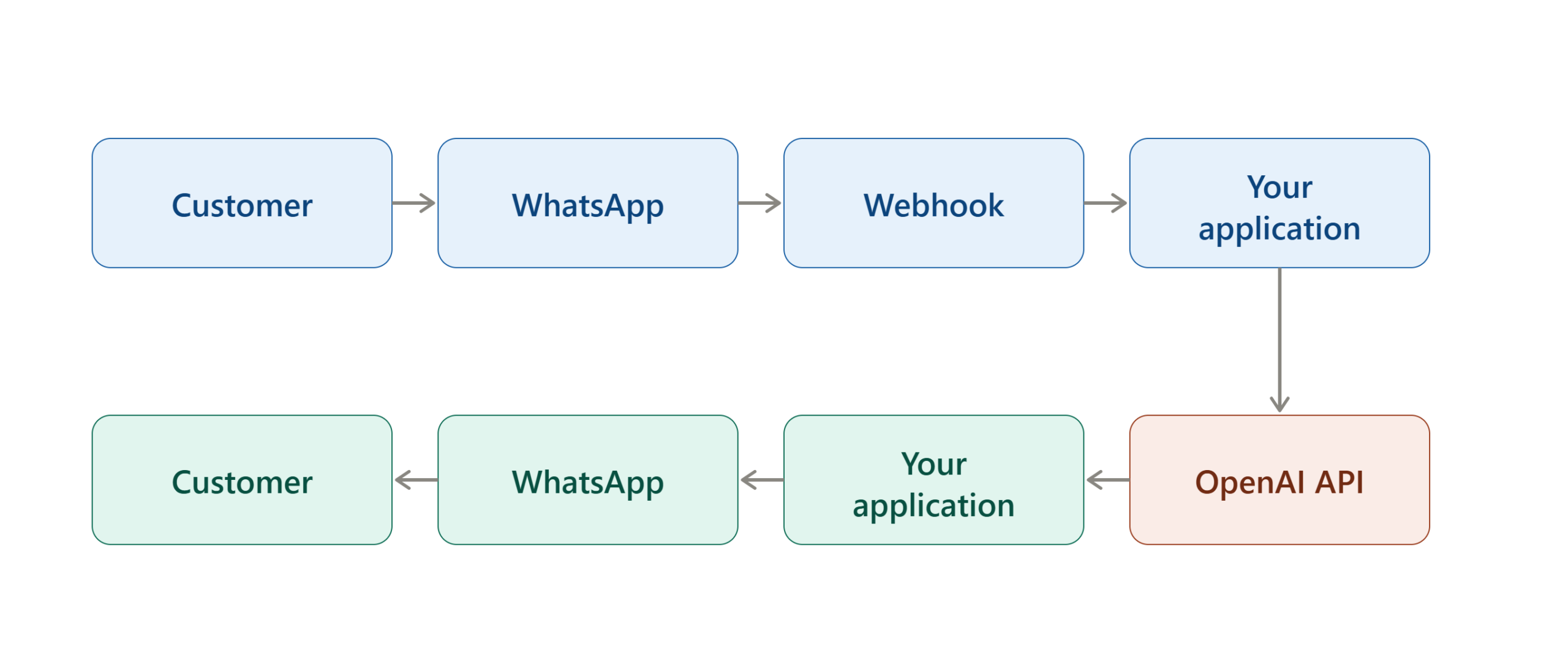
The exact WhatsApp setup can vary depending on whether you use Meta’s business infrastructure directly or an approved third-party provider.
Step 1 — Define the Bot’s Job
Start with a narrow use case.
For example:
Good first version:
Answer questions about our website’s services and transfer complicated questions to a human.
Avoid trying to automate every business process on day one.
A narrowly defined bot is easier to test and troubleshoot.
Step 2 — Set Up Your WhatsApp Business Infrastructure
For a business-owned integration, you need an appropriate WhatsApp business messaging setup.
This is separate from simply using the normal WhatsApp Messenger application.
You should follow the current Meta/WhatsApp onboarding requirements for your business and region because account, messaging, and availability requirements can change.
WhatsApp also supports third-party AI agents. Its current Help Center explains that third-party agents can be connected to WhatsApp and can receive the information users choose to share with those agents.
Step 3 — Create Your OpenAI API Access
Create an API key through the OpenAI platform.
OpenAI’s developer quickstart uses an API key and official SDKs for making API requests.
Store the key as a server-side environment variable.
For example:
OPENAI_API_KEY=your_secret_keyThe actual secret should never be published in your website’s front-end code.
Step 4 — Create a Webhook Endpoint
Your application needs a publicly reachable HTTPS endpoint capable of receiving incoming WhatsApp events.
Conceptually:
POST /webhookYour endpoint should:
- Receive the incoming event.
- Validate the request.
- Extract the WhatsApp sender.
- Extract the message.
- Determine whether the message needs AI processing.
- Send appropriate input to OpenAI.
- Return or trigger the WhatsApp response.
Step 5 — Send the User’s Message to OpenAI
Your server can send the text to the OpenAI Responses API.
OpenAI’s current quickstart shows the basic pattern:
const response = await client.responses.create({
  model: "your-selected-model",
  input: "User's WhatsApp message"
});

console.log(response.output_text);
The model name should be selected from the models currently available to your API account rather than copied blindly from an old tutorial. OpenAI’s API documentation provides the current model list and availability.
Step 6 — Add Instructions
A useful production bot needs instructions that define its role.
For example:
You are the customer support assistant for Example Company.

Answer using the approved company information provided to you.
Do not invent prices, delivery dates, policies, or product specifications.
If you cannot answer confidently, tell the customer that a human agent is required.
Keep WhatsApp responses concise and easy to read.
The objective is to constrain the AI to the business task rather than allowing it to behave like an unrestricted general-purpose assistant.
Step 7 — Add Conversation Context
A chatbot becomes much more useful when it understands the current conversation.
For example:
Customer: I want the blue one.
Without context, “blue one” is ambiguous.
If the previous message was:
Customer: Do you have the blue iPhone case?
the application can understand what the user means.
Your application therefore needs a strategy for managing conversation state.
Possible approaches include:
- Conversation IDs
- Stored message history
- Application-managed context
- OpenAI conversation features
- A database keyed to the WhatsApp user
The exact approach should depend on your architecture and privacy requirements.
Step 8 — Send the AI Response Back to WhatsApp
After OpenAI returns a response, your application passes the generated text back through your WhatsApp messaging layer.
The resulting workflow is:
WhatsApp message
        ↓
Webhook
        ↓
Your server
        ↓
OpenAI Responses API
        ↓
Generated answer
        ↓
WhatsApp messaging API
        ↓
Customer
Step 9 — Add Human Handoff
Do not design an important customer-support bot without a human escalation path.
A customer should be able to reach a person when:
- The AI does not understand the request.
- The question concerns an account-specific issue.
- The customer requests a human.
- The issue involves sensitive information.
- The AI cannot verify the answer.
- A transaction requires human approval.
This is one of the most important differences between a demonstration bot and a production support system.
How to Add Business Knowledge to Your WhatsApp ChatGPT Bot
A common mistake is assuming that connecting an AI model automatically gives it knowledge of a company’s current products and policies.
It does not.
If your business information changes frequently, your application should provide the model with appropriate current information.
Use a Knowledge Base
You could maintain approved information covering:
- Products
- Services
- Pricing
- Shipping
- Returns
- FAQs
- Support procedures
- Business hours
The application can retrieve relevant information before asking the model to generate an answer.
Use Retrieval for Large Knowledge Bases
For a large documentation library, a retrieval-based architecture can find relevant passages and provide them to the model.
The basic process becomes:
WhatsApp question → Search knowledge base → Retrieve relevant information → OpenAI → Answer
This helps separate information retrieval from language generation.
Keep Time-Sensitive Information Separate
Do not hard-code information such as:
- Current prices
- Stock levels
- Delivery estimates
- Appointment availability
- Temporary promotions
into a permanent prompt if the information changes regularly.
Instead, retrieve current data from the appropriate system.
How to Test the Integration
A WhatsApp AI bot should be tested systematically before customers depend on it.
Test Normal Questions
Send questions the bot is expected to answer.
Check:
- Response accuracy
- Response speed
- Formatting
- Tone
- Context handling
Test Unknown Questions
Ask something outside the bot’s knowledge.
The correct behavior is not necessarily to produce an answer.
A properly designed assistant may need to say that it does not have enough information or transfer the conversation to a human.
Test Follow-Up Questions
Try:
What is the price?
followed by:
Does it come in black?
The second question should be interpreted using the appropriate conversation context.
Test Human Handoff
Explicitly ask:
I want to speak to a human.
The system should follow the escalation workflow you configured.
Test Invalid Input
Try:
- Empty messages
- Very long messages
- Unsupported media
- Unexpected commands
- Repeated messages
Your server should handle these gracefully.
How to Verify the ChatGPT WhatsApp Integration Works
A successful integration should pass several checkpoints.
| Test | Expected result |
|---|---|
| WhatsApp message sent | Webhook receives the event |
| User message extracted | Correct text is identified |
| OpenAI request sent | API returns a response |
| Response processed | Application extracts the intended output |
| WhatsApp response sent | Customer receives the answer |
| Follow-up message sent | Context works as designed |
| Unknown question | Bot follows fallback behavior |
| Human request | Escalation works |
| Error occurs | User receives a useful fallback message |
If all of these tests pass, the basic integration is functioning.
What to Do If ChatGPT Does Not Work on WhatsApp
Troubleshooting depends on which integration method you use.
Official ChatGPT WhatsApp Is Not Available
Check whether your WhatsApp number’s country code is within the supported EEA rollout.
OpenAI states that availability is based on the country code associated with the WhatsApp number and may be gradual.
Also confirm that you are contacting the verified official ChatGPT contact.
The WhatsApp Bot Receives Messages but Does Not Reply
For a custom bot, inspect the system from left to right:
WhatsApp → Webhook → Server → OpenAI → Server → WhatsApp
Determine where the message stops.
Check:
- Webhook delivery
- Server logs
- API authentication
- OpenAI API response
- WhatsApp sending response
- Network connectivity
- Rate or usage limits
OpenAI API Requests Fail
Verify:
- API key
- Account/project configuration
- Selected model
- Request format
- Server-side authentication
- Current API availability
OpenAI’s API documentation also notes that API keys are secrets and should be kept securely on the server.
The Bot Gives Incorrect Answers
The problem may not be the WhatsApp connection.
It may be caused by:
- Poor instructions
- Missing business information
- Outdated data
- Ambiguous user questions
- Incorrect retrieval
- Excessive conversation context
- Lack of validation
Improve the application’s information layer before simply changing prompts repeatedly.
The Bot Repeats Itself
Check whether your application is accidentally sending duplicate webhook events or processing the same incoming message more than once.
Production systems should use message identifiers or another idempotency strategy where appropriate.
The Bot Exposes Private Information
Stop the workflow and review your data handling.
Only provide the model with information it is authorized to use. Do not assume that an AI model should automatically have access to a customer’s complete account history.
Official ChatGPT vs Custom WhatsApp Bot
The two approaches solve different problems.
| Feature | Official ChatGPT on WhatsApp | Custom ChatGPT WhatsApp Bot |
|---|---|---|
| Setup | Very simple | Technical |
| Developer required | No | Usually |
| Custom business logic | Limited | Yes |
| Custom knowledge base | No custom architecture | Yes |
| CRM integration | Not the purpose | Possible |
| Automated business workflow | Limited | Yes |
| Human handoff | Not a custom workflow | Yes |
| Control over prompts | Limited | High |
| Best for | Personal use | Businesses and developers |
The important point is that a custom bot is not simply “turning on ChatGPT in WhatsApp.” It is an application that connects WhatsApp messaging with OpenAI services.
Alternative Ways to Add AI to WhatsApp
If you do not specifically need OpenAI, WhatsApp also has native AI experiences from Meta.
WhatsApp’s current Help Center documents Meta AI and other AI experiences, although availability varies by country and language.
Meta also provides AI-related business features. Its documentation describes Meta Business Agent as an AI service for businesses that can respond to customers in selected situations, with availability currently limited to eligible businesses and countries.
This creates three broad options:
Use OpenAI’s Official WhatsApp Experience
Choose this when you simply want to interact with ChatGPT through WhatsApp and are in a supported region.
Build an OpenAI-Powered Bot
Choose this when you need custom business logic, knowledge, integrations, automation, or control.
Use WhatsApp’s Native Meta AI Features
Choose this when the native Meta/WhatsApp AI functionality already satisfies your requirements.
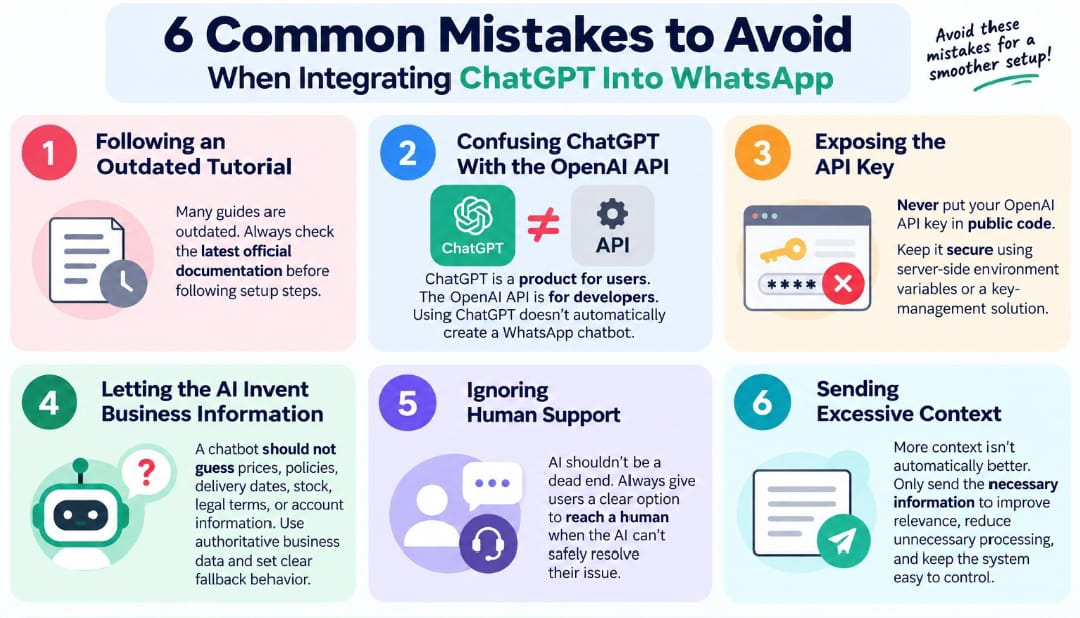
Common ChatGPT WhatsApp Integration Mistakes
Expert Insights for a Better WhatsApp AI Bot
The strongest WhatsApp AI integrations are usually designed as business systems, not merely as “ChatGPT connected to WhatsApp.”
Keep the AI Layer Separate From Business Logic
Your application should determine what actions are allowed.
For example:
User → AI understands request → Application validates request → Application performs permitted action
Do not let the model alone determine whether a sensitive business operation should occur.
Use AI for Language, Not Authority
An AI model is excellent at understanding and generating language.
Your database or business system should remain the authority for facts such as inventory, account status, booking availability, or current pricing.
Create Explicit Fallbacks
A useful fallback might be:
“I don’t have enough verified information to answer that. I can connect you with a support agent.”
This is better than forcing the model to produce an uncertain answer.
Log Important Events
For a production system, maintain appropriate operational logs for:
- Message processing
- API failures
- Response times
- Escalations
- Duplicate events
- Error categories
Do this according to your privacy, security, and data-retention requirements.
Test Before Automating Sensitive Actions
Start with read-only functionality.
For example:
Phase 1: Answer FAQs
Phase 2: Retrieve account information
Phase 3: Create support tickets
Phase 4: Perform approved actions
This staged approach makes it easier to identify failures before the bot receives permission to perform consequential operations.
Privacy and Security Considerations
WhatsApp’s AI architecture has important privacy distinctions.
WhatsApp explains that personal messages with friends and family remain end-to-end encrypted, while messages intentionally shared with third-party AI agents are delivered to the destination selected by that agent. WhatsApp says conversations with third-party agents are not considered end-to-end encrypted in the same way as direct device-to-device personal chats because they are managed by a service on behalf of the agent.
This matters when designing a custom AI assistant.
Do not tell customers that every AI-powered WhatsApp conversation has exactly the same privacy properties as a normal personal WhatsApp conversation.
For the OpenAI side, review the current API data controls and retention documentation for the endpoint and configuration you use. OpenAI documents retention behavior for API endpoints and provides organization-level data controls.
Decision Framework: Which Method Should You Use?
Ask these questions before starting.
Do You Just Want to Chat With ChatGPT?
Use the official WhatsApp experience if it is available for your country.
Do You Want a Business to Automatically Answer Customers?
Build or deploy a WhatsApp business AI integration.
Do You Need Your Own FAQs and Product Data?
Use a custom application with an appropriate knowledge or retrieval layer.
Do You Need CRM or Database Integration?
Use a custom backend that can securely connect WhatsApp, OpenAI, and your business systems.
Do You Need No-Code Setup?
Consider a supported third-party integration provider rather than building the complete API infrastructure yourself. Verify its current WhatsApp and OpenAI compatibility before committing.
Future Considerations for WhatsApp AI Integrations
The important trend is that WhatsApp AI is becoming a broader platform rather than a single chatbot experience.
WhatsApp currently documents native Meta AI features as well as third-party AI agents, while OpenAI’s 2026 updates show that ChatGPT availability on WhatsApp can change according to region and platform policy.
For businesses, this means an integration should not be designed around one hard-coded assumption about how WhatsApp AI works.
Use modular architecture:
WhatsApp layer → Application layer → AI layer → Business data layer
That structure makes it easier to replace or update individual components later.
Implementation Checklist
Before Starting
- Define whether you need personal ChatGPT access or a custom business bot.
- Check WhatsApp availability in your country.
- Decide whether you need OpenAI API access.
- Define the bot’s purpose.
- Identify the information the bot is allowed to use.
- Plan human escalation.
During Implementation
- Set up the appropriate WhatsApp business infrastructure.
- Create secure OpenAI API credentials.
- Keep API keys server-side.
- Configure your webhook.
- Process incoming messages.
- Send appropriate requests to OpenAI.
- Return responses through WhatsApp.
- Store only the data you actually need.
- Add error handling.
- Add human handoff.
After Completion
- Test normal questions.
- Test unknown questions.
- Test follow-up questions.
- Test long and malformed messages.
- Test duplicate events.
- Test API failures.
- Test human escalation.
- Review privacy and retention requirements.
- Monitor logs and performance.
- Recheck official WhatsApp and OpenAI documentation periodically.
Frequently Asked Questions
Can I use ChatGPT on WhatsApp in 2026?
Yes, but availability depends on the region. OpenAI states that ChatGPT returned to WhatsApp in the EEA in July 2026 through the verified 1-800-CHATGPT contact. Availability is based on the country code associated with the WhatsApp number and may roll out gradually.
What is the official ChatGPT WhatsApp number?
OpenAI’s current Help Center identifies the verified ChatGPT WhatsApp contact as 1-800-CHATGPT, or +1-800-242-8478.
Do I need a ChatGPT account to use ChatGPT on WhatsApp?
For the current EEA WhatsApp experience, OpenAI says you can start without a ChatGPT account. Linking an account is optional and provides higher usage limits.
Can I build my own ChatGPT WhatsApp chatbot?
Yes. A custom chatbot can connect WhatsApp messaging infrastructure to a backend application and then use the OpenAI API to generate responses. OpenAI provides an API and official SDKs for building these applications.
Is ChatGPT API the same as ChatGPT?
No. ChatGPT is a user-facing product, while the OpenAI API is a developer platform for integrating AI capabilities into your own software and services.
Can I connect ChatGPT to WhatsApp Business?
Yes, a custom business integration can connect WhatsApp business messaging infrastructure with an OpenAI-powered backend. The exact setup depends on the WhatsApp business architecture and provider you use.
Is WhatsApp’s Meta AI the same as ChatGPT?
No. Meta AI is an AI service from Meta, while ChatGPT is an OpenAI product. WhatsApp currently provides native Meta AI experiences and also supports third-party AI agents.
Why does an old article say ChatGPT no longer works on WhatsApp?
That information may refer to the original 2025–January 2026 transition. OpenAI announced that the earlier WhatsApp service would end on January 15, 2026, but subsequently announced the return of ChatGPT to WhatsApp in the EEA in July 2026.
Is a custom WhatsApp ChatGPT bot free?
Not necessarily. A custom implementation can involve WhatsApp/business messaging costs, hosting, third-party provider fees if applicable, and OpenAI API usage costs. Exact pricing depends on the services, region, message volume, and architecture you choose.
Should I use an API integration or the official ChatGPT WhatsApp service?
Use the official service when you simply want to interact with ChatGPT through WhatsApp and it is available in your region. Use a custom API integration when you need business-specific instructions, databases, customer workflows, automation, or control over the application architecture.
Read more:
Key Takeaways
The most important point is that “ChatGPT on WhatsApp” and “building a ChatGPT WhatsApp bot” are not the same thing.
For eligible users in the EEA, OpenAI currently provides an official WhatsApp experience through the verified 1-800-CHATGPT contact. The service supports text, images, voice notes, image creation, and multiple languages, subject to availability and usage limits.
For businesses and developers, the more flexible approach is a custom architecture connecting WhatsApp, a backend application, and the OpenAI API. The backend should control business rules, data access, security, error handling, and human escalation rather than relying on the AI model as the sole authority.
The safest implementation strategy is to start with a narrowly defined use case, test it thoroughly, keep credentials secure, use verified business data, and provide a clear human fallback.

