

To make a good YouTube video in 2026, start with a clear audience problem or interest, build the video around one strong idea, and plan the title and thumbnail before filming. Then create a strong opening, record clear audio and stable visuals, edit out unnecessary material, and deliver the promised value without filler. After publishing, use YouTube Studio to study impressions, click-through rate, audience retention, watch time, and other performance signals so you can improve future videos. YouTube itself emphasizes three broad areas of viewer response: appeal, engagement, and satisfaction.
A good YouTube video does not require expensive equipment or a specific runtime. YouTube states that there is no universal ideal video length; the appropriate length depends on the content, audience, and purpose.
What Makes a YouTube Video Good?
A good YouTube video gives viewers a clear reason to click, quickly confirms that they made the right choice, and continues delivering useful or entertaining content throughout the viewing experience.
You can think of video quality as five connected parts:
- Idea: The video addresses something people care about.
- Packaging: The title and thumbnail clearly communicate the value.
- Opening: The first part quickly establishes what the viewer will get.
- Delivery: The video provides useful, entertaining, educational, or emotional value.
- Experience: Good audio, visuals, pacing, editing, and structure make the content easy to consume.
YouTube’s current recommendation guidance describes performance through three broad buckets: appeal, meaning whether people choose to watch; engagement, meaning whether they continue watching; and satisfaction, meaning whether viewers enjoyed the experience.
That means making a good video is not simply a matter of buying a better camera. A technically impressive video can still perform poorly if the idea is weak or the viewer cannot understand why they should watch it.
A Simple Formula for a Good YouTube Video
A practical formula is:
Useful idea + clear promise + strong opening + valuable delivery + clean editing + accurate packaging + performance analysis
If one part is weak, the entire viewing experience can suffer.
For example, excellent editing cannot completely compensate for a video that solves no meaningful problem. Likewise, an excellent idea may struggle if the title and thumbnail fail to communicate what viewers will receive.
Why Are Good YouTube Videos Important?
Good videos give viewers a reason to continue watching, return to the channel, share the content, or explore another video.
For creators, the objective should not be to manufacture a particular metric. Instead, create a video that satisfies the viewer’s expectation and then use performance data to understand what happened.
YouTube recommends using Analytics to understand how audiences respond to content. Audience retention can reveal where viewers stay, leave, rewatch, or skip, while impressions and click-through rate help creators understand how their packaging performs.
This creates a useful improvement cycle:
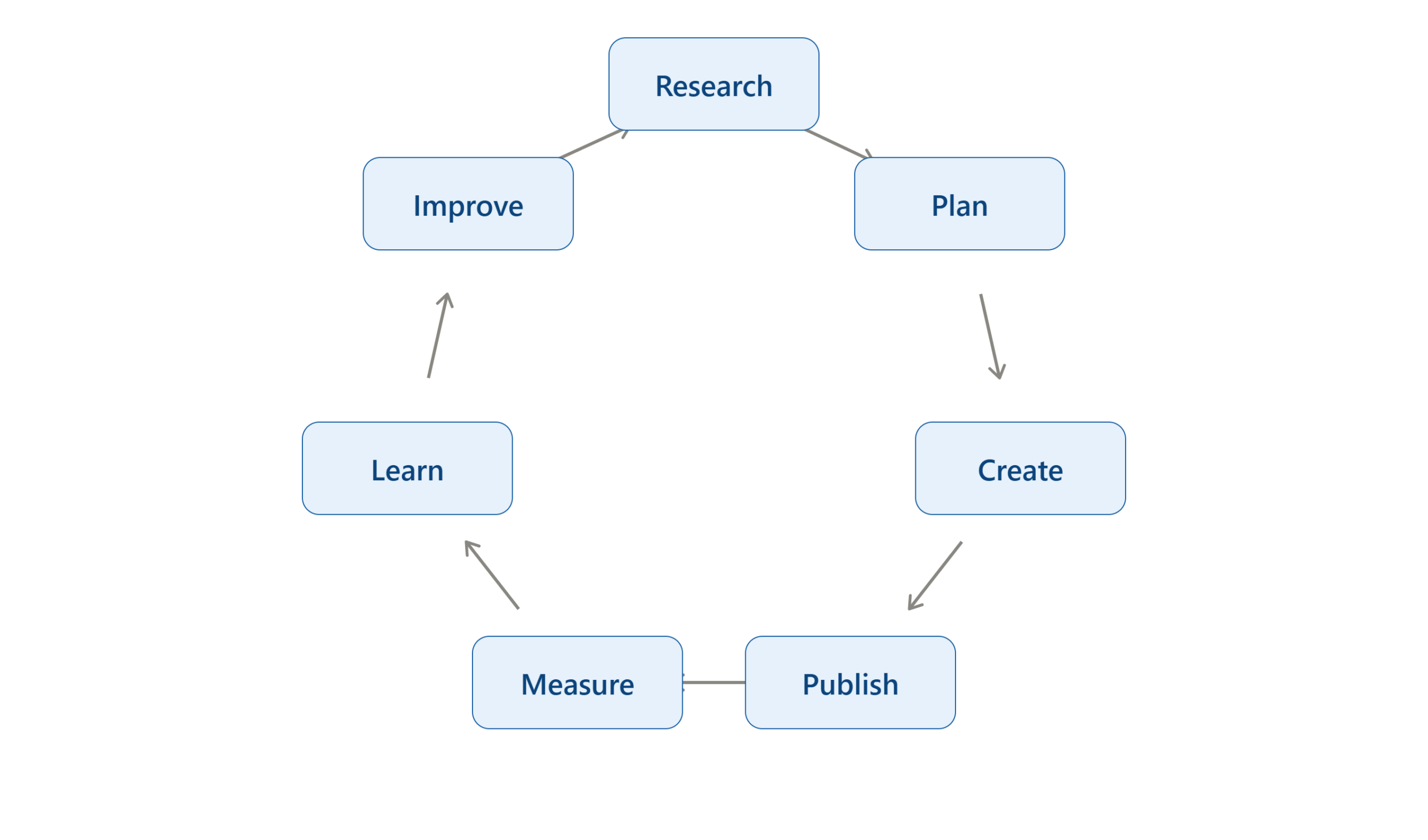
The important point is that a good video is not necessarily perfect on the first attempt. A creator can improve substantially by studying what viewers actually did rather than relying only on personal assumptions.
How Do You Make a Good YouTube Video?
The complete process can be divided into ten practical stages:
- Choose a useful video idea.
- Define the target viewer.
- Research the topic and competition.
- Plan the title and thumbnail concept.
- Create a simple structure or script.
- Record clear video and audio.
- Edit for clarity and pace.
- Prepare the title, thumbnail, description, and other details.
- Upload and complete YouTube’s checks.
- Analyze the results and improve the next video.
The most important principle is to design the viewer experience before pressing record.
How to Choose a Good YouTube Video Idea
The first step is choosing an idea that is valuable to a specific audience. A useful video idea normally does at least one of these things:
- Solves a problem.
- Answers a question.
- Teaches a skill.
- Explains something confusing.
- Reviews or compares something.
- Documents an experience.
- Entertains a particular audience.
- Helps viewers make a decision.
- Shows a process or transformation.
Instead of starting with, “What video can I make today?” ask:
“What would my target viewer genuinely want to watch?”
YouTube’s Audience analytics can also help creators understand what their viewers watch outside their own channel and identify patterns in topics, thumbnails, titles, and other channels their audience engages with.
How to Research a YouTube Video Before Recording
Research should happen before scripting and filming.
Search YouTube for the topic and examine videos that address the same viewer need. Do not copy their wording or structure. Instead, identify what viewers are already being offered and look for ways to make your own video more useful.
Look for:
- Common questions.
- Missing explanations.
- Repeated complaints.
- Outdated information.
- Topics that receive strong audience interest.
- Points that competing videos explain poorly.
- Comments asking follow-up questions.
- Different ways creators package similar topics.
Your goal is not:
“How can I make the same video?”
Your goal is:
“What would make my version more useful to this audience?”
How to Plan the Title and Thumbnail Before Filming
One of the most useful improvements is to think about packaging before creating the video.
YouTube says viewers commonly see the thumbnail and title first, and recommends that both accurately represent the video. YouTube also recommends concise titles with important words near the beginning and distinguishes between searchable titles and titles designed to create curiosity.
Your title and thumbnail should work together rather than simply repeat each other.
Create the Title
A useful title generally tells viewers:
- What the video is about.
- Who it is for, when relevant.
- What outcome they can expect.
For example:
Weak:
“How I Made This Video”
Clearer:
“How to Make Your First YouTube Video: Beginner Workflow”
The second title communicates the topic and audience more clearly.
Create the Thumbnail Concept
A thumbnail should communicate the central idea quickly.
Keep it:
- Easy to understand.
- Visually simple.
- Relevant to the video.
- Readable at small sizes.
- Focused on one main visual idea.
YouTube notes that thumbnails appear differently across devices and recommends making the thumbnail image as large as possible. It also advises against overly complex designs.
YouTube reports that 90% of its best-performing videos have custom thumbnails, although that statistic does not mean a custom thumbnail guarantees performance.
Use the Title and Thumbnail as a Pair
Think of the combination as:
Thumbnail = visual reason to notice
Title = contextual reason to understand
Avoid misleading packaging. YouTube specifically advises creators to avoid titles and thumbnails that deceive, misrepresent, or sensationalize the content.
How to Write a YouTube Video Script
You do not always need a word-for-word script. Choose the format that matches your experience and video type.
Use a Full Script When:
- You are teaching technical material.
- The video contains important facts.
- You want precise wording.
- You are presenting a sponsored segment.
- You are uncomfortable speaking spontaneously.
Use an Outline When:
- You are making a vlog.
- The video depends on natural conversation.
- You want a more spontaneous presentation.
- You are comfortable improvising.
A practical structure for many videos is:
Hook → Promise → Context → Main Value → Examples → Conclusion → Next Step
Remove the Unnecessary Introduction
One common problem is spending too much time introducing the creator before addressing the viewer’s reason for clicking.
For a tutorial, the viewer usually cares about the solution first.
Instead of:
“Hey everyone, welcome back to my channel. My name is…”
Move quickly toward:
“By the end of this video, you’ll know exactly how to…”
This does not mean every video needs an aggressive hook. It means the opening should respect the viewer’s expectation.
How to Create a Strong YouTube Hook
The first seconds of a video should confirm that the viewer has found what they expected.
YouTube’s retention guidance specifically connects a strong intro with matching the expectations created by the title and thumbnail.
A good hook can use:
- A direct promise.
- An interesting question.
- A problem.
- A surprising result.
- A preview of the final outcome.
- A demonstration.
- A mistake the viewer wants to avoid.
For example:
“If your first YouTube videos feel boring even though the information is useful, the problem may be your structure. In this video, I’ll show you a simple workflow for fixing it.”
The opening identifies the problem and promises a solution.
How to Record a Good YouTube Video
You do not need a professional studio to begin. A phone can be enough for many formats if you control the fundamentals:
- Lighting.
- Audio.
- Framing.
- Background.
- Camera stability.
- Delivery.
Improve Your Lighting
Face a window or use a suitable light source positioned so your face is clearly visible.
Avoid placing a bright window directly behind you unless you deliberately want a silhouette.
The objective is not expensive lighting. The objective is consistent, understandable visuals.
Improve Your Audio
Audio is one of the first production elements viewers notice.
Before recording: Choose a relatively quiet room, Reduce unnecessary background noise, Keep the microphone reasonably close, Record a short test, Listen through headphones if possible and Make sure your voice is clear before filming the entire video.
Stabilize the Camera
Use a tripod, stand, desk mount, or another stable setup when appropriate.
Avoid unnecessary camera movement unless movement contributes to the video.
Frame Yourself Carefully
For a talking-head video, leave enough space around your head and shoulders while keeping yourself prominent in the frame.
For demonstrations, make sure the important object, screen, or action is large enough to understand.
Record Extra Footage
Capture useful supporting footage such as: Close-ups, Screen recordings, Product details, Environment shots, Demonstrations and Different camera angles.
This additional material becomes B-roll during editing.
How to Edit a Good YouTube Video
Editing should make the video easier to understand and watch. The goal is not to add an effect to every few seconds.
Start by removing:
- Long pauses.
- Repeated sentences.
- Mistakes.
- Unnecessary explanations.
- Off-topic sections.
- Repetitive examples.
Then add visual support where it improves understanding.
Useful additions can include:
- B-roll.
- Screen recordings.
- Text labels.
- Captions.
- Diagrams.
- Zooms used sparingly.
- Graphics.
- Relevant sound effects.
- Chapter-friendly transitions.
Edit for Information Density
Ask of every section:
Does this help the viewer understand, feel, or do something?
If a sentence adds nothing, remove it.
This is particularly important for tutorials. A 12-minute video that solves the problem clearly can be more useful than a 25-minute video padded with repetition.
YouTube explicitly states that there is no universal ideal video length. The appropriate length depends on the content, audience, and purpose.
Use B-Roll to Support the Explanation
B-roll should have a purpose.
If you are explaining how to edit a video, show the editing timeline. If you are reviewing a product, show the product being used. If you are explaining a travel experience, show relevant locations.
Do not add unrelated stock footage merely to make the video look busy.
How to Use Music and Sound Effects Safely
Music can improve pacing and atmosphere, but copyright should be considered before publishing.
YouTube recommends using copyright-safe sources such as the YouTube Audio Library, original music, or appropriately licensed music. YouTube warns that music labeled “free” elsewhere can still trigger Content ID restrictions if the necessary rights are not established.
The YouTube Audio Library is available inside YouTube Studio and provides music and sound effects that YouTube identifies as copyright-safe for use on YouTube. Some tracks may require attribution, so check the individual license requirements.
Do not assume that:
- A song is safe because another creator used it.
- A track is safe because it says “no copyright.”
- Buying a song automatically gives you every right needed for YouTube.
- Giving the artist credit automatically grants permission.
YouTube explains that copyright owners generally control how their original works are used, and using copyrighted material can result in Content ID claims or other copyright actions.
How to Add Text, Captions, and Graphics
Text should clarify the content, not compete with it.
Use on-screen text for:
- Key terms.
- Important numbers.
- Steps.
- Definitions.
- Names.
- Short summaries.
- Visual emphasis.
Avoid placing large blocks of text on screen while simultaneously asking viewers to listen to a different explanation.
Captions can improve accessibility and help viewers understand speech in different viewing environments. YouTube’s upload workflow supports adding subtitles and captions.
How to Create a Good YouTube Thumbnail
A strong thumbnail should communicate the video’s central idea immediately.
YouTube recommends simple compositions, readable text when text is used, and designs that accurately represent the content. It also encourages creators to experiment with thumbnails and review their performance using Analytics.
A practical thumbnail process is:
- Identify the single most important idea.
- Choose one primary image or visual.
- Remove unnecessary background elements.
- Add short text only if it improves understanding.
- Check the design at a small size.
- Make sure it accurately represents the video.
- Compare its message with the title.
Do not create a thumbnail that promises something the video does not deliver.
How to Write a Good YouTube Title
A good title balances clarity and curiosity.
YouTube identifies two useful approaches: searchable titles, which clearly explain what viewers can expect, and intriguing titles, which create curiosity for viewers who may not already be searching for the topic.
For educational videos, a searchable title might be appropriate:
How to Edit YouTube Videos for Beginners
For a broader story-driven video, a curiosity-oriented title might be more appropriate:
I Changed My Editing Workflow for 30 Days
The correct approach depends on the audience and discovery context.
Keep the title accurate and concise. YouTube recommends putting the most important words near the beginning because viewers may not see the complete title in every context.
How to Upload a YouTube Video Correctly
When the video is finished, upload it through YouTube Studio.
YouTube’s current upload workflow allows creators to upload the video, edit its details, add video elements, complete checks, and select visibility settings.
Step 1 — Open YouTube Studio
Sign in to the YouTube channel associated with the video. Choose Create and then Upload videos.
YouTube currently supports uploading multiple videos in the Studio workflow, although you should still review each video’s details individually.
Step 2 — Add the Video Details
Prepare: Title, Description, Thumbnail, Playlist, when appropriate, Audience settings, Relevant additional details.
The title and thumbnail should make the video’s value immediately understandable.
Step 3 — Add Video Elements
Depending on the video and channel, consider: Subtitles, Captions, End screens, Cards, and other available interactive elements.
YouTube’s upload documentation notes that end screens can direct viewers toward related videos, websites, and calls to action, while cards can provide interactive elements.
Step 4 — Review the Checks
YouTube provides a Checks stage that can screen the upload for potential copyright issues before publication. YouTube notes that these results are not necessarily final, so passing the checks does not mean future claims or policy actions are impossible.
This is an important checkpoint before making the video public.
Step 5 — Select Visibility
You can choose an appropriate visibility option, including: Public, Private, Unlisted, Scheduled.
Use private or unlisted visibility when you need additional time to review the published presentation before making the video public.
How to Verify That Your YouTube Video Is Ready
Before publishing, run a final quality check.
Content Check
Ask:
- Does the video fulfill its promise?
- Is the information accurate?
- Is anything important missing?
- Is there unnecessary repetition?
- Does the ending provide a useful conclusion?
Audio Check
Ask:
- Is the voice easy to understand?
- Is the music too loud?
- Are there distracting background sounds?
- Does the volume remain reasonably consistent?
Visual Check
Ask:
- Is the subject easy to see?
- Are important demonstrations readable?
- Are graphics correctly positioned?
- Are there accidental black frames or visual errors?
Packaging Check
Ask:
- Does the title accurately describe the video?
- Does the thumbnail accurately represent it?
- Do the title and thumbnail work together?
- Is the viewer’s expected outcome obvious?
Policy and Copyright Check
Ask:
- Do you own or have permission for the footage?
- Are music licenses appropriate?
- Are third-party images and clips properly cleared?
- Does the video comply with YouTube’s Community Guidelines?
YouTube’s Community Guidelines apply to content on the platform, including videos and thumbnails, and cover areas such as spam, deceptive practices, sensitive content, dangerous content, and misinformation.
What to Do If Your YouTube Video Gets Few Views
Low views do not automatically mean that the video is bad. First identify where the problem occurs.
A useful diagnostic model is:
- Low impressions → distribution/topic/packaging question
- Impressions but few clicks → packaging question
- Clicks but early viewer drop-off → opening or expectation mismatch
- Good retention but limited reach → examine topic, audience, and traffic sources
- Strong viewing but weak next-video activity → improve the viewer journey
These are diagnostic categories rather than universal rules. YouTube recommends interpreting metrics together and considering traffic sources and audience context instead of judging CTR alone.
Problem: Viewers Leave Immediately
Possible cause: The opening does not match the title and thumbnail, takes too long to reach the point, or does not establish value quickly.
Solution: Review the first 30 seconds and compare it with the viewer’s expectation.
Problem: Viewers Drop at One Specific Section
Possible cause: The section may be confusing, repetitive, too slow, or less relevant.
Solution: Look at the retention graph and inspect what happens at the drop.
How to Use YouTube Analytics to Improve Your Videos
YouTube Studio provides several reports that help creators understand how viewers discover and consume videos.
The Reach and Content analytics areas can show metrics such as impressions, CTR, views, average view duration, watch time, audience retention, and traffic sources.
Analyze Impressions
Impressions tell you how often registered YouTube thumbnail impressions were shown.
A video with very few impressions has a different problem from a video with many impressions but few clicks.
Analyze CTR in Context
CTR measures how frequently viewers watched after seeing a registered thumbnail impression.
Do not treat a single CTR number as a universal target. YouTube states that CTR varies by content type, audience, and where the impression occurred.
Analyze Audience Retention
Retention shows where viewers stay and where they leave.
Look for: Early drops, Strong sections, Rewatch spikes, Repeated weak points, Places where valuable information appears too late.
YouTube recommends comparing retention against your typical retention, including videos of similar length, rather than using an unrelated universal benchmark.
Analyze Your Audience
The Audience tab can help identify what your viewers watch outside your channel, patterns in the content they consume, and other channels they engage with.
These observations can inform future topic and packaging decisions.
How to Improve Your Next YouTube Video
Do not attempt to change everything simultaneously. Choose one or two variables based on evidence.
For example:
- Video 1: Strong topic, weak opening.
- Video 2: Keep the topic approach but improve the opening.
- Video 3: Keep the improved opening and test a clearer title and thumbnail concept.
- Video 4: Study which section generated the strongest retention.
This turns YouTube Analytics into a learning system rather than simply a scoreboard.
Use a Video Improvement Loop
After each upload, record:
| Area | Question |
|---|---|
| Idea | Did the topic attract the intended audience? |
| Title | Did the title clearly communicate the value? |
| Thumbnail | Was the visual message easy to understand? |
| Hook | Did viewers stay through the opening? |
| Content | Which sections retained attention? |
| Editing | Where did viewers drop? |
| Satisfaction | Did viewers respond positively to the content? |
| Next video | What should be repeated or changed? |
The purpose is not to chase a single metric. It is to discover which combination of topic, packaging, delivery, and audience fit works for your channel.
Common Mistakes When Making YouTube Videos
Mistake 1 — Starting Without a Clear Audience
Why it happens: The creator wants to appeal to everyone.
Why it matters: A broad message can become less relevant to each viewer.
Correct approach: Define the primary viewer and the specific problem or interest the video addresses.
Mistake 2 — Buying Expensive Equipment Too Early
Why it happens: Creators assume production quality comes mainly from equipment.
Why it matters: Expensive equipment cannot fix a weak concept, poor audio setup, or confusing structure.
Correct approach: Improve idea quality, lighting, audio, framing, and editing before making major equipment investments.
Mistake 3 — Making the Video Longer Than Necessary
Why it happens: The creator believes longer videos are automatically better.
Why it matters: Filler can reduce the usefulness of the content.
Correct approach: Make the video as long as necessary to fulfill its promise. YouTube explicitly states that there is no universal ideal length.
Mistake 4 — Using Misleading Titles or Thumbnails
Why it happens: The creator wants more clicks.
Why it matters: A click is not useful if the viewer immediately discovers that the promise was misleading.
Correct approach: Make the packaging compelling while remaining accurate. YouTube specifically advises against deceptive or misleading titles and thumbnails.
Mistake 5 — Using Copyrighted Music Without Checking Rights
Why it happens: The track appears to be freely available online.
Why it matters: Copyright restrictions can affect the video.
Correct approach: Use appropriately licensed music, original music, YouTube Audio Library resources, or other sources where you have verified the applicable rights.
Mistake 6 — Ignoring Audience Retention
Why it happens: Creators focus mainly on views.
Why it matters: Views alone do not show where viewers lost interest or what sections worked.
Correct approach: Review the retention graph after enough data has accumulated and identify specific moments that deserve investigation.
Mistake 7 — Changing Too Many Things at Once
Why it happens: A creator wants immediate improvement.
Why it matters: You may not know which change caused the difference.
Correct approach: Make deliberate changes and compare results over multiple videos.
Advanced YouTube Video Optimization Tips
Build the Video Around a Viewer Journey
Instead of treating the video as a collection of facts, design a progression.
For a tutorial:
Problem → Explanation → Demonstration → Common mistake → Better method → Result
For a review:
Expectation → Test → Evidence → Advantages → Limitations → Conclusion
For storytelling:
Setup → Conflict → Development → Turning point → Resolution
The structure should match the video’s purpose.
Move Strong Content Earlier When Appropriate
If Analytics repeatedly shows that the strongest moments happen late in the video, consider whether some of that value should appear earlier.
YouTube specifically recommends considering this when top moments occur later because audience size generally decreases as a video progresses.
This does not mean giving away the entire video immediately. It means reducing unnecessary distance between the viewer and the valuable content.
Create Content From Proven Audience Interests
Your Analytics can reveal what your existing viewers watch outside your channel.
Use those patterns to identify:
- Recurring topics.
- Related questions.
- Potential series.
- Collaboration opportunities.
- New angles on successful subjects.
YouTube specifically recommends using Audience analytics to identify patterns in what viewers watch.
Create a Repeatable Production System
Instead of reinventing the workflow for every video, create a repeatable process:
Research → Idea → Outline → Title concept → Thumbnail concept → Script → Record → Edit → Review → Upload → Analyze
This reduces decision fatigue and makes publishing more consistent.
Keep a Post-Publication Learning Log
For every video, record a few observations.
Example:
| Observation | Action for Next Video |
|---|---|
| Viewers dropped during long introduction | Start with the demonstration |
| Strong retention during screen recording | Add more visual demonstrations |
| Thumbnail generated interest but retention was weak | Improve expectation matching |
| Strong section appeared late | Move similar value earlier |
| Audience watches related tutorials | Develop a connected series |
Over time, this becomes a channel-specific knowledge base.
Frequently Asked Questions
What equipment do I need to make a good YouTube video?
You can start with equipment you already have, including a smartphone, basic lighting, and a suitable microphone or the phone’s built-in microphone. The most important fundamentals are clear audio, understandable visuals, stable framing, and useful content. Expensive equipment can improve production quality, but it does not replace a strong idea or good structure.
How long should a good YouTube video be?
There is no universal ideal length. YouTube explicitly says the right length depends on the content, audience, and purpose. Make the video long enough to deliver the promised value and avoid adding material simply to increase duration.
How long should the introduction be?
There is no single required duration, but the opening should quickly confirm that the video matches what the viewer expected. YouTube’s retention reports use the first 30 seconds as an important intro measurement, allowing creators to examine how many viewers remain after that point.
What makes a YouTube thumbnail good?
A good thumbnail is easy to understand, visually clear, relevant to the video, readable at small sizes, and consistent with the title. YouTube recommends simple compositions and accurate representation rather than misleading packaging.
Should I write a script for every YouTube video?
Not necessarily. Tutorials, educational videos, reviews, and technical explanations often benefit from a structured script, while vlogs and conversational videos may work better with an outline. Choose the method that helps you communicate clearly without making the delivery unnatural.
Why do viewers leave my YouTube video early?
Possible causes include a slow introduction, mismatch between the title or thumbnail and the actual content, unclear explanations, poor audio, unnecessary repetition, or delayed delivery of the main value. Use the audience-retention report to identify where the drop occurs and then inspect what happens at that point.
Can I use any “free” music in my YouTube video?
No. Music described as “free” online may still have copyright restrictions. YouTube recommends using sources such as the YouTube Audio Library, original music, or properly licensed music and checking the applicable license terms.
Should I change my thumbnail if my video is not performing well?
A thumbnail can be worth reviewing when the packaging is unclear or inaccurate, but do not assume that changing it automatically fixes performance. YouTube recommends evaluating impressions and CTR together with traffic sources and audience context.
What YouTube Analytics metrics should beginners watch?
Start with impressions, CTR, views, average view duration, watch time, and audience retention. Also examine traffic sources to understand how people discovered the video. You do not need to optimize every available metric simultaneously.
Read More:
How to Get Your First 1,000 Subscribers Fast on YouTube in 2026
Final Takeaway
Making a good YouTube video in 2026 is less about owning the most expensive camera and more about designing a strong viewer experience.
Start with a specific audience and a useful idea. Build a clear promise, create a title and thumbnail that accurately communicate that promise, and then make the first part of the video deliver on it quickly. Record clear audio and visuals, remove unnecessary material during editing, use copyright-safe assets, and review YouTube’s checks and policies before publishing.
After publication, do not judge the video only by its view count. Study how viewers responded. Look at impressions and CTR together, inspect retention for specific drop-offs and strong moments, and use Audience analytics to understand what your viewers watch.
The strongest long-term workflow is:
Make → Measure → Learn → Improve → Make again.
That process lets each upload teach you something useful about your audience and gradually produces a more consistent, focused YouTube channel.

