


The easiest way to find a Telegram group in 2026 is to open Telegram, tap the Search field, and enter the group’s name, username, or a specific topic keyword. Public groups that are discoverable can appear in search results; open the relevant group and tap Join or, where applicable, Request to Join. Telegram’s universal search also handles chats, messages, and usernames.
If you cannot find the group, it may be private, invite-only, newly created, renamed, inactive, or using a username that does not match the words you searched. In those situations, look for an official invite link, ask an existing member, search the web for the group’s public t.me link, or use a reputable Telegram community directory.
How to Find Groups on Telegram in 2026?
Finding the right Telegram group is usually straightforward when you know the group’s name or username. It becomes more difficult when you are looking for a community based only on an interest or location.
Telegram’s own search is the best starting point, but it is not the only discovery method. Public groups can have usernames and public links, while private groups generally require an invitation or invite link. Telegram also supports very large groups, with the official FAQ stating that groups can have up to 200,000 members.
This guide explains the current methods for finding Telegram groups, how to join them, why groups may not appear in search, and how to avoid suspicious communities.
What Is a Telegram Group?
A Telegram group is a conversation-based community where multiple users can communicate, share files, post messages, and participate in discussions.
Telegram groups are different from channels. Groups are designed for discussion and interaction, while channels are primarily used to broadcast content to subscribers. Telegram also provides features such as replies, mentions, hashtags, moderation tools, pinned messages, and topics for organizing large discussions.
Telegram groups can be:
- Public groups: Discoverable through public search when they have the necessary public identity and can generally be joined by anyone.
- Private groups: Not openly discoverable; access normally depends on an invitation or invite link.
- Topic-based groups: Communities focused on interests such as gaming, technology, education, sports, finance, or hobbies.
- Regional groups: Communities organized around cities, countries, languages, or local interests.
Understanding this distinction makes it much easier to choose the right search method.
Why Are Telegram Groups Useful?
Telegram groups allow people with a shared interest to communicate in one place.
For example, you might use a Telegram group to:
- Discuss a particular hobby
- Practice a language
- Get help with software
- Discuss gaming
- Follow a professional community
- Exchange educational resources
- Meet people with similar interests
- Participate in local communities
- Discuss technology or cryptocurrency
- Ask questions and receive community feedback
The best group depends on what you want to accomplish. A group with 100,000 members is not automatically better than one with 2,000 active members.
How Do Telegram Groups Work?
Telegram groups operate as multi-user conversations. Depending on the group’s settings, members can post messages, reply to other messages, use mentions, share files, and participate in organized topics.
Public groups can have a public username and short t.me link. Telegram explains that a public group can allow anyone to view its chat history and join the conversation.
Private groups work differently. Their existence is not intended to be openly searchable, so knowing the exact topic is not enough. You generally need an invitation or a valid invite link.
Methods to Find Groups on Telegram
There are several legitimate ways to find a Telegram group. Start with Telegram’s own search and move to external discovery methods only when necessary.
1. Using the Telegram Search Bar

- Open the Telegram app on your phone or computer.
- Tap the magnifying glass icon in the top right corner.
- Type a keyword or topic you want to find.
- Look under the Global Search section for public groups.
- Tap the group name and click Join.
2. Browsing Web Directories
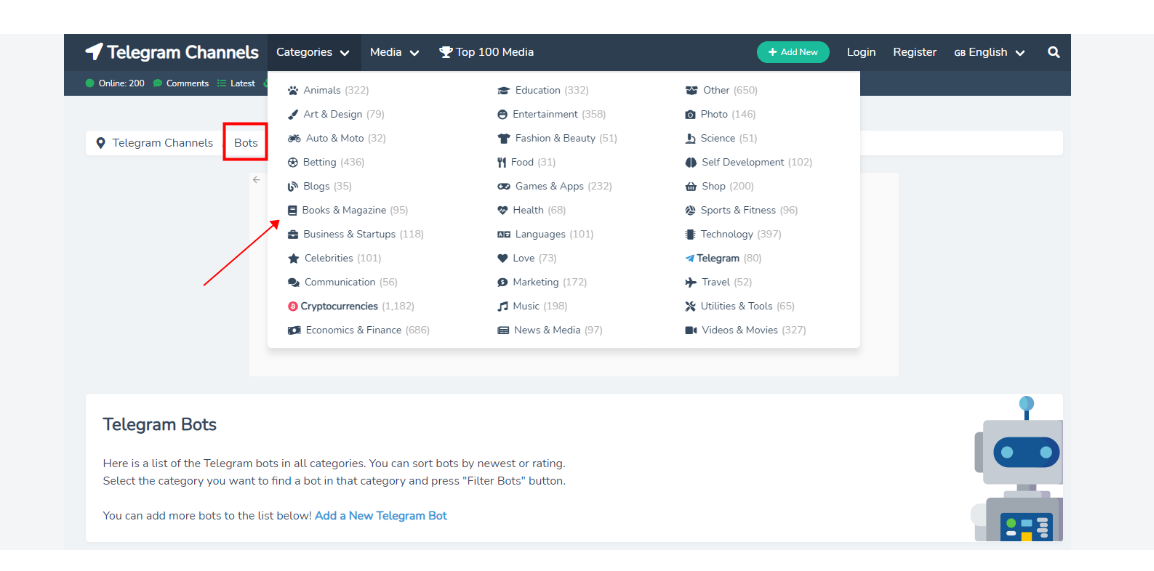
- Open a web browser on your device.
- Search for online Telegram group directories like Telegram Channels or TGBase.
- Browse the categories or use their search tools to find active groups.
- Click the group link to open it directly in your Telegram app.
- Tap Join Group at the bottom of the screen.
3. Using Direct Invite Links
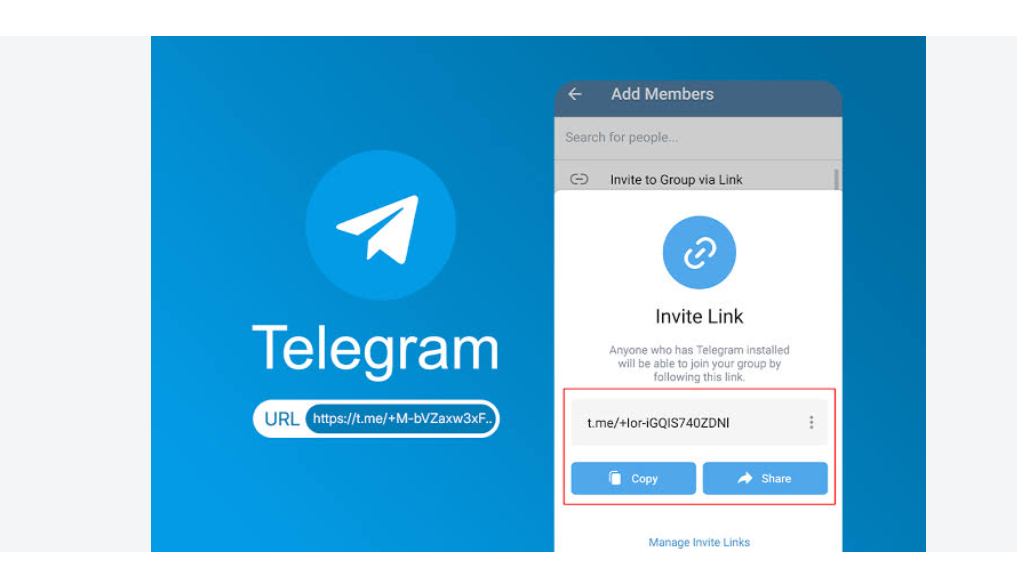
- Find a shared invite link (starting with
t.me/) from a friend, website, or social media post. - Tap or click the invite link.
- Confirm you want to open the link in Telegram.
- Tap the Join button at the bottom of the chat window.
How to Find a Specific Telegram Group
If you already know the group name, use the exact name first.
For example, if someone tells you the group is called Digital Marketing Professionals, search that exact phrase.
If the result does not appear, try variations:
Digital Marketing ProfessionalsDigital MarketingMarketing ProfessionalsDigital Marketers
If you know the group’s username, search that instead.
Telegram’s official FAQ explains that public usernames appear in global search results and can also be used to create t.me/username links.
How to Find Telegram Groups by Topic
When you do not know a group’s name, topic-based searching is usually the best approach.
Example: Finding a Gaming Group
Instead of searching only:gaming
try:
gaming communityPC gamingmobile gamingPlayStationXboxMinecraftValorantGTAgaming discussion
Example: Finding a Study Group
Try:
study groupstudentsexam preparationIELTSEnglish learningmath helpuniversity students
The more specific your search intent, the easier it becomes to identify relevant communities.
How to Find Telegram Groups by Country or Language
Telegram groups can also be organized around countries, cities, languages, and regional communities.
For example, someone looking for an English-learning community could search:
English learners
Someone looking for a regional community could try:
Pakistan studentsLondon communityDubai expatsGerman languageArabic discussion
The important point is to combine topic + location/language rather than relying on a single generic keyword.
How to Find Telegram Groups Using Google
Telegram’s internal search is not always enough. You can also use Google or another search engine to locate public Telegram links.
A useful search format is:
site:t.me "your topic"
For example:
site:t.me "photography group"
or:
site:t.me "English learning"
You can also combine the topic with words such as:
Telegram groupTelegram communityjoin TelegramTelegram invite
This method can surface public Telegram pages that are mentioned on websites, forums, blogs, or social media.
Important limitation
Search engines do not provide access to private Telegram groups simply because you know the topic. A private group still requires legitimate access, such as an invite link.
How to Find Telegram Groups Through Directories
Telegram community directories can be useful when you have no idea what the group is called.
Instead of searching one keyword at a time, directories may allow you to browse communities by:
- Topic
- Category
- Country
- Language
- Member count
- Community type
Current Telegram directories advertise large databases of public groups and channels, although their listings should be treated as third-party information rather than official Telegram recommendations.
How to use a directory
- Choose a reputable Telegram directory.
- Search for your topic.
- Filter the results if category or language options are available.
- Review the group’s description.
- Check its recent activity.
- Open the Telegram link.
- Verify that the destination is actually the community you intended to join.
Do not assume that a directory’s “verified” or “active” label guarantees that a group is safe. Always inspect the destination yourself.
How to Find Telegram Groups Through Existing Communities
Another effective method is to start with a Telegram channel or group you already trust.
Look at:
- Pinned messages
- Group descriptions
- Related communities
- Administrator announcements
- Community recommendations
- Linked discussion groups
- Official social profiles
This can work particularly well for niche communities where the best groups are not obvious from generic keyword searches.
For example, a software project’s official community may link to a Telegram discussion group from its website or documentation.
How to Find a Private Telegram Group
Private Telegram groups generally cannot be discovered through ordinary public search.
If someone tells you that a particular private group exists, ask them for its official invite link.
Telegram’s official FAQ explains that invite links can be used to let people join a group, and an administrator can revoke an invite link so that it stops working.
Typical private-group workflow
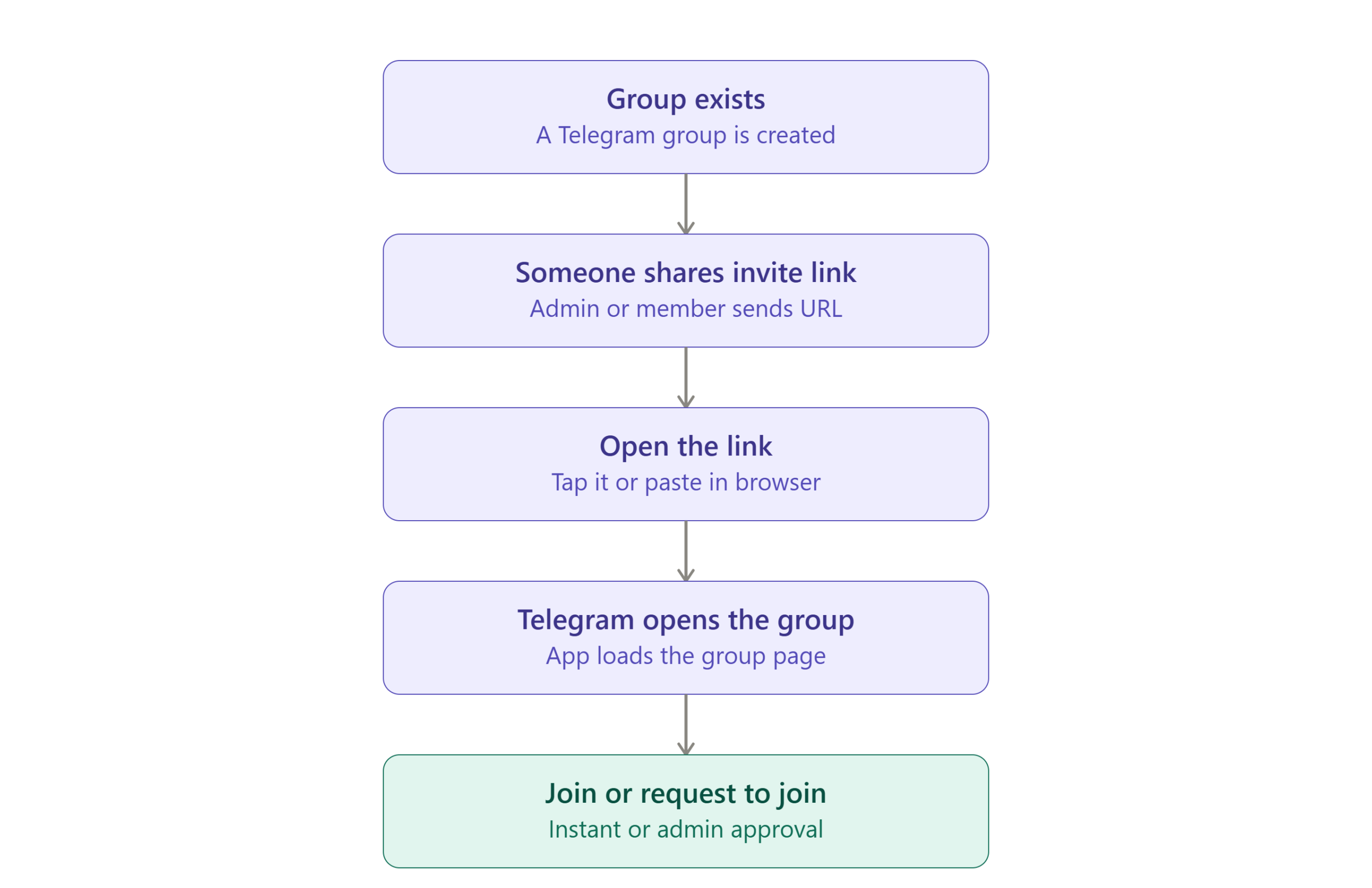
If you do not have an invite link, your best option is to contact an administrator or someone who is already a legitimate member.
How to Join a Telegram Group Using an Invite Link
If you already have a Telegram group link, joining is simple.
Step 1: Open the invite link. It may look similar to: t.me/+xxxxxxxx or another Telegram invitation format.
Step 2: Allow the link to open Telegram. Check the group name before continuing.
Step 3: Review the Group. Look at the name, description, member information, and available preview.
Step 4: Tap Join. If approval is required, submit the request and wait for an administrator to approve it.
Step 5: Read the Rules. If the group has pinned rules or a welcome message, read them before posting.
How to Find Telegram Groups on Android, iPhone, and Desktop
The basic discovery process is similar across platforms.
| Platform | Main Method | Best Use |
|---|---|---|
| Android | Telegram Search | Topic and group discovery |
| iPhone/iPad | Telegram Search | Topic and group discovery |
| Windows/macOS/Linux | Telegram Desktop Search | Exact names and broader desktop searching |
| Telegram Web | Search | Quick browser-based discovery |
| Any platform | Invite link | Private or specific groups |
| Any platform | Search engine | Finding publicly indexed links |
| Any platform | Directory | Browsing groups by topic |
Telegram officially provides apps across multiple platforms, and its groups are designed to be accessible across devices.
Can You Find Nearby Telegram Groups?
Not through Telegram’s old People Nearby feature.
This is an important point because many older articles still recommend it.
Telegram’s People Nearby feature was removed. Telegram’s own bug tracker records the feature as removed, so instructions telling users to open People Nearby to discover local groups are outdated.
Instead, search manually using combinations such as:
Islamabad communityNew York studentsLondon Pakistani communityDubai jobsToronto tech
You can also look for local communities through external websites, social platforms, and links published by legitimate organizations.
How to Tell Whether a Telegram Group Is Worth Joining
Finding a group is only half the task. You also need to determine whether it is useful.
Before joining, evaluate these signals:
| Signal | What to Check |
|---|---|
| Activity | Are recent messages being posted? |
| Topic relevance | Does the conversation match the group’s stated purpose? |
| Moderation | Are spam and abusive posts controlled? |
| Description | Is the purpose of the group clear? |
| Members | Does the membership appear genuine? |
| Recent content | Does the group still appear active? |
| Rules | Are there clear community guidelines? |
| Links | Are users constantly being pushed to suspicious websites? |
| Promotions | Is the group mostly advertisements or useful discussion? |
Member count alone is not a quality indicator.
A smaller community with genuine conversations can be much more useful than a huge group filled with automated posts.
How to Avoid Fake or Scam Telegram Groups
Be particularly careful when joining groups involving money, investments, cryptocurrency, jobs, giveaways, or account credentials.
Watch for:
- Requests for passwords or verification codes
- “Guaranteed” investment returns
- Pressure to send cryptocurrency
- Fake administrator accounts
- Suspicious download links
- Requests to pay for access through unknown accounts
- Fake giveaways
- Impersonation of companies or public figures
- Messages asking for Telegram login codes
- Unusually aggressive direct messages
Never share your Telegram login code with another person.
If a group claims to represent a company, verify the community through the company’s official website or verified social profiles, rather than trusting the Telegram group’s own description.
Why Can’t I Find a Telegram Group?
There are several possible reasons.
| Problem | Possible Cause | Solution |
|---|---|---|
| Group does not appear | It is private | Ask for an invite link |
| Search returns unrelated results | Keyword is too broad | Use more specific keywords |
| Exact name does not work | Group name changed | Search the username or related keywords |
| Group disappeared | It may have been deleted or renamed | Look for an updated link |
| Link does not work | Invite was revoked or expired | Ask the sender for a new link |
| You found a channel instead | Search results are mixed | Check whether it is a group or channel |
| Group seems inactive | Community may be abandoned | Check recent messages before joining |
| Search gives poor results | Group uses an unrelated name | Try adjacent keywords or external discovery |
What to Do When Telegram Search Shows Nothing
If your search produces no useful groups, don’t immediately assume that no groups exist.
Use this sequence:
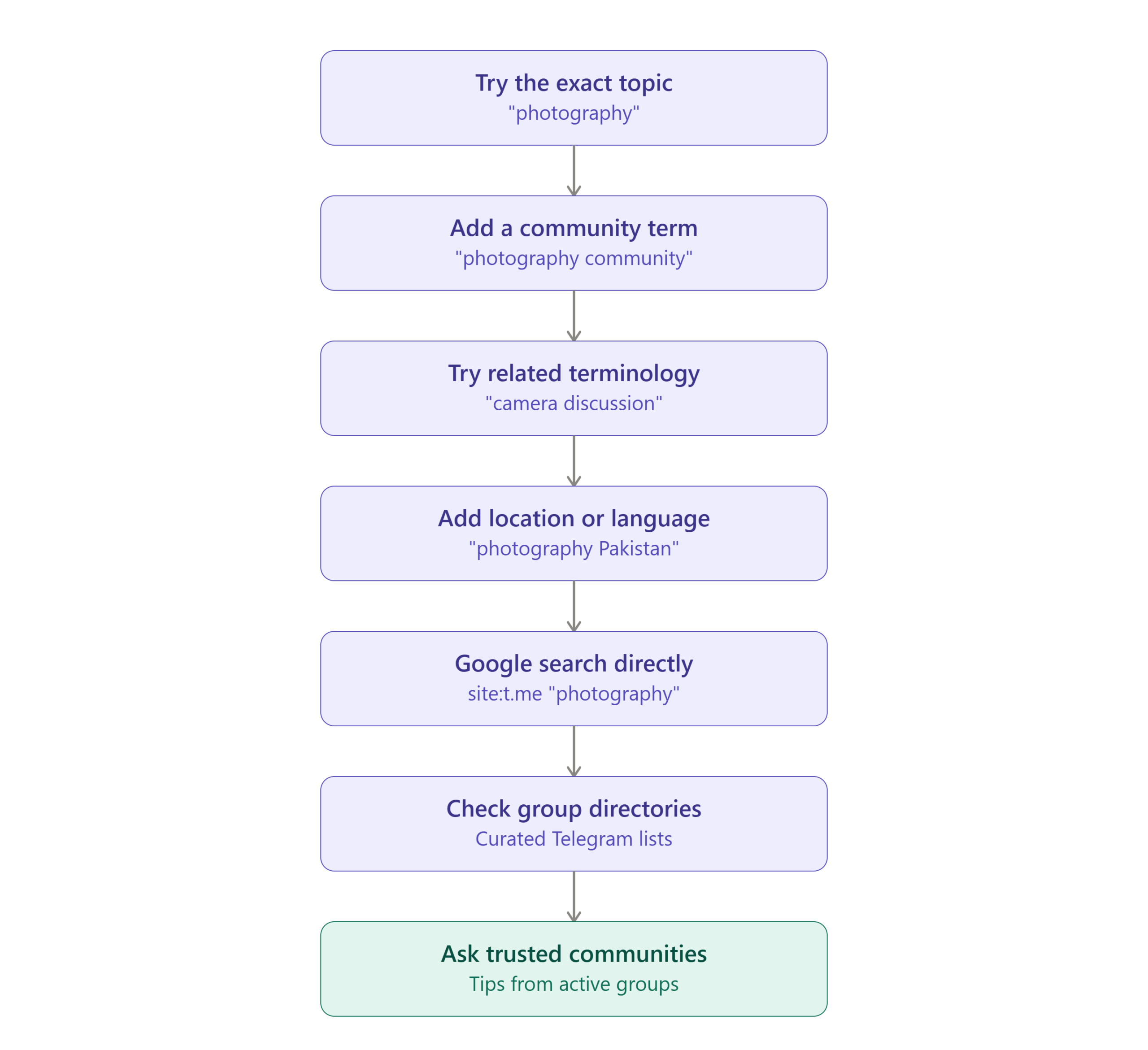
This gives you multiple discovery paths instead of depending entirely on one search query.
Public vs. Private Telegram Groups
The distinction is critical.
| Feature | Public Group | Private Group |
|---|---|---|
| Public discovery | Possible | Generally no |
| Username/link | Can have public username | May rely on invite link |
| Joining | Usually open | Requires access |
| Invite link | Optional for discovery | Commonly required |
| Search visibility | Can appear in public/global search | Not openly searchable |
| Access control | More open | More restricted |
Telegram states that public groups can be joined by anyone, while invite links provide a way for people to access groups.
Telegram Groups vs. Telegram Channels
Another common mistake is finding a channel when you actually want a group.
| Feature | Telegram Group | Telegram Channel |
|---|---|---|
| Main purpose | Discussion | Broadcasting |
| Member interaction | High | Usually limited |
| Members can converse | Yes | Not in the same way |
| Best for | Communities | News and announcements |
| Typical label | Members | Subscribers |
| Community discussion | Primary function | Secondary/optional |
If you want to talk with other users, choose a group.
If you mainly want to receive updates from an organization or creator, a channel may be more appropriate.
Telegram also supports channels with discussion-related features, so the distinction is based primarily on the community’s intended function.
Common Mistakes When Searching for Telegram Groups
Searching Only One Keyword
A single keyword may not match the group’s public name or username.
Better approach: Use several related terms.
Assuming Every Group Is Public
Many communities are intentionally private.
Better approach: Ask for an invite link when the group is not publicly discoverable.
Confusing Channels With Groups
A channel may appear highly relevant but does not provide the type of two-way discussion you want.
Better approach: Check the community type before joining.
Trusting Member Counts
A large number of members does not guarantee quality or activity.
Better approach: Inspect recent conversations and moderation.
Using Outdated “People Nearby” Instructions
Older guides may tell you to use People Nearby to discover local Telegram communities.
That feature has been removed, so those instructions are no longer applicable.
Clicking Random Invite Links
Not every Telegram link is trustworthy.
Better approach: Verify where the link came from before joining and be especially cautious with financial, investment, or credential-related communities.
Expert Insight: The Best Telegram Group Discovery Strategy
The most effective strategy is not to rely on one search method.
Use a three-layer discovery system:
Layer 1 — Telegram Search
Use it when you know the topic, name, or username.
Layer 2 — External Search
Use Google or another search engine to locate public t.me links that Telegram’s internal search did not surface for you.
Layer 3 — Community Referrals
Use established websites, organizations, creators, forums, or existing communities to locate more specialized groups.
This approach is stronger than relying on a single Telegram directory because each layer solves a different discovery problem.
A Simple Decision Framework
Do you know the group’s exact name?
→ Yes: Search the name or username in Telegram.
→ No: Search the topic using multiple related keywords.
Still cannot find it?
→ Search Google using site:t.me.
Still cannot find it?
→ Check reputable Telegram directories and community websites.
You know the group exists but it never appears?
→ It may be private. Ask for an invite link.
You have an invite link but it doesn’t work?
→ Ask the sender for a new link because the previous invitation may have been revoked or become invalid.
How to Verify You Found the Right Telegram Group
Before joining, verify at least these five things:
- Name: Does it match what you were looking for?
- Description: Does the stated purpose match the topic?
- Activity: Are recent conversations actually happening?
- Members: Does the community appear genuine?
- Safety: Are there suspicious links, payment requests, or impersonators?
A successful search is not simply finding a Telegram result. The real outcome is finding a relevant, active, legitimate community.
Implementation Checklist
Before Searching
- Define the topic you are interested in.
- Decide whether you need a group or channel.
- Identify your preferred language or region if relevant.
During Searching
- Search the exact group name if known.
- Try multiple related keywords.
- Search topic + location when appropriate.
- Check Telegram’s public results.
- Use Google with
site:t.meif necessary.
Before Joining
- Check the group description.
- Review recent activity.
- Look for clear rules.
- Check for obvious spam.
- Verify suspicious claims independently.
If the Group Is Private
- Request an official invite link.
- Verify who provided the link.
- Do not pay an unknown person simply for an invitation.
Frequently Asked Questions (FAQs)
How do I search for groups on Telegram?
Open Telegram and use the Search field at the top of your chat list. Enter the group’s name, username, or a relevant topic keyword. Public communities that match your search can appear in the results. Telegram’s universal search also searches chats, messages, and usernames.
Can I find a Telegram group without an invite link?
Yes, if it is a publicly discoverable group. Public groups can have public usernames and links and may appear through Telegram’s search. Private or invite-only groups generally require an invite link or another form of legitimate access.
Why can’t I find a Telegram group by name?
The group may be private, renamed, inactive, or using a username that differs from its visible name. Try searching related keywords or ask a member for the group’s current t.me link.
How do I find private Telegram groups?
Private groups are not intended to be openly discoverable. The normal way to join one is to receive an invitation or invite link from an administrator or existing member.
How do I find local Telegram groups?
Search using your topic plus your city, country, or language. For example, search for Islamabad students rather than only students. Do not rely on old tutorials recommending People Nearby because Telegram removed that feature.
Is there a Telegram group finder?
Third-party Telegram directories and search tools exist, and some index public communities by topic or country. However, they are independent services, not official Telegram recommendations. Private groups should not be expected to appear in public directories.
How do I know if a Telegram group is active?
Check the timestamps and quality of recent messages. A high member count does not necessarily mean that a group is currently active.
Can I find Telegram groups on Google?
Yes. Public Telegram pages can sometimes be discovered through search engines. A query such as site:t.me "your topic" can help locate public Telegram links.
What’s the difference between a Telegram group and channel?
Groups are primarily designed for community discussion and interaction, while channels are primarily designed to broadcast information to subscribers.
Can I join a Telegram group from a link?
Yes. Opening a valid Telegram invite link can take you to the relevant group, where you can join if you meet the group’s access requirements. Telegram allows group administrators to revoke invite links.
Key Takeaways
Finding Telegram groups in 2026 is easiest when you use the right method for the situation.
- If you know the group name: use Telegram Search.
- If you know only the topic: search several related keywords rather than one broad term.
- If you know the group exists but cannot find it: ask for its invite link because it may be private.
- If Telegram Search is not enough: use Google, reputable directories, and recommendations from established communities.
- If you want local groups: search using location-specific keywords rather than relying on the discontinued People Nearby feature.
Most importantly, finding a group is only the first step. Check its activity, relevance, moderation, and safety before becoming an active member.

