

WhatsApp disappearing messages are an optional privacy feature that automatically removes new messages from a chat after a selected period. As of 2026, WhatsApp offers three timers: 24 hours, 7 days, or 90 days. The setting does not retroactively remove messages that were already sent or received, and certain messages can remain visible if they are kept, quoted, forwarded, or included in a backup before they disappear.
Disappearing messages are useful for temporary conversations and reducing chat history, but they should not be treated as a guarantee that nobody can preserve a message. WhatsApp itself documents several situations in which content can remain available outside the normal disappearing-message lifecycle.
What Are WhatsApp Disappearing Messages?
WhatsApp disappearing messages are messages configured to automatically disappear from a conversation after a selected period. The feature is designed as an optional privacy and chat-management control rather than a replacement for ordinary message deletion.
You can enable disappearing messages for a particular conversation or configure a default message timer for new individual chats. WhatsApp currently provides three available durations: 24 hours, 7 days, and 90 days. When the feature is enabled, the selected duration applies to messages sent after the setting takes effect.
This distinction is important because enabling disappearing messages does not clean up the entire history of an existing conversation. Messages that were already sent or received before the setting was enabled are not affected by the new timer.
For example, suppose you have a WhatsApp conversation containing six months of old messages. You turn on a 7-day disappearing-message timer today. The older six-month conversation does not suddenly disappear. Instead, new messages sent after the setting is enabled follow the selected timer.
The feature can therefore be understood as a forward-looking message-expiry setting, not an instant chat-cleanup tool.
Why Are WhatsApp Disappearing Messages Useful?
Disappearing messages can be useful when a conversation contains information that does not need to remain in the chat indefinitely. They can also reduce the amount of old conversational material that remains visible in a chat.
Common use cases include:
- Temporary plans and arrangements
- Short-lived work discussions
- Travel coordination
- Event planning
- Information that becomes outdated quickly
- Conversations where users prefer less permanent chat history
- Reducing long-term chat clutter
The appropriate timer depends on how long the information needs to remain available. A 24-hour timer is designed for very short-lived conversations, while 90 days provides a substantially longer window.
The important point is that the feature manages the WhatsApp message lifecycle. It does not guarantee that the underlying information can never be copied, recorded, retained elsewhere, or preserved through another mechanism.
How Do WhatsApp Disappearing Messages Work?
When disappearing messages are enabled, new messages in the affected chat are assigned the selected disappearing-message behavior. WhatsApp currently supports 24 hours, 7 days, and 90 days. The setting affects new messages rather than retroactively changing previous messages.
The following table summarizes the basic behavior:
| Timer | General Use | What It Means |
|---|---|---|
| 24 hours | Very temporary conversations | New messages disappear after the selected 24-hour period |
| 7 days | Short-term conversations | New messages disappear after 7 days |
| 90 days | Longer temporary retention | New messages disappear after 90 days |
| Off | Permanent chat history under normal WhatsApp behavior | New messages are not subject to disappearing-message timer |
WhatsApp states that disappearing messages disappear for both the sender and recipient. The feature also applies to messages sent to yourself.
There are, however, several exceptions. A message can be kept, quoted content can remain visible, a forwarded copy can behave differently in another chat, and a backup created before the message disappears can contain the message.
What Happens When the Timer Expires?
When the selected duration expires, the disappearing message is removed from the chat according to WhatsApp’s disappearing-message system.
However, the process is not identical to manually deleting a message for everyone.
For example, WhatsApp notes that if the recipient does not open WhatsApp during the selected period, the message can disappear from the chat while its preview may still appear in a notification until WhatsApp is opened.
This means users should not assume that the disappearance timer controls every copy or representation of the message on a device.
The safest interpretation is:
The WhatsApp chat copy is designed to disappear after the selected period, but the information itself should not be considered impossible to preserve.
What Happens to Messages Sent Before Disappearing Messages Were Enabled?
Messages sent or received before disappearing messages were enabled are not affected by the new timer.
This is one of the most important details to understand.
For example:
- You have an existing conversation.
- The conversation contains messages from January through September.
- You enable a 7-day disappearing-message timer in September.
- January through September messages remain in the chat.
- New messages sent after the setting takes effect follow the disappearing-message behavior.
WhatsApp explicitly states that changing the duration affects new messages and does not change messages that were already sent or received.
If your objective is to remove older messages, you need to use WhatsApp’s normal message or chat deletion controls rather than relying on disappearing messages.
How to Turn On Disappearing Messages in WhatsApp
The exact interface can change as WhatsApp updates Android, iPhone, Web, and desktop applications, but the underlying workflow is based on the chat’s information/settings screen.
Step 1 — Open the WhatsApp Chat
Open WhatsApp and select the individual or group conversation where you want to use disappearing messages.
For a one-to-one conversation, open the relevant contact’s chat. For a group, open the group conversation.
Step 2 — Open Chat Information
Open the conversation information by selecting the contact or group name at the top of the chat.
This takes you to the settings and information associated with that particular conversation.
Step 3 — Select Disappearing Messages
Find Disappearing Messages in the chat settings.
If WhatsApp displays an explanatory screen, continue to the timer options.
Step 4 — Choose a Timer
Select one of the available durations: 24 hours, 7 days, 90 days.
WhatsApp documents these three current durations.
Step 5 — Send New Messages
Once the setting is enabled, new messages sent in that conversation follow the selected disappearing-message timer.
Messages that were already present before the setting was enabled remain unaffected.
Step 6 — Confirm the Setting
Return to the chat information screen and confirm that the selected disappearing-message duration is shown.
You can then send a test message if you want to verify the behavior in a non-sensitive conversation.
How to Turn Off Disappearing Messages
You can disable disappearing messages from the same chat settings area.
Step 1 — Open the Chat
Open the individual or group chat where disappearing messages are enabled.
Step 2 — Open Chat Information
Tap or click the contact or group name at the top of the conversation.
Step 3 — Open Disappearing Messages
Select Disappearing Messages.
Step 4 — Select Off
Choose Off rather than a timer duration.
After the feature is disabled, new messages in that chat will no longer follow the disappearing-message timer.
How to Set a Default Disappearing Message Timer
WhatsApp also provides a default message-timer setting for new individual chats.
This is different from manually enabling disappearing messages in one specific conversation.
Step 1 — Open WhatsApp Settings
Open WhatsApp’s main settings.
Step 2 — Open Privacy
Go to Settings → Privacy.
WhatsApp’s current privacy documentation identifies the default message timer as part of the privacy settings.
Step 3 — Open Default Message Timer
Select Default Message Timer.
Step 4 — Select a Duration
Choose: 24 hours, 7 days, 90 days, Off.
WhatsApp introduced the default timer so users could apply disappearing-message behavior automatically to new individual chats rather than configuring each conversation separately.
Step 5 — Review Existing Chats Separately
Remember that a default timer is primarily a setting for new individual chats.
If you want to apply disappearing messages to existing conversations, review those conversations individually and confirm the appropriate chat setting.
How Disappearing Messages Work in WhatsApp Groups
Disappearing messages also work in group chats, but group permissions can affect who is allowed to change the setting.
WhatsApp currently states that group members can enable or disable disappearing messages by default, while group administrators can change group settings so that only administrators can control the feature.
To configure it in a group:
- Open the WhatsApp group.
- Open Group Info by selecting the group name.
- Select Disappearing Messages.
- Choose 24 hours, 7 days, or 90 days.
- Confirm the setting.
Only messages affected by the setting after it is enabled follow the new timer; older messages are not retroactively changed.
This matters in busy groups because different participants may assume the timer means the entire conversation will disappear. It does not.
What Are Kept Messages?
WhatsApp provides a Keep function for disappearing messages.
A disappearing message can be kept so that it does not disappear when its normal timer expires. WhatsApp says kept messages remain visible to everyone in the conversation.
There is an important control for the sender: WhatsApp states that the sender has ultimate control over who can keep a message. If someone keeps a message you sent, you receive a notification. You can also unkeep the message.
WhatsApp currently states that there is approximately a 30-day period to unkeep a message from the time it was kept.
This makes the Keep feature an important exception to the normal disappearing-message lifecycle.
Example of a Kept Message
Imagine you send a disappearing message with a 7-day timer. Before the seven days expire, the message is kept.
Instead of disappearing normally when the timer expires, the kept message remains available in the conversation according to WhatsApp’s kept-message rules.
Therefore, if a message is important, do not assume the timer guarantees automatic deletion in every circumstance.
Can Someone Screenshot a WhatsApp Disappearing Message?
Disappearing messages should not be treated as screenshot-proof privacy.
WhatsApp’s current disappearing-message documentation explains several ways content can remain available, including forwarding, quoted messages, backups, and message previews. It does not describe ordinary disappearing messages as a system that guarantees the recipient cannot preserve the content.
This is different from View Once media. WhatsApp explicitly says that recipients cannot take a screenshot of View Once photos or videos using the normal screenshot function, while also warning that other recording methods remain possible.
The practical distinction is:
| Feature | Main Purpose | Expiry Behavior |
|---|---|---|
| Disappearing Messages | Temporary chat messages | 24 hours, 7 days, or 90 days |
| View Once | One-time photos, videos, and voice messages | Disappears after being opened once |
| Normal Messages | Standard chat history | Remain until manually deleted or otherwise removed |
Neither feature should be treated as an absolute guarantee that information can never be captured outside WhatsApp.
What Happens If a Disappearing Message Is Forwarded?
Forwarding creates an important exception.
WhatsApp states that if a disappearing message is forwarded to a chat where disappearing messages are off, the forwarded message does not disappear in that destination chat.
For example:
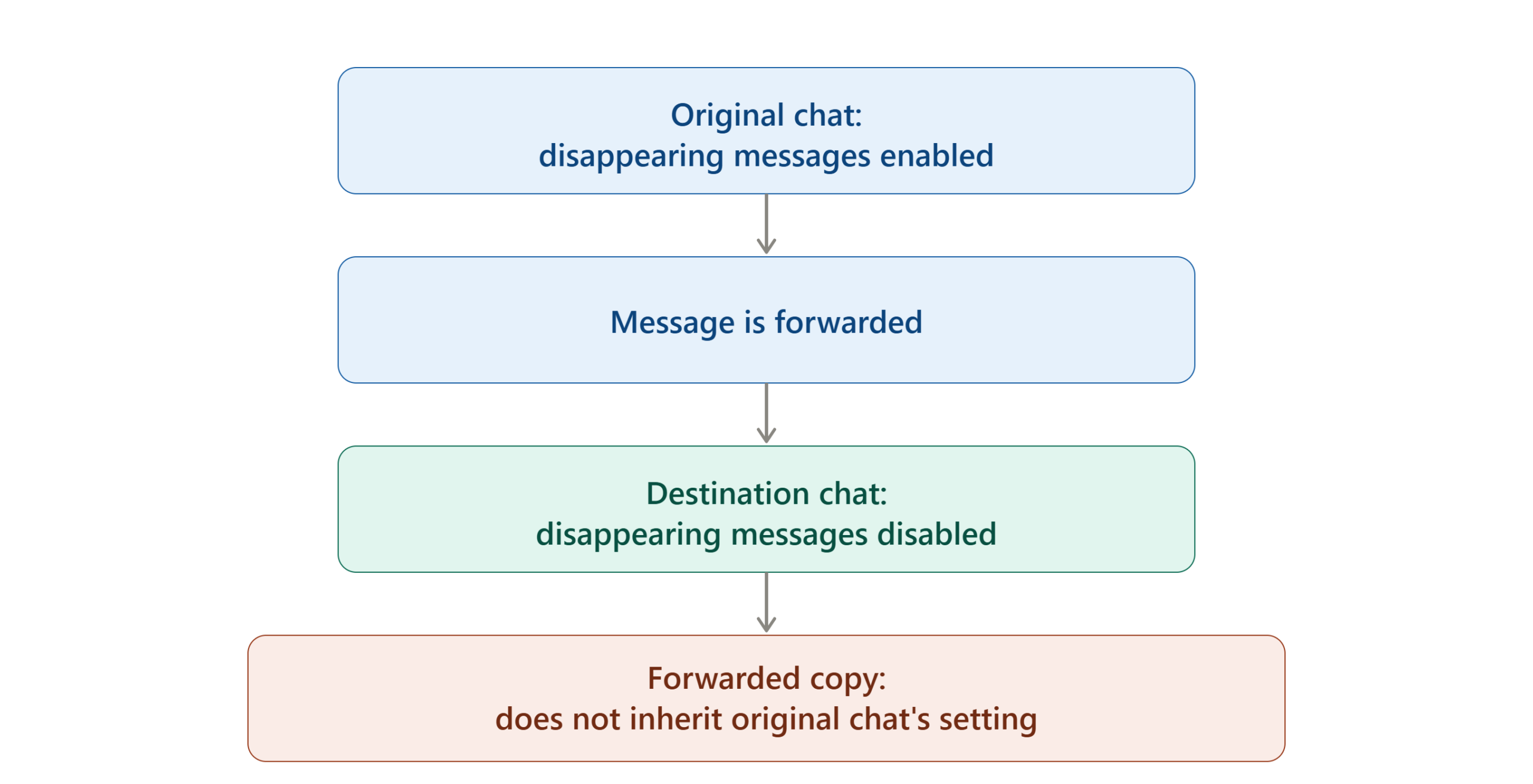
This is why disappearing messages should be understood as a chat-level message lifecycle feature, rather than a universal copy-destruction mechanism.
What Happens When You Reply to a Disappearing Message?
Replies create another exception.
When you reply to a WhatsApp message, the original message is quoted in the response. WhatsApp states that when disappearing messages are enabled, the quoted message may still be visible after the original message’s disappearance duration has passed.
This means the original message and its quoted representation should not always be assumed to have exactly the same visibility lifecycle.
If you are using disappearing messages for privacy, this is particularly important when replying to sensitive information.
What Happens to Photos and Videos?
WhatsApp’s current Help Center states that media sent in a chat with disappearing messages enabled will disappear and will not be saved to the recipient’s photos by default.
However, media behavior should not be confused with View Once.
Disappearing-message media follows the disappearing-message system associated with the chat.
View Once media is a separate feature where supported photos, videos, and voice messages disappear after being opened once.
If your objective is simply to make ordinary chat media temporary, disappearing messages may be appropriate. If you specifically need one-time media behavior, use the dedicated View Once option instead.
Are WhatsApp Disappearing Messages Really Private?
Disappearing messages can improve privacy by limiting how long messages remain in the normal WhatsApp conversation, but they are not a guarantee of permanent deletion of every possible copy.
Several documented exceptions demonstrate why:
- A message can be kept.
- A forwarded copy can remain in another chat.
- Quoted content may remain visible.
- A backup created before disappearance can contain the message.
- A notification preview may remain until WhatsApp is opened.
- Information can potentially be preserved outside the WhatsApp message itself.
WhatsApp’s own documentation therefore supports treating disappearing messages as a privacy and retention-control feature, rather than an absolute anti-recording system.
What Happens to Disappearing Messages in Backups?
Backups are one of the most important exceptions to understand.
WhatsApp states that if a user creates a backup before a disappearing message expires, the disappearing message is included in that backup. When the user restores from a backup, WhatsApp says the disappearing message will be deleted.
This means a backup can temporarily contain information that has not yet reached its disappearing-message expiration point.
It also means users should not interpret the existence of a backup as a straightforward method for permanently recovering an expired disappearing message.
WhatsApp separately states that it cannot restore chat history for users because chat history is not stored on WhatsApp’s servers.
Can You Recover a Disappearing Message After It Disappears?
There is no official WhatsApp recovery feature that simply restores an expired disappearing message back into the chat.
The official documentation instead explains how disappearing messages interact with backups, kept messages, quoted messages, and other copies.
If a message has not yet disappeared, the safest approach is to preserve it using an appropriate WhatsApp feature, such as keeping the message when that option is available.
If it has already disappeared, recovery becomes dependent on whether another legitimate copy exists, such as content preserved elsewhere before expiration.
Be cautious with third-party applications that claim they can recover every expired WhatsApp disappearing message. Such claims should not be treated as equivalent to an official WhatsApp recovery function.
Why Did a WhatsApp Disappearing Message Not Disappear?
Several explanations are possible.
The Message Was Sent Before the Timer Was Enabled
The most straightforward explanation is that the message predates the disappearing-message setting. WhatsApp states that changing the timer does not affect previous messages.
The Message Was Kept
A message that has been kept can remain visible instead of disappearing when its timer expires.
The Message Was Quoted in a Reply
WhatsApp notes that quoted versions of disappearing messages may remain visible after the original message expires.
The Message Was Forwarded
A forwarded copy in a chat where disappearing messages are disabled will not disappear simply because the original message was disappearing.
You Are Looking at a Notification Preview
If WhatsApp has not been opened, the message itself may disappear from the chat while its notification preview remains visible until WhatsApp is opened.
Troubleshooting WhatsApp Disappearing Messages
Use this troubleshooting sequence before assuming the feature is broken.
| Problem | Possible Cause | Solution |
|---|---|---|
| Old messages are still visible | Timer was enabled after they were sent | Delete old messages separately if necessary |
| New messages are not disappearing | The chat timer may be off | Open chat information and check Disappearing Messages |
| A message remained after expiry | Message was kept | Check whether it was saved as a kept message |
| Forwarded message remains | Destination chat has disappearing messages off | Check the timer in the destination conversation |
| Quoted text remains | The message was included in a reply | Check the quoted portion of the reply |
| Notification still shows text | WhatsApp has not been opened | Open WhatsApp and check the conversation |
| Group timer cannot be changed | Admin permissions may restrict the setting | Ask a group administrator to check group permissions |
| Media remains somewhere else | A separate copy may have been created | Check how the media was saved or shared before relying on disappearing mode |
The first troubleshooting step should always be to check the actual chat setting rather than immediately reinstalling WhatsApp or using third-party recovery software.
What Should You Do If Disappearing Messages Are Not Available?
If the disappearing-message option is missing, first confirm that WhatsApp is updated and that you are checking the correct chat information screen.
Also consider whether the issue involves a particular type of message or account configuration. WhatsApp notes that disappearing messages are not available for certain payment or order-related messages in some countries.
For normal individual and group chats, check the current WhatsApp Help Center documentation for the relevant platform.
Avoid relying on old screenshots or tutorials because WhatsApp’s interface can change across Android, iPhone, Web, and desktop versions.
Disappearing Messages vs Delete for Everyone
These two features solve different problems.
- Disappearing messages automatically control the lifespan of eligible new messages in a chat.
- Delete for Everyone is a manual action used to remove specific messages that you sent from an individual or group chat, subject to WhatsApp’s applicable rules and availability.
WhatsApp’s message-deletion documentation explains that deleting a message for everyone replaces it with a deleted-message indicator rather than functioning as a disappearing-message timer.
A useful decision rule is:
- Use Disappearing Messages when you want future messages in a chat to have an automatic expiry behavior.
- Use Delete for Everyone when you need to manually remove a particular sent message.
- Use View Once when sending supported media that should disappear after it has been opened once.
Disappearing Messages vs View Once
These features are often confused because both are temporary.
Disappearing Messages
Disappearing messages apply to messages in a chat configured with a 24-hour, 7-day, or 90-day timer. They are intended for temporary conversation history.
View Once
View Once is designed for supported photos, videos, and voice messages that disappear after the recipient opens them once. WhatsApp states that View Once photos and videos are not saved to the recipient’s Photos or Gallery and that the recipient cannot take a screenshot using the normal screenshot function.
Which Disappearing Message Timer Should You Use?
There is no universally correct timer. The appropriate choice depends on how long the conversation needs to remain accessible.
| Situation | Potential Timer | Reason |
|---|---|---|
| Very short-lived information | 24 hours | Keeps the retention window short |
| Temporary planning or routine conversations | 7 days | Provides more time while limiting long-term history |
| Information needed for several weeks or months | 90 days | Provides the longest available disappearing-message period |
| Permanent reference material | Off | Avoids automatic message expiry |
These are practical usage scenarios rather than WhatsApp’s official recommendations. The actual choice should reflect the information’s usefulness, sensitivity, and required retention period.
Common Mistakes to Avoid
Mistake 1 — Expecting Old Messages to Disappear
Turning on disappearing messages does not erase previous chat history.
Correct approach: Treat the timer as a setting for new messages.
Mistake 2 — Assuming the Message Is Impossible to Save
Disappearing does not mean uncapturable or impossible to preserve.
Correct approach: Avoid sending highly sensitive information simply because disappearing messages are enabled.
Mistake 3 — Confusing Disappearing Messages With View Once
The two features have different purposes.
Correct approach: Use the chat timer for temporary conversations and View Once for supported one-time media.
Mistake 4 — Forgetting About Forwarded Copies
A disappearing message forwarded into a chat without disappearing messages can remain there.
Correct approach: Consider the destination chat separately from the original chat.
Mistake 5 — Assuming Turning the Feature Off Restores Messages
Disabling the timer does not bring back messages that have already disappeared.
Correct approach: Preserve important messages before expiration.
Mistake 6 — Using Third-Party Recovery Apps as a First Solution
Unverified recovery applications can create privacy and security risks and are not equivalent to an official WhatsApp recovery feature.
Correct approach: Check WhatsApp’s own message, backup, and kept-message mechanisms first.
Expert Insights for Using Disappearing Messages
The most useful way to think about disappearing messages is as a retention control, not a complete privacy solution.
If a conversation contains temporary information, the feature can reduce the amount of that information that remains in the normal chat history. But the information can still have other representations, including a quoted message, forwarded copy, backup copy, notification preview, or manually preserved content.
Another important distinction is between privacy during communication and data preservation.
If your goal is to minimize long-term chat history, disappearing messages can help.
If your goal is to guarantee that information cannot be saved by another person, disappearing messages alone cannot provide that guarantee.
For sensitive communication, users should therefore consider:
- Whether the information needs to be sent at all.
- How long the recipient needs access to it.
- Whether the information could be safely shared through another method.
- Whether a message needs to be deliberately preserved.
- Whether the recipient should receive temporary media through View Once instead.
Advanced Tip: Use the Default Timer Carefully
The default message timer can be convenient because it reduces the need to configure every new individual chat manually.
However, convenience can also create unexpected behavior.
If you routinely communicate with people who need permanent access to important information, review the timer before assuming a new chat will retain its messages indefinitely.
A good workflow is:
Choose default behavior → Start a new chat → Check the chat’s timer → Send important information only after confirming the intended retention behavior.
WhatsApp provides the default message timer under its privacy settings.
Advanced Tip: Keep Important Messages Before They Expire
If a disappearing message contains information that you later need, do not wait until the timer is almost finished.
Where the Keep feature is available, use it while the message is still eligible to be kept. WhatsApp states that kept messages remain visible to everyone in the conversation and that the sender has ultimate control over who can keep a message.
This creates a useful workflow:
Temporary by default → Keep only what matters → Allow the rest to disappear.
That approach can provide more practical control than simply switching disappearing messages on or off for the entire conversation.
How to Verify That Disappearing Messages Are Working
You do not need to wait 90 days to understand whether the setting is configured correctly.
Check the Chat Setting
Open the chat information page and confirm that the intended disappearing-message duration is selected.
Send a Non-Sensitive Test Message
If necessary, send a harmless test message after enabling the timer.
Check the Message Lifecycle
Confirm that the message behaves according to the selected timer and that you understand which exceptions apply.
Test the Right Feature
If your objective is one-time media rather than temporary chat history, test View Once instead of disappearing messages.
Check Other Copies
Remember that quoted, forwarded, kept, backed-up, or notification representations can behave differently from the main chat message.
WhatsApp Disappearing Messages Checklist
Before Enabling
- Decide whether the chat should use temporary messages.
- Choose between 24 hours, 7 days, and 90 days.
- Check whether existing messages need separate deletion.
- Decide whether the feature is appropriate for the information being shared.
After Enabling
- Confirm the timer in the chat settings.
- Remember that only applicable new messages are affected.
- Explain the setting to group members when necessary.
- Avoid treating disappearing messages as an absolute privacy guarantee.
Before a Message Expires
- Keep important messages when appropriate.
- Preserve information through legitimate means if it is needed later.
- Remember that replies and forwarded copies can have different behavior.
After Expiration
- Check whether the message was kept.
- Check whether a quoted version remains.
- Consider whether a legitimate backup or other copy existed before expiration.
- Do not assume third-party recovery tools can restore an expired message.
Frequently Asked Questions
Are WhatsApp disappearing messages available for 24 hours?
Yes. WhatsApp currently provides three disappearing-message durations: 24 hours, 7 days, and 90 days.
Do disappearing messages delete old WhatsApp messages?
No. The disappearing-message setting affects new messages and does not retroactively apply to messages that were already sent or received.
Can I turn disappearing messages off?
Yes. You can open the relevant chat’s information/settings, select Disappearing Messages, and choose Off. Group permissions can affect who is allowed to change the setting.
Can a disappearing WhatsApp message be kept?
Yes. WhatsApp allows disappearing messages to be kept before they expire. Kept messages remain visible in the conversation, and WhatsApp states that the sender has ultimate control over who can keep a message.
Do disappearing messages disappear for both people?
Yes. WhatsApp states that disappearing messages disappear for both the sender and recipient.
Can a disappearing message be forwarded?
Yes. However, WhatsApp states that if it is forwarded to a chat where disappearing messages are disabled, the forwarded message will not disappear in that destination chat.
Can WhatsApp recover expired disappearing messages?
WhatsApp does not provide a simple official recovery function for expired disappearing messages. Its documentation explains that disappearing messages can be included in a backup created before they disappear, but those messages are deleted when the backup is restored.
Are disappearing messages the same as View Once?
No. Disappearing messages control the lifespan of applicable chat messages using a 24-hour, 7-day, or 90-day timer. View Once is a separate feature for supported photos, videos, and voice messages that disappear after being opened once.
Why can I still see a disappearing message in a notification?
WhatsApp states that if you do not open WhatsApp within the selected period, the message can disappear from the chat while its preview may remain in the notification until WhatsApp is opened.
Read More:
Final Takeaway
WhatsApp disappearing messages are best understood as an automatic message-retention feature. In 2026, WhatsApp offers 24-hour, 7-day, and 90-day timers, and you can configure them for individual chats, groups, or as a default for new individual conversations.
The most important limitation is that disappearing does not mean permanently unrecoverable or impossible to preserve. Messages can be kept, quoted content may remain visible, forwarded copies can behave differently, and backups created before expiration can contain disappearing messages.
If you want temporary chat history, enable the timer that matches the information’s useful lifespan. If you need one-time media, consider View Once instead. And if a message contains information that must never be retained by another person, do not rely on disappearing messages alone.

