


Facebook Search Ads are ads that can appear in Facebook Search Results, including relevant search-result surfaces and Marketplace search. They are not the same as Google Search Ads: advertisers should not assume they can simply choose individual Facebook keywords, set keyword bids, and build a traditional search campaign. Instead, Search Results is treated as an ad placement within Meta Ads Manager, and eligibility and delivery depend on the campaign, audience, creative, placement availability, and Meta’s delivery system.
Facebook is primarily known as a social platform, but its advertising system reaches users across many different surfaces. Depending on the campaign and available inventory, Meta ads can appear in feeds, Stories, Reels, Marketplace, Search Results, and other placements.
This guide explains what Facebook Search Ads are, how they work, how to set them up, how targeting differs from traditional search advertising, how to create suitable creative, how to measure performance, and what to do when Search Results is unavailable or produces weak results.
What Are Facebook Search Ads?
Facebook Search Ads are paid advertisements that can be delivered within Facebook’s search-result environment.
The simplest way to understand them is:
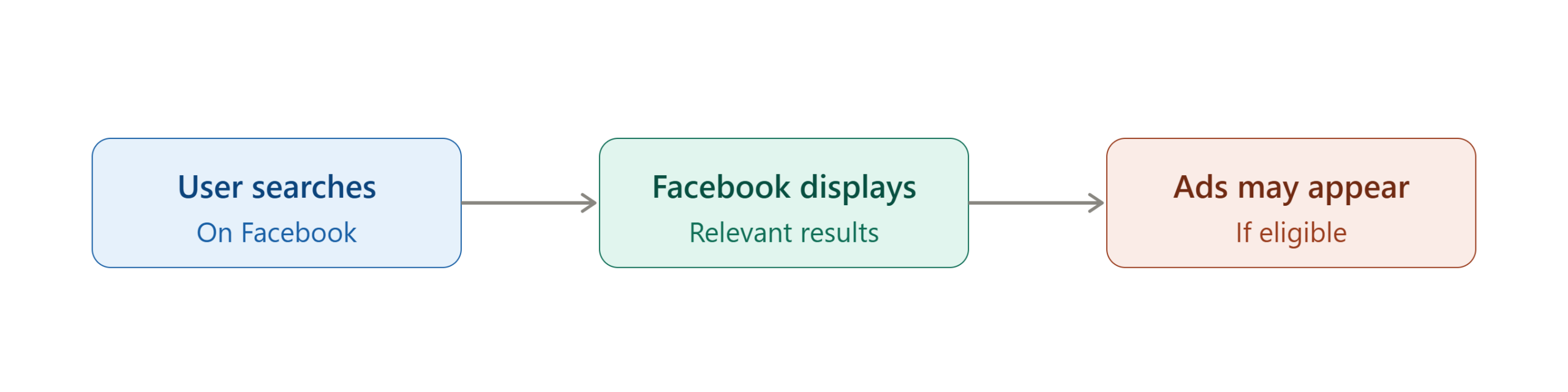
Search Results is therefore best understood as a placement, rather than a completely separate advertising platform.
This distinction matters because traditional search advertising usually revolves around explicit keyword targeting. For example, a Google advertiser might create a campaign around terms such as:
- “running shoes”
- “buy running shoes”
- “best running shoes”
- “running shoes near me”
The advertiser can organize those keywords into campaigns and ad groups and make keyword-level bidding decisions.
Facebook advertising works differently.
Your campaign is built around an advertising objective, audience, creative, destination, budget, and placements. Search Results can form part of that delivery environment when available and eligible.
Are Facebook Search Ads the Same as Google Search Ads?
No.
The two advertising systems have an important difference.
| Feature | Facebook Search Ads | Traditional Google Search Ads |
|---|---|---|
| Main environment | Facebook search experience | Google search results |
| Keyword bidding | Not a standard advertiser-controlled keyword system | Core part of search advertising |
| Campaign management | Meta Ads Manager | Google Ads |
| Audience targeting | Meta audience and delivery controls | Keyword, audience, location and other Google controls |
| Search placement | Part of Meta placement system | Core search inventory |
| Creative | Meta ad creative | Search ad formats |
| Marketplace relationship | Facebook Marketplace can be part of the search environment | No equivalent Facebook Marketplace surface |
| Delivery | Meta’s advertising delivery system | Google Ads auction and systems |
The key takeaway is simple: do not build your Facebook campaign assuming it behaves like a keyword-by-keyword Google Search campaign.
Why Are Facebook Search Ads Important?
Search behavior can provide useful signals about what a person wants to find.
Someone casually scrolling through a Facebook feed may not have a specific commercial intention. A person searching for something can be different because the action itself indicates that they are actively looking for information, products, pages, services, or other content.
Search Results placement can therefore provide another opportunity to reach people within the Meta ecosystem.
They Add Another Advertising Surface
A strong Meta campaign does not have to depend on one location.
Depending on campaign eligibility, Meta can distribute ads across different placements. Search Results gives advertisers another potential surface where their existing campaign can compete for impressions.
They Can Complement Feed Advertising
Feed ads are primarily encountered while users browse.
Search Results ads are encountered within a search context.
That difference can be useful when your creative and offer make sense for people who are actively looking for something related to your business.
They Can Support Product Discovery
E-commerce companies may benefit when users search for product-related information on Facebook or Marketplace.
For example, a retailer selling fitness equipment might create an ad promoting a product category rather than trying to force a generic brand message into every placement.
They Can Extend an Existing Campaign
One of the practical advantages of a placement-based approach is that you do not necessarily need to create an entirely separate advertising ecosystem just to test Search Results.
If the placement is available for your campaign, you can evaluate its performance alongside other Meta placements.
How Do Facebook Search Ads Work for Advertisers?
Facebook Search Ads work through Meta’s broader advertising delivery system.
A simplified process looks like this:
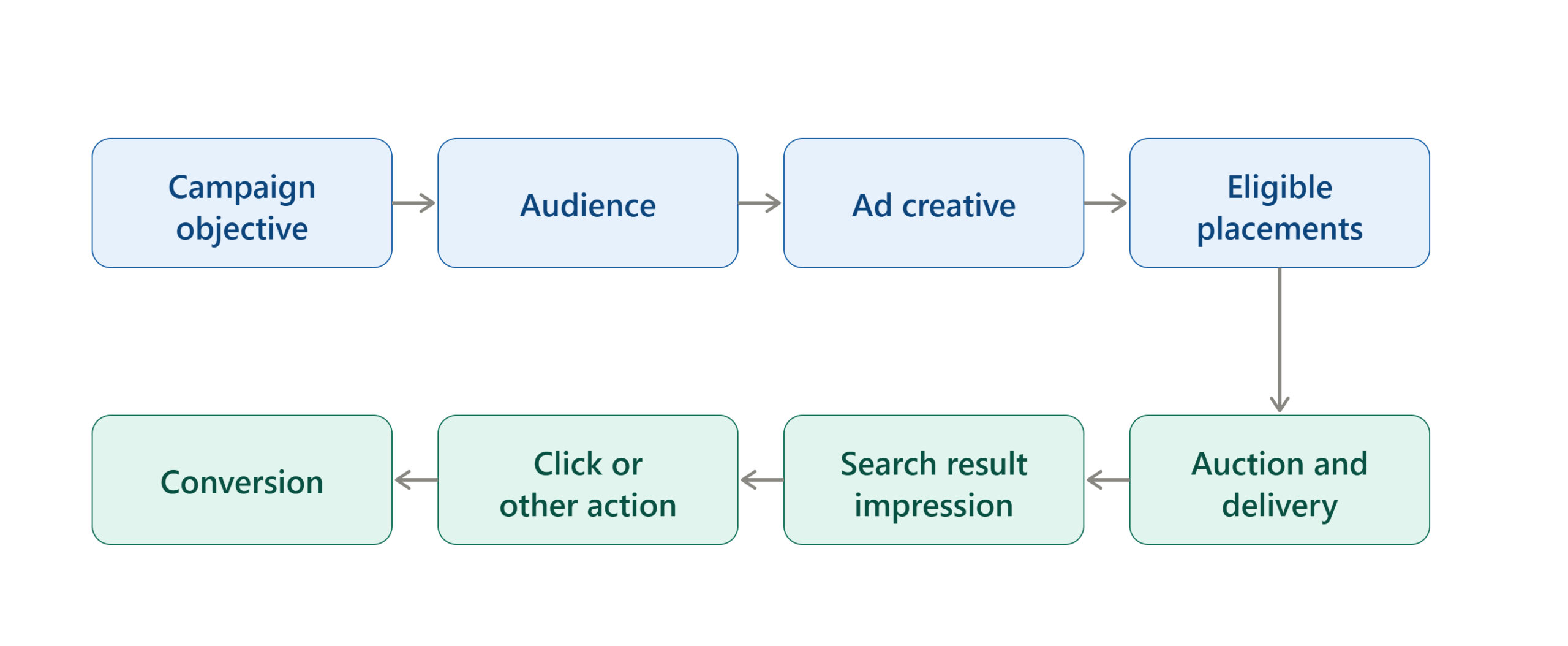
You control important campaign inputs, but Meta determines when and where an eligible ad is delivered based on its advertising system and the settings of the campaign.
Step 1: You Create a Campaign
You start in Meta Ads Manager and choose the objective that matches your business goal. Your objective might focus on outcomes such as:
- Sales
- Leads
- Website actions
- Engagement
- App-related actions
- Other supported business outcomes
The exact options and campaign experience can change as Meta updates Ads Manager.
Step 2: You Define the Audience
You then specify who you want your campaign to reach.
Depending on the campaign, this can involve factors such as:
- Location
- Age
- Language
- Custom audiences
- Lookalike or similar audience strategies where available
- Audience controls
- Other Meta targeting signals
The important point is that audience targeting and search behavior are not the same thing.
Do not assume that choosing a Facebook interest is equivalent to selecting a search keyword.
Step 3: You Select Placements
Placements determine where Meta can show the ad. Depending on the campaign setup, you may encounter options such as:
- Facebook Feed
- Instagram Feed
- Facebook Stories
- Instagram Stories
- Facebook Reels
- Instagram Reels
- Marketplace
- Search Results
- Other eligible placements
Meta’s current advertising ecosystem increasingly emphasizes automated delivery through Advantage+ features. Placement availability can vary by campaign, objective, creative and account.
Step 4: Meta Determines Delivery
After the campaign is published, Meta’s delivery system evaluates eligible opportunities.
The system considers factors related to:
- Your campaign settings
- Audience
- Creative
- Placement eligibility
- Auction conditions
- Estimated action probability
- Advertiser value
- User experience considerations
- Your selected optimization event
This means you should not expect every impression to come from Search Results simply because you enabled or included that placement.
Step 5: You Measure Business Results
The final step is measurement. Do not evaluate Search Results solely by asking:
“How many people clicked?”
Instead ask:
“Did those people produce the outcome the campaign was designed to generate?”
- For an e-commerce company, that might be purchases.
- For a service company, it might be qualified leads.
- For a publisher, it might be valuable website sessions.
- For an app business, it could be installs or post-install events.
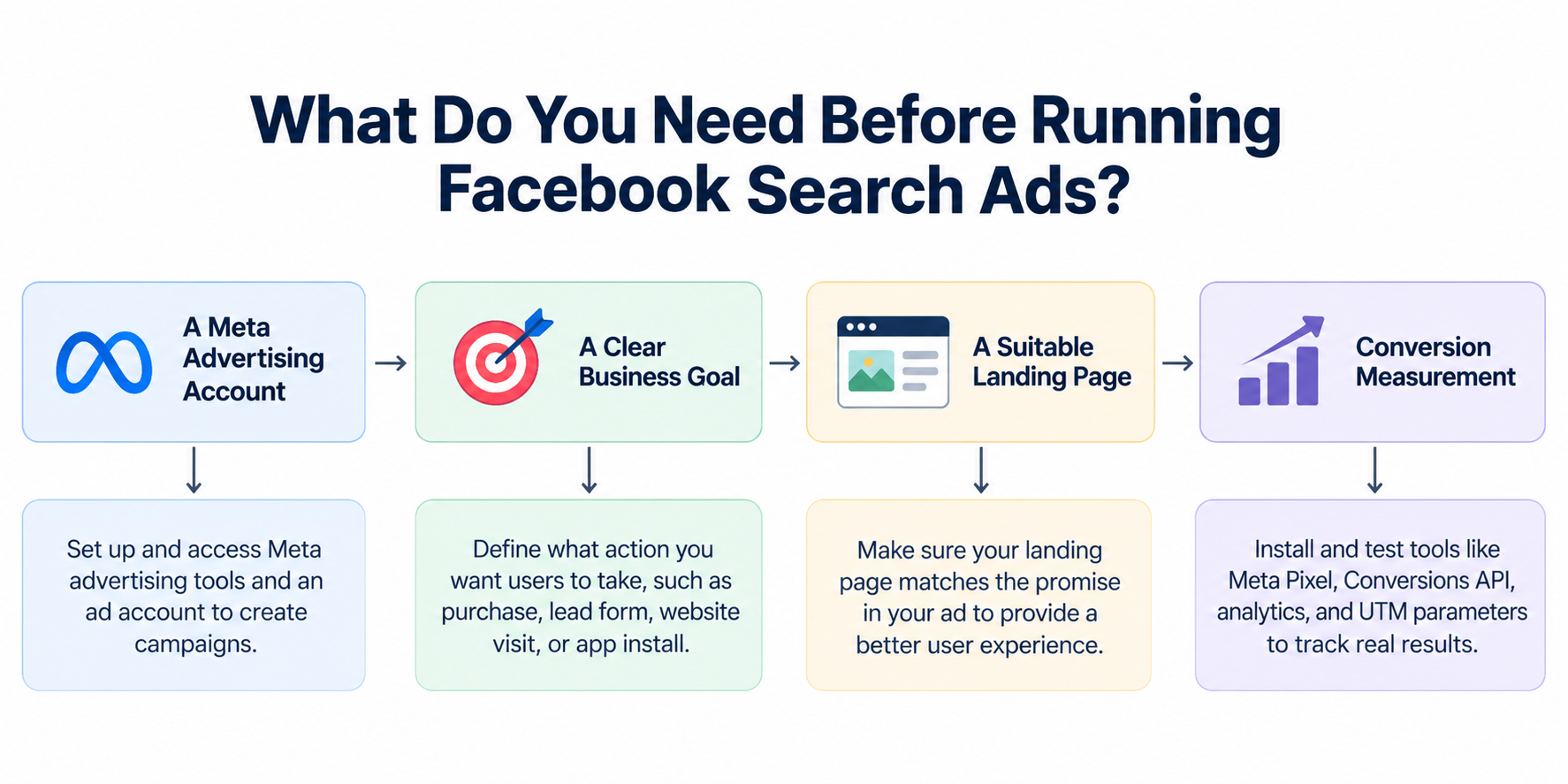
What Do You Need Before Running Facebook Search Ads?
Before creating a campaign, prepare the fundamentals. A simple flowchart is below:
How to Create Facebook Search Ads Step by Step
The exact Ads Manager interface can change, so treat the following as a practical workflow rather than a promise that every account will show identical buttons.
Step 1 — Open Meta Ads Manager
Log into your Meta advertising account and open Ads Manager. If you manage multiple businesses or ad accounts, confirm that you are working in the correct account before creating the campaign.
Check:
- Correct business
- Correct ad account
- Correct Facebook Page
- Correct payment method
- Correct destination
- Correct tracking setup
A surprising number of advertising mistakes occur before the campaign is even launched.
Step 2 — Choose Your Campaign Objective
Create a new campaign and choose the objective that best matches the outcome you want.
For example:
- Online store: Sales
- Service business: Leads
- Website promotion: Traffic, where appropriate
- App business: App promotion or another relevant objective
Do not choose an objective simply because it sounds related to search. The better question is:
What result should Meta optimize toward?
Step 3 — Define the Campaign Settings
Give the campaign a clear internal name. A useful naming system might look like:
Brand | Objective | Audience | Market | Month
For example:
ExampleStore | Sales | Prospecting | US | Sep 2026
This makes reporting easier once you have multiple campaigns.
Step 4 — Configure the Ad Set
The ad set is where important delivery settings are configured. Depending on your campaign, this can include:
- Audience
- Location
- Budget
- Schedule
- Optimization
- Placements
- Conversion destination
Start with a realistic audience rather than trying to target everyone.
Step 5 — Review Placements
Look for the placement settings. If your account and campaign support Search Results, you may see it as an available placement. You can generally approach this in two ways.
Option A: Advantage+ placements
Allow Meta’s system to determine which eligible placements should receive delivery.
Option B: Manual placements
Select the placements you want to include or exclude, subject to the controls available for your campaign.
For a beginner, Advantage+ placements can be a sensible starting point when there is no strong business reason to restrict delivery.
Step 6 — Build the Ad Creative
Create the actual advertisement. Your creative should clearly communicate:
- What you offer
- Who it is for
- Why it matters
- What action the user should take
For example:
Primary text:
“Need a faster way to organize your small-business finances? Try a simple accounting platform designed for growing teams.”
Headline:
“Simple Accounting Software”
CTA:
“Learn More”
Avoid writing copy that depends entirely on a feed environment.
Step 7 — Match the Creative to the Placement
Do not assume that one creative asset will look perfect everywhere. Search Results can have different visual requirements from Reels or Stories.
Use Ads Manager’s previews and placement-specific customization where available.
For example:
- Square creative may work well for some search-result contexts.
- Vertical creative is often more suitable for Stories and Reels.
- Horizontal creative can be useful for feed-style placements.
A major practical principle is:
Build creative for the actual surface rather than forcing every placement to use exactly the same asset.
Step 8 — Add the Destination
If the advertisement sends users to a website, enter the appropriate URL.
Check that:
- The URL works
- HTTPS is enabled
- The page loads on mobile
- The content matches the advertisement
- The CTA works
- Forms function correctly
- Tracking parameters are present if needed
Never launch a paid campaign without testing the destination yourself.
Step 9 — Review the Campaign
Before publishing, check:
Campaign
- Correct objective
- Correct account
- Correct budget
Ad set
- Correct audience
- Correct location
- Correct schedule
- Correct placements
- Correct optimization event
Ad
- Correct Page
- Correct creative
- Correct copy
- Correct CTA
- Correct URL
- Correct tracking
Step 10 — Publish and Monitor
Publish the campaign and allow enough time for meaningful delivery. Do not repeatedly change every setting immediately after launch.
Frequent changes can make it difficult to determine which change actually affected performance.
Instead:
- Launch.
- Confirm delivery.
- Check tracking.
- Watch spend.
- Review placement data.
- Evaluate conversions.
- Make controlled changes.
Can You Target Specific Facebook Search Keywords?
This is one of the most important questions for beginners.
Do not assume that Facebook Search Results works like Google Ads keyword targeting.
Historically, Meta’s Search Results placement did not give advertisers a conventional interface for selecting individual search keywords. Industry documentation about the placement explicitly described Facebook selecting the relevant search terms rather than advertisers manually bidding on each term.
That means a strategy such as:
Keyword: “best running shoes”
Bid: $1.50
Keyword: “cheap running shoes”
Bid: $1.20
should not be treated as the normal Facebook Search Results workflow.
What Should You Optimize Instead?
Optimize the factors you can actually control.
These include:
- Campaign objective
- Audience
- Offer
- Creative
- Ad copy
- Landing page
- Conversion tracking
- Product relevance
- Placement strategy
- Budget
- Performance signals
If search relevance matters to your business, use language that clearly describes your offer without trying to manipulate the system through keyword stuffing.
For example, a business selling accounting software should naturally communicate terms such as:
- Accounting software
- Small-business accounting
- Invoicing
- Expense tracking
- Business bookkeeping
The purpose is to make the offer understandable and relevant, not to create a fake keyword-bidding structure.
How Should You Target People for Facebook Search Ads?
Audience strategy is more important than simply trying to guess search phrases.
Start With the Customer
Define:
- Who needs the product? Then define:
- What problem are they trying to solve? Then define:
- What offer can solve that problem?
For example:
A company selling project-management software might target business owners, managers, teams, or other relevant audiences rather than attempting to build dozens of artificial search-keyword groups.
Use Broad Targeting When Appropriate
Meta’s advertising systems increasingly rely on automated audience and delivery capabilities. Broad targeting can give the system more room to find people who are likely to complete your chosen outcome.
However, broad targeting is not automatically correct for every business.
- A highly localized business may still need geographic restrictions.
- A regulated business may have additional requirements.
- A niche product may require a more specific audience.
Use First-Party Data Where Appropriate
If your business has existing customer or website data, relevant first-party audiences can become valuable components of a broader Meta advertising strategy.
Potential examples include:
- Existing customers
- Website visitors
- People who interacted with your content
- Previous leads
- Product viewers
Always follow Meta’s applicable policies and privacy requirements when using customer data.
How Much Do Facebook Search Ads Cost?
There is no universal fixed price for a Facebook Search Ad.
The cost can vary according to:
- Industry
- Audience
- Country
- Competition
- Campaign objective
- Creative quality
- Placement
- Time of year
- Conversion event
- Auction conditions
- Budget
- User response
Therefore, avoid articles or calculators claiming that every Facebook Search Ad costs a specific amount.
A more useful approach is to measure your own economics.
Example
Suppose you spend:
$500
and generate:
25 qualified leads
Your cost per lead is:
$500 ÷ 25 = $20
If five of those leads become customers, your advertising cost per customer is:
$500 ÷ 5 = $100
That number is much more meaningful than simply knowing your average CPC.
Which Metric Matters Most?
It depends on the business model.
| Business | Primary Metric |
|---|---|
| E-commerce | Cost per purchase / ROAS |
| Lead generation | Cost per qualified lead |
| SaaS | Cost per trial or customer |
| App | Cost per valuable install/action |
| Publisher | Revenue per visit / monetized session |
| Local service | Cost per qualified inquiry |
The best metric is the one connected to your actual business objective.
How to Write Better Facebook Search Ad Copy
Search-oriented creative should communicate relevance quickly.
Lead With the Problem
Weak:
“Welcome to our company.”
Better:
“Struggling to manage invoices across multiple clients?”
The second version immediately identifies a problem.
Explain the Outcome
Users should understand what they gain.
Examples:
- Save time managing invoices
- Compare plans before buying
- Find a local service
- Download a useful resource
- Book a consultation
Keep the Offer Specific
Avoid vague claims such as:
“The ultimate solution for everyone.”
Instead:
“Accounting software for small businesses with invoicing and expense tracking.”
Specificity makes the advertisement easier to understand.
Match the Landing Page
If your advertisement promises:
“50% off annual plans”
the landing page should clearly explain that offer.
Do not make the visitor search the entire website for the promised information.
How to Measure Facebook Search Ads Performance
Measurement should happen at both the placement level and the business-result level.
Track Delivery Metrics
Useful metrics include:
- Impressions
- Reach
- Frequency
- CPM
- Clicks
- Link clicks
- CTR
These tell you what happened to delivery.
Track Conversion Metrics
Depending on your objective, monitor:
- Leads
- Purchases
- Registrations
- Revenue
- Cost per result
- Conversion rate
- Return on ad spend
These tell you whether the campaign is producing business value.
Compare Search Results With Other Placements
Do not automatically assume Search Results is better simply because users are searching.
Compare it with other relevant placements.
For example:
| Placement | Spend | Clicks | Leads | Cost/Lead |
|---|---|---|---|---|
| Search Results | $200 | 120 | 10 | $20 |
| Facebook Feed | $400 | 300 | 25 | $16 |
| Reels | $150 | 250 | 6 | $25 |
In this hypothetical example, Search Results generated leads at $20 each.
That is not necessarily bad.
But Facebook Feed produced leads at $16, so the advertiser should investigate whether Search Results provides another strategic advantage before moving more budget into it.
How to Find Competitor Facebook Ads
Meta’s Ad Library can be useful for competitive research.
You can search for advertisements associated with businesses and review examples of their current or recent advertising activity, depending on the location and ad category.
Look for:
- Headlines
- Offers
- Creative formats
- Calls to action
- Product positioning
- Landing-page promises
- Repeated creative concepts
- Variations of the same campaign
Do not copy competitors.
Instead, ask:
- What customer problem are they emphasizing?
- What offer are they using?
- What objection are they addressing?
- What can our advertisement explain more clearly?
This turns competitor research into an information-gain exercise rather than imitation.
What If Facebook Search Results Is Not Available?
This is a common beginner problem.
The first thing to understand is that placement availability can depend on the campaign setup.
Check the following.
Check Your Campaign Objective
Some placements are unavailable for particular objectives or campaign configurations.
Try reviewing whether another appropriate campaign objective makes the placement available.
Check Your Ad Format
Not every creative format is eligible for every placement.
Review the available placement requirements and creative previews inside Ads Manager.
Check Your Audience and Delivery Settings
Very restrictive targeting can reduce the number of eligible delivery opportunities.
Review: Location, Age, Audience size, Other restrictions, Placement settings.
Check Whether Meta Has Changed the Interface
Meta frequently changes Ads Manager.
An old tutorial may show:
Facebook Search
while a newer interface may use:
Search Results
or group it under another placement category. Do not assume that a missing button means the feature has permanently disappeared.
Do Not Force an Unsupported Setup
If Search Results is unavailable, do not try to recreate it through misleading campaign settings.
Use another relevant Meta placement or another advertising platform that actually supports the search behavior you need.
Facebook Search Ads Troubleshooting Guide
| Problem | Possible Cause | Solution |
|---|---|---|
| Search Results is missing | Campaign or placement eligibility | Review objective, format and placement availability |
| Ads spend mostly elsewhere | Advantage+ delivery | Review placement breakdown and campaign strategy |
| Search traffic is expensive | High competition or weak conversion | Improve offer, creative and landing page |
| Many clicks but few conversions | Poor landing-page match | Align page with ad promise |
| Low CTR | Weak relevance or creative | Improve headline, offer and visual |
| No conversions | Tracking or offer problem | Test tracking and conversion path |
| Creative looks wrong | Asset not optimized for placement | Use placement-specific assets |
| Delivery is very low | Narrow audience or limited eligibility | Review targeting and restrictions |
| Results fluctuate | Auction and delivery changes | Evaluate trends over enough data rather than single-day changes |
Common Facebook Search Ads Mistakes
Treating Facebook Like Google Ads
This is probably the biggest conceptual mistake. Facebook Search Results should not be approached as though you can create a traditional keyword list and manually bid on every phrase.
Correct approach: build a strong Meta campaign and optimize the controllable inputs.
Focusing Only on CTR
A high CTR does not automatically mean a successful campaign. People can click an advertisement without buying, submitting a lead, or completing another valuable action.
Correct approach: connect advertising performance to business outcomes.
Using Generic Creative
A generic advertisement may fail to communicate why it belongs in a search context.
Correct approach: make relevance obvious quickly.
Sending Traffic to an Unrelated Homepage
A visitor who clicks on a specific product advertisement should not have to hunt through an unrelated homepage.
Correct approach: use a focused landing page.
Changing Everything at Once
If you change audience, creative, budget, objective and placements simultaneously, you cannot easily identify what caused performance to change.
Correct approach: make controlled changes and document them.
Ignoring Placement-Level Reporting
A campaign can look profitable overall while one placement performs very differently from another.
Correct approach: analyze placement-level results where reporting allows it.
Believing Search Intent Guarantees Conversions
Search behavior can indicate active interest, but it does not guarantee purchase intent.
Someone searching for a product might be: Researching, Comparing prices, Looking for reviews, Browsing. Seeking a specific brand, Ready to purchase.
Correct approach: match the advertisement to the likely stage of the customer journey.
Facebook Search Ads vs Google Search Ads
Choosing between Facebook and Google depends on the behavior you are trying to capture.
Use Google Search Ads When:
- Keyword-level search intent is central to your strategy.
- You need explicit control over search terms.
- People commonly search Google for your product.
- Your campaign depends heavily on high-intent keyword queries.
Use Facebook Search Results When:
- Your customers already spend time within Facebook.
- Your broader Meta advertising strategy is performing well.
- Your creative is suitable for Meta environments.
- You want to test another Meta placement.
- Your audience can be reached effectively through Meta’s delivery system.
Use Both When:
Your customer journey involves both discovery and active search.
For example:
Facebook/Instagram → Product discovery → Website research → Google search → Purchase
In this situation, Meta and Google can serve different parts of the journey rather than being treated as identical advertising channels.
Expert Insights for Facebook Search Ads
Search Placement Should Be Part of a Larger Strategy
A common mistake is treating Search Results as a standalone trick.
It is usually more useful to think of it as one part of the broader Meta advertising ecosystem.
Your campaign still depends on:
Offer + Audience + Creative + Landing Page + Measurement + Delivery
Search Results cannot compensate for a weak offer.
Creative Relevance Matters More Than Keyword Stuffing
Because Facebook Search Results is not simply a traditional keyword-bidding system, advertisers should not waste time stuffing dozens of phrases into ad copy.
Instead, communicate the product and customer problem clearly.
Optimize for the Business Event
If your objective is sales, optimize your strategy around sales.
If your objective is qualified leads, optimize around qualified leads.
A campaign that produces cheap clicks but expensive customers is not truly efficient.
Start With a Controlled Test
Do not allocate your entire advertising budget to Search Results immediately.
A better testing approach is:
- Define one clear business objective.
- Create a strong advertisement.
- Establish conversion tracking.
- Include appropriate placements.
- Monitor delivery.
- Break down results by placement.
- Compare business outcomes.
- Increase investment only when results justify it.
Test the Offer Before Over-Optimizing the Placement
Advertisers often spend too much time asking:
“Which placement is best?”
The more important question can be:
“Is the offer compelling enough?”
If the product, price, message, or landing page is weak, changing placements may only move the problem around.
A Simple Facebook Search Ads Decision Framework
Use this framework before creating a campaign.
Do You Need Keyword-Level Search Control?
Yes:
Consider a dedicated search advertising platform such as Google Ads.
No:
Meta Search Results may be worth testing as part of your broader Meta campaign.
Do You Have a Clear Conversion Goal?
Yes:
Build the campaign around that measurable outcome.
No:
Define the business outcome before spending money.
Is Search Results Available?
Yes:
Include it in your placement testing strategy where appropriate.
No:
Review eligibility and consider other Meta placements.
Do You Have Reliable Tracking?
Yes:
Launch a controlled test.
No:
Fix measurement before increasing spend.
Practical Facebook Search Ads Checklist
Before Starting
- Define the campaign objective.
- Identify the target customer.
- Define the offer.
- Prepare the landing page.
- Confirm tracking.
- Prepare suitable creative.
- Confirm budget.
- Check placement availability.
During Campaign Setup
- Select the correct ad account.
- Choose the appropriate objective.
- Configure audience.
- Review placements.
- Check Search Results eligibility.
- Upload appropriate creative.
- Verify the destination URL.
- Test tracking.
Before Publishing
- Check copy.
- Check spelling.
- Check CTA.
- Check mobile experience.
- Check landing page.
- Check conversion event.
- Review budget.
- Review schedule.
After Launch
- Confirm delivery.
- Confirm impressions.
- Confirm clicks.
- Confirm conversions.
- Review placement performance.
- Monitor cost per result.
- Check tracking.
- Avoid unnecessary changes.
- Document meaningful tests.
Frequently Asked Questions
Are Facebook Search Ads still available in 2026?
Facebook Search Results remains part of the broader Meta placement ecosystem, but availability can depend on campaign configuration, objective, creative and account circumstances. Advertisers should check the current placement options shown inside Meta Ads Manager rather than relying on an older tutorial.
Can I choose exact keywords for Facebook Search Ads?
Do not assume that you can. Facebook Search Results has historically not operated like Google Search Ads, where advertisers directly build and bid on keyword lists. The important strategy is to control campaign, audience, creative and business-result inputs rather than treating Facebook Search Results as a conventional keyword auction.
Are Facebook Search Ads free?
No. They are paid advertising inventory. Your actual advertising cost depends on factors such as campaign objective, audience, competition, placement, creative and auction conditions.
Do Facebook Search Ads appear in Marketplace?
Search-related advertising can include Marketplace search surfaces where eligible. However, placement availability depends on the current Meta campaign configuration.
Can small businesses use Facebook Search Ads?
Yes, when the relevant placement is available and appropriate for the campaign. Small businesses should begin with a clearly defined objective, controlled budget and reliable conversion tracking rather than spending heavily simply because Search Results sounds high-intent.
Are Facebook Search Ads better than Google Search Ads?
Neither is automatically better. Google Search is generally more appropriate when explicit keyword-level search intent and keyword control are central to the strategy. Facebook Search Results can be useful when the business already benefits from Meta’s audience and advertising ecosystem.
Why can I not see Search Results in Ads Manager?
The placement may not be available for your particular campaign objective, ad format, account setup or current Meta configuration. Review the current placement options inside Ads Manager and check whether changing an appropriate campaign setting makes the placement available.
Should I use Advantage+ placements?
For many advertisers, allowing Meta to optimize across eligible placements can be a reasonable starting point. However, businesses with strong placement-specific evidence, creative limitations or business restrictions may have reasons to use manual controls.
How long should I run a test?
There is no universal number of days that guarantees meaningful results. The test needs enough delivery and conversion volume to support a reasonable comparison. Avoid making major decisions from a handful of impressions or clicks.
What is the most important Facebook Search Ads metric?
The answer depends on your objective. For e-commerce, revenue, purchases and return on ad spend may matter most. For lead generation, qualified leads and cost per qualified lead are more useful than clicks alone.
Read More:
Key Takeaways
Facebook Search Ads are best understood as Search Results placement within Meta’s advertising ecosystem, not as a direct copy of Google keyword search advertising.
The most important principles are:
- Do not assume you can manually bid on individual Facebook search keywords.
- Build campaigns around a clear business objective.
- Treat Search Results as one potential placement.
- Use relevant, specific creative.
- Match advertisements to landing pages.
- Set up conversion tracking before scaling.
- Compare Search Results against other placements.
- Judge success by business outcomes rather than clicks alone.
- Use controlled testing instead of changing everything simultaneously.
- Check the current Meta Ads Manager interface because placement availability and campaign controls can change.
For beginners, the strongest starting point is simple:
Define the goal → create a relevant offer → build the Meta campaign → review Search Results availability → launch a controlled test → measure conversions → optimize based on evidence.
That approach is more reliable than trying to force Facebook Search Ads into a Google-style keyword model.
Final Takeaway
Facebook Search Ads can be useful when they fit naturally into a broader Meta advertising strategy, but their biggest beginner misconception is treating them as a traditional keyword-search advertising platform.
The practical opportunity is not simply to “rank” for a Facebook keyword. It is to create an advertisement that is relevant to the audience, eligible for the right placements, compelling enough to earn attention, connected to a strong landing page, and measurable against a real business outcome.
If Search Results is available in your campaign, test it. If it is not available, do not build your entire strategy around finding a hidden keyword option. Meta’s placement availability and advertising interface can change, so the current Ads Manager configuration should always be treated as the source of truth.
For most advertisers, the winning process is:
Clear objective → relevant audience → strong creative → appropriate placement → reliable tracking → measured optimization.
That framework remains useful even as Meta changes individual placement names, campaign interfaces, and automation features.

